


Most dental CRM guides chase the wrong problem. Dentists do not need another stack of shiny features, they need one patient record that can move a person from first call to booked hygiene recall without software hopping, because GoHighLevel for Dentists is built around consolidation, not a dental-only product. In practice, that means the same system can carry SMS, email, calendars, web chat, reputation, and payments while keeping appointment reminders, recall campaigns, and review requests tied to one workflow instead of disconnected apps. In the U.S., the practical pricing conversation starts with $97/month for Starter or $297/month for Unlimited, then adds usage costs for phone, SMS, and email, plus $297/month for the HIPAA add-on if the practice needs compliant workflows (pricing overview, HIPAA add-on guidance).
The part most owners miss is simple. The first five automations are not about doing everything. They are about booking more appointments, reducing no-shows, and getting patients back on schedule with less front-desk friction. If you start anywhere else, you usually buy complexity before you buy results.
Table of Contents
- Why Dentists Replace Six Tools With One Platform
- The Five Dental Workflows That Actually Book Appointments
- HIPAA, Patient Data, and What HighLevel Handles by Default
- Solo Practices vs Multi-Location DSOs and Where Each Should Start
- The Agency Playbook for Onboarding a Dentist Sub-Account
- Real Cost Per Chair and What the ROI Math Actually Looks Like
- A 90-Day Dental Rollout Plan and Common Questions Answered
Why Dentists Replace Six Tools With One Platform
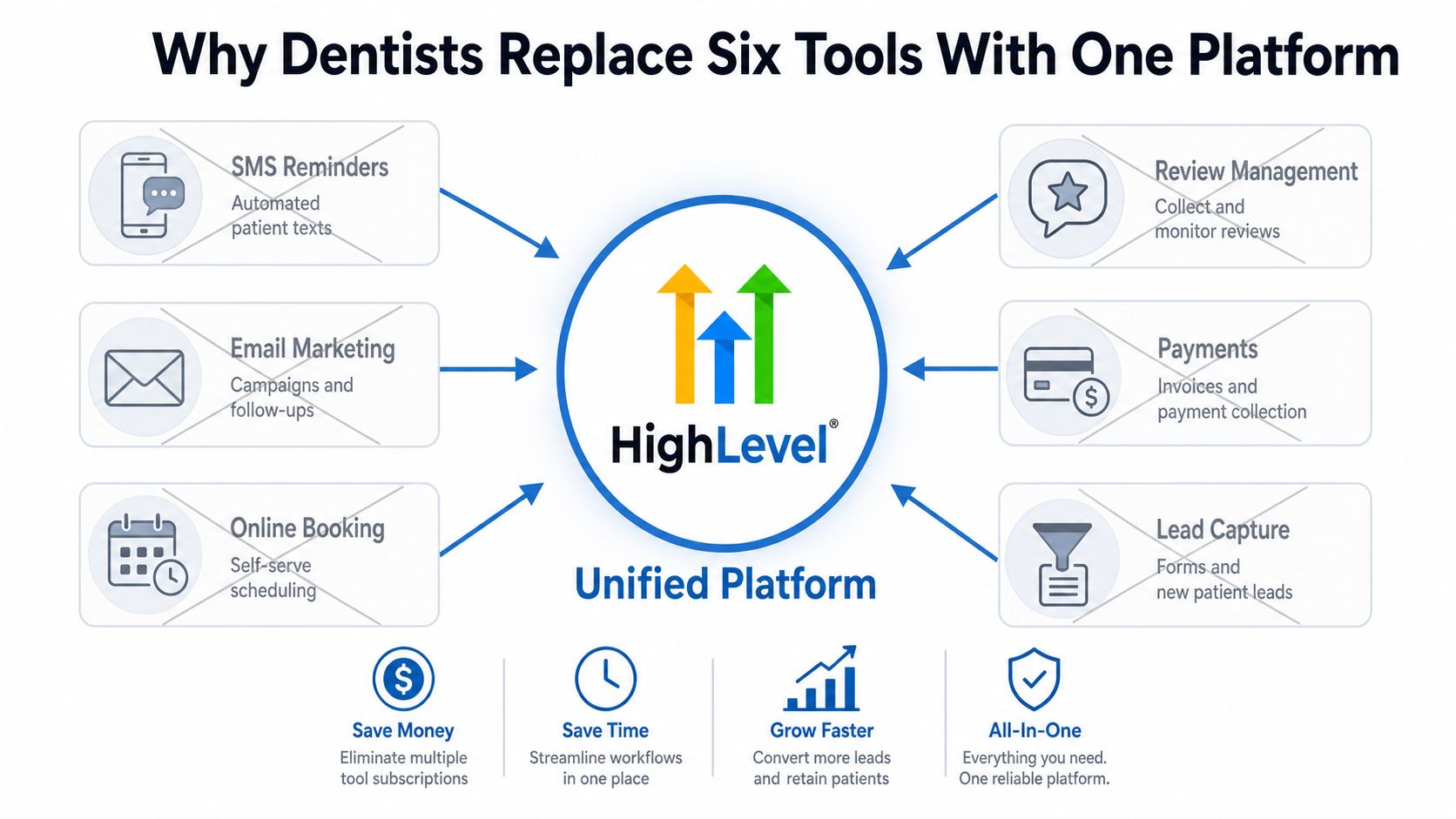
A dental practice should not run patient communication across separate tools for SMS reminders, email marketing, online booking, review management, payments, and lead capture. That setup forces the front desk to stitch together each step, and no one system sees the full patient lifecycle. GoHighLevel for Dentists works better as the single system of record for those interactions, because one patient record can drive reminders, recalls, reactivation, and review requests from the same data set.
The operational gain is concrete. A new patient can fill out a form, book an exam, receive a reminder, and later enter a six-month recall sequence without the practice juggling three unrelated platforms. Consolidation cuts the hidden cost of copying data between tools, retraining staff on multiple interfaces, and fixing broken handoffs. In dentistry, that matters because appointment slots, callbacks, and hygiene cycles depend on timing.
Practical rule: if a tool does not directly move a patient from inquiry to booked visit, or from completed visit to recall, it stays off the early stack.
The value is coordination of the patient lifecycle. That is why the first implementation priority is not to activate every module. It is to unify the communication path and keep the team inside one workflow structure. A mature 2026 implementation pattern already exists for dentists, which tells you the setup is repeatable rather than experimental, and that matters when you want a system a team can run (complete 2026 guide for dentists). In the U.S., owners should also evaluate it as a replacement stack. The official plan pricing starts at $97/month for Starter and $297/month for Unlimited, with communication usage billed separately (2026 pricing breakdown, pricing overview).
For agencies, the same structure is why a single dental snapshot can scale across accounts. The orchestration logic stays the same for patient reminders, review requests, and reactivation, while branding changes from practice to practice. That is the packaging model described in HighLevel's guide for agencies, and it is the right reference point if you are building repeatable onboarding instead of custom one-off setups.
The Five Dental Workflows That Actually Book Appointments
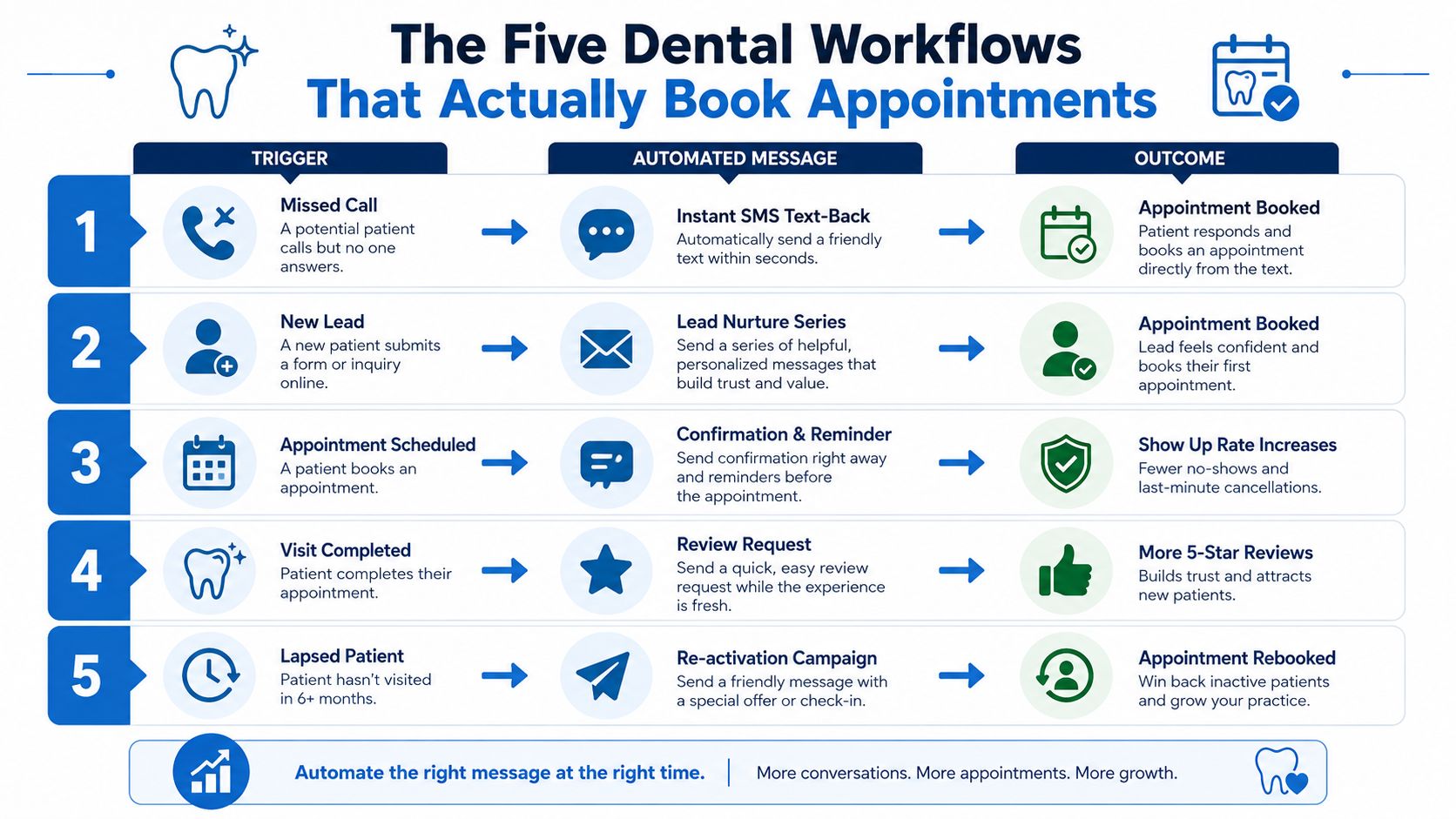
The fastest way to waste a dental CRM is to start with vague “nurture” automations. Dentists need workflows with a trigger, a message, and a clear outcome. The five worth setting up first are missed-call text-back, appointment reminders, hygiene recall, review requests, and no-show rebook sequences.
Missed-Call Text-Back
The best lead in dentistry is the person who already called. Use a 60-second missed-call text-back as the standard, because that is the moment when intent is highest and patience is lowest (60-second missed-call text-back). The workflow is simple. Missed call. Immediate SMS. A callback option or a direct booking link. That sequence recovers demand the front desk loses when phones are tied up. For teams ready to implement missed call text back, this is the first workflow I would turn on.
Appointment Confirmation and Reminder
Keep the reminder workflow tight. Start with a two-day reminder and a one-week reminder, because the job is attendance control, not persuasion. GoHighLevel supports appointment reminders in dental scheduling flows, and that is one of the cleanest uses of the platform because it maps directly to fewer no-shows and less front-desk chaos (appointment reminder automation in dental workflows).
Hygiene Recall
This is the retention workflow that pays for itself. A hygiene recall sequence turns a finished visit into the next appointment, and dental guidance consistently treats six-month recall campaigns as a standard automation pattern (hygiene recall automation). If a practice only automates one follow-up loop, make it this one. It keeps hygiene calendars from going stale and moves recall work out of staff memory and into a repeatable system.
Post-Visit Review Request
Reviews matter because patients leave happy and forget to post. Automated review requests fix that by asking while the visit is still fresh. Keep the sequence direct. Appointment marked complete. Short thank-you. Review link. Skip extra copy, because every extra step lowers completion in the real world.
No-Show Rebook Sequence
A no-show should trigger a rebook flow, not a lecture. Send a message that offers a fresh appointment window and makes rescheduling easy. That is the only version worth using, because the goal is to recover the slot and preserve the relationship, not to argue with someone who already missed the visit.
Start with the workflows that touch money first, missed calls, reminders, recalls, and rebooks. Save the clever segmentation and AI layers until the practice can already run the basics without friction.
The point is operational discipline. Missed-call text-back captures high-intent callers, reminders reduce avoidable gaps, recall protects lifetime value, review requests build trust, and rebook sequences recover lost chair time. Get those five working cleanly before you touch anything fancy.
HIPAA, Patient Data, and What HighLevel Handles by Default
HIPAA is where dental CRM enthusiasm usually gets sloppy. The platform is not HIPAA compliant by default, so a U.S. dental office should treat the standard account as an operations layer, not a place for protected health information. The right first question is simple: what data belongs in the normal setup, and what data stays out until the compliant tier is in place?
What is safe in a standard sub-account
A normal dental sub-account can handle routine operational details like name, phone number, email, appointment time, and service type when the workflow is set up for scheduling and communication, not clinical recordkeeping. Those are the fields the common reminder and booking automations need. They let the practice confirm appointments, send recall messages, and recover missed calls without pulling protected health details into the system.
Keep the message content plain. If a text or form only needs to say “your cleaning is confirmed” or “we have an opening at 3:00,” that belongs in the standard account. If staff start adding symptoms, treatment history, or anything that reads like a chart note, the workflow has crossed the line.
What pushes you into the HIPAA tier
The moment you start handling intake forms with sensitive health details, clinical notes, or insurance information, the conversation changes. That is no longer a marketing setup decision. It is a compliance decision, and the vendor setup should reflect that before the practice sends a single message or form response through the system.
The same caution applies to any workflow that would expose protected health information in messages or form capture. In the U.S., do not let the team build a polished intake flow first and worry about compliance later. That order creates unnecessary risk and usually leads to rework.
How to frame the vendor conversation
Skip the vague question of whether the platform can “handle everything.” Ask which exact workflows stay in the standard account and which ones move into the compliant tier. That keeps the discussion operational and stops staff from mixing appointment automation with patient data handling.
In the U.S., that buying conversation also needs hard numbers. The HIPAA add-on is commonly cited at $297/month, on top of the base subscription and usage charges for communications (HIPAA pricing note, pricing overview). For the buying question, the right lens is whether is GoHighLevel a smart choice for the mix of appointment communication and patient data you plan to run.
Solo Practices vs Multi-Location DSOs and Where Each Should Start
A solo practice and a multi-location DSO should not launch the same way. The solo office needs the smallest set of automations that removes front-desk pressure. The DSO needs repeatable structure, sub-account discipline, and cloneable workflows. That difference matters more than whether the platform can technically do everything.
| Automation Priority by Practice Size | Solo Practice Priority | DSO Priority |
|---|---|---|
| Missed-call text-back | Very high, because it captures the hottest inbound intent | Very high, and should be standardized across locations |
| Appointment reminders | High, because it directly reduces manual follow-up | Very high, especially when multiple coordinators touch the schedule |
| Hygiene recall | High, because it protects repeat visits | Very high, and worth cloning by location |
| Review requests | High, after staff can handle the messaging tone well | Very high, because reputation consistency matters across locations |
| No-show rebook | High, but only after reminder logic is stable | Very high, with location-specific routing |
| Conversation AI | Low to medium, unless the front desk is overwhelmed | High, because routing volume is larger and less predictable |
Solo offices usually overestimate AI and underestimate boring automation. A receptionist who can answer one clean missed-call text-back and one reminder sequence gets more value than a front desk buried in conversation routing. DSOs are different. Once a marketing director is managing multiple locations, the ability to clone snapshots, keep branding consistent, and maintain separate sub-accounts becomes a real operating advantage.
My rule of thumb: if staff already struggles to manage phones, do not add AI layers first. If the team already runs clean processes, then automation can start to expand.
The platform's agency-first structure is exactly why multi-location operators can use it well. Each location can stay separate enough to keep reporting clean, while still inheriting the same workflow logic. That reduces reinvention. The risk is workflow sprawl, where every location gets custom exceptions and nobody knows which version is current.
For DSOs, the winning approach is simple. Standardize the core workflows, then allow only location-level changes where the practice differs. For solo practices, keep the scope narrow until the team stops thinking of the CRM as “another system” and starts treating it as the booking layer.
The Agency Playbook for Onboarding a Dentist Sub-Account
Agencies serving dentists should sell implementation, not software novelty. The cleanest play is a repeatable snapshot, a white-label wrapper, and a 14-day onboarding sequence that gets the practice to live workflows fast. That's where HighLevel's CRM reseller program fits for agencies that want to package the system under their own brand.
The 14-day onboarding sequence
Days 1 to 3 should cover account structure, business info, and the core booking path. Days 4 to 7 are for missed-call text-back, reminder messages, and review requests. Days 8 to 10 should validate the calendar, test internal routing, and confirm that staff knows what happens when a lead replies. Days 11 to 14 are for final edits, handoff, and a live check with the front desk.
What to clone from the snapshot
A good dental snapshot should already contain the boring but necessary parts, calendars, triggers, message templates, and pipeline stages. Clone the workflow, then localize the practice name, service names, and reply logic. Do not rebuild each account from zero unless you enjoy repeating the same mistakes across every client.
Rebilled services and margin
The platform also supports rebilling phone and email at the usage level, which matters because agencies can pass through communication costs cleanly while keeping their management fee separate. In current U.S. pricing breakdowns, local numbers, SMS, email, and voice usage are treated as variable charges on top of the subscription (usage pricing example, pricing overview). That is a commercial conversation, not a technical one. It becomes useful once the client understands that communication spend is part of the operating system, not an extra surprise.
If you're positioning the sale, keep it plain. The practice is buying a communication layer for reminders, recalls, and reactivation. The agency is packaging setup, support, and optimization around that layer. That framing is more credible than promising a magic CRM transformation.
If you want the broader white-label angle, the guide to agency marketing automation is the right companion reference for building repeatable client delivery. Agencies that get this right end up selling a system, not one-off setup hours.
Real Cost Per Chair and What the ROI Math Actually Looks Like
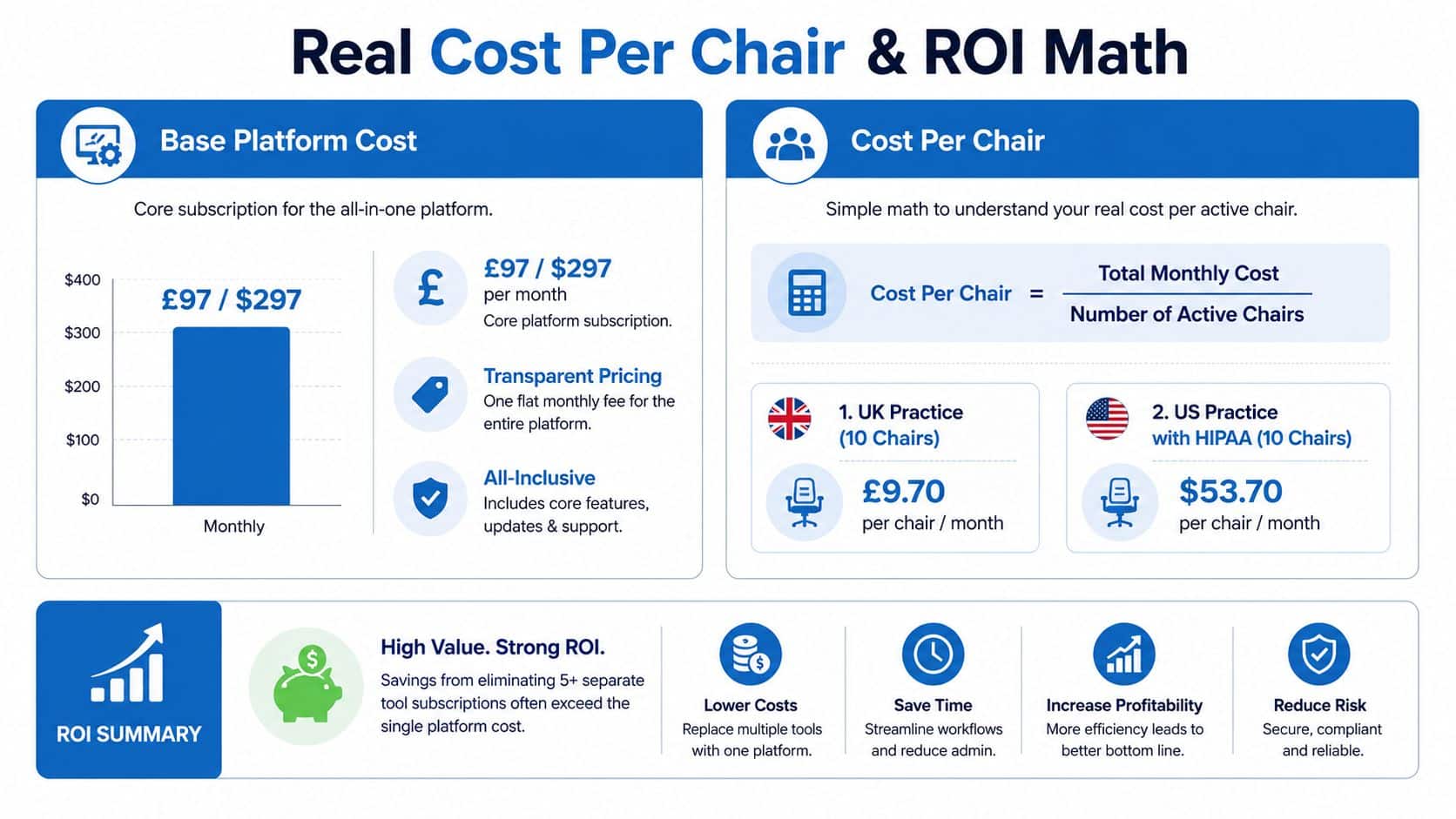
Cost only matters when it is tied to chair economics. A practice should judge GoHighLevel by what it replaces and what it recovers, not by the subscription line alone. For U.S. practices, the cleanest baseline is $97/month for Starter or $297/month for Unlimited, plus communication usage. If the office needs compliant patient-data workflows, add $297/month for HIPAA on top of that (2026 pricing breakdown, HIPAA add-on guidance). In practical terms, many dental and medical operators end up somewhere in the roughly $140 to $650 per month range once configuration and volume are factored in (dental and medspa cost estimate).
How to think about the math
Start with total monthly platform cost, then divide it by active chairs. That gives you the per-chair burden, which is the right way to judge whether the stack is pulling its weight. From there, compare that number with the value of a single recovered appointment, a rescued missed call, or a hygiene recall that would otherwise have fallen out of the schedule.
The mistake is treating software cost as a standalone expense. A practice that runs six disconnected tools often pays less attention to the true monthly drag, because the spend is split across vendors, inboxes, logins, and support lines. A single platform with a disciplined workflow can be the cheaper option even if the invoice looks higher on paper. The primary waste usually hides in duplicated subscriptions and weak follow-through, not in the platform itself.
Where ROI usually comes from
The strongest returns come from missed-call recovery, reminder compliance, and recall reactivation. Review requests support reputation, which helps future bookings, but the fastest operating gain is tighter chair utilization. Once those workflows are working, the practice can decide whether extra features are worth the time and training.
The cleanest rule is simple. Estimate monthly hygiene recalls, attach a realistic visit value, then compare that against the platform cost and message spend. If the recovered bookings cover the system, the math works. If the model feels blurry, the team is probably trying to activate too many workflows at once.
That is why the first six months should stay focused. Build the patient communication layer first, then expand only after the front desk is consistently handling calls, texts, and recalls. The guide to agency marketing automation fits that operating mindset well, because the agencies that win here sell a working system, not a pile of features.
A 90-Day Dental Rollout Plan and Common Questions Answered
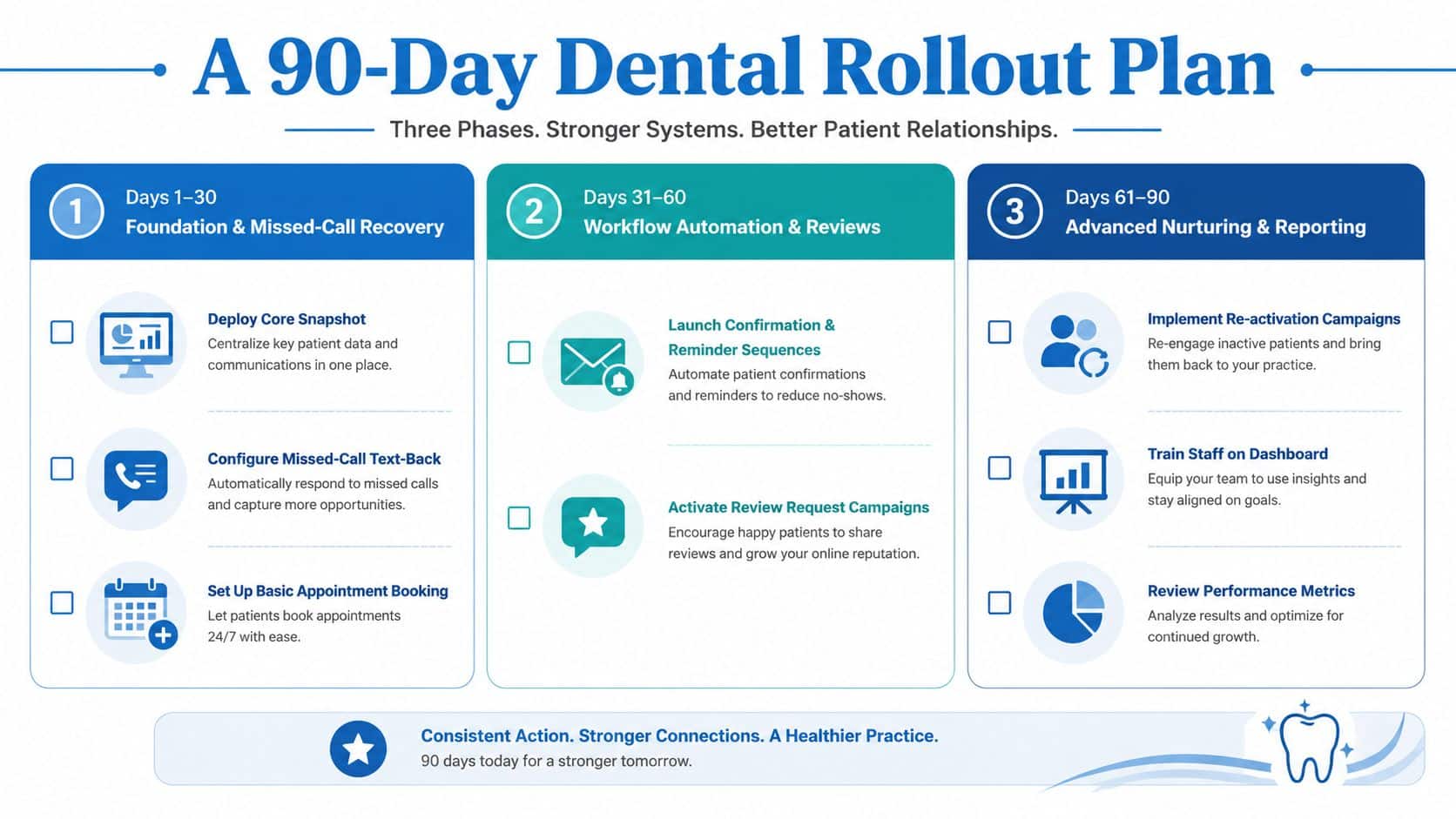
The cleanest rollout is phased. Days 1 to 30 should focus on missed-call text-back, basic booking, and review requests. Days 31 to 60 should add reminders and recall campaigns. Days 61 to 90 is when you introduce Conversation AI, paid calendars, and membership offers if the base layer is already stable, a pattern that lines up with the broader guide to agency marketing automation.
Quick FAQ
Do U.S. practices need the HIPAA add-on? If the practice plans to handle protected health information inside the platform, yes, that conversation starts immediately. If the setup is limited to basic communication without PHI, the standard account may be enough, but the boundary has to be defined clearly.
How many sub-accounts should a multi-location DSO run? One per location is the cleanest operational model. That keeps reporting, calendars, and reputation management tied to the right office.
What if the practice already uses Dentrix or Eaglesoft? Keep clinical records there and use the CRM layer for communication, reminders, recalls, and reactivation. That separation avoids turning a patient communication system into a charting replacement.
If you want a system that handles the communication layer without forcing your team to stitch together reminders, recalls, reviews, and payments by hand, start with HighLevel. It's built to centralize the workflows dentists use, and the winning setup is still the same, fewer tools, cleaner data, tighter follow-up.
