


You're probably at the point where the software stack feels harder to manage than the clients using it. You know you need a branded CRM offer, but you don't want to hire developers, wait months for a build, or end up selling yet another tool that still looks like someone else's product. That's where a white label CRM reseller model changes the game, because you're not starting from code, you're packaging, branding, and operationalizing a platform that already works.
The hard part isn't getting the platform. It's running the business around it. The agencies that last are the ones that treat the CRM like a productized service, with clean branding, disciplined pricing, templated onboarding, and support that doesn't collapse under its own weight.
Table of Contents
- What the White Label CRM Reseller Model Actually Is
- Setting Up Your Branded SaaS Platform
- Pricing Your White Label CRM for Maximum Margin
- Templated Onboarding with Snapshots
- Client Acquisition Strategies That Actually Work
- Avoiding the Mistakes That Kill Reseller Businesses
- Your 90-Day Launch Plan for Reseller Success
What the White Label CRM Reseller Model Actually Is
A lot of agency owners think they're building software when they first look at white labeling. In practice, they are entering a rebranding-and-resale business. The vendor owns and maintains the core application, while the reseller controls the client-facing brand, pricing, and packaging. That split matters more than any feature list. A useful comparison is building custom CRM for founders, because the operational load changes completely when you sell a branded platform instead of commissioning a bespoke build.
The appeal is control where it matters. Modern white-label CRM setups usually let you replace the logo, colors, login domain, and outbound emails, while presenting the platform as your own product. Independent guides also describe the model as supporting custom domains such as app.youragency.com, along with account and billing management for end clients, which turns the CRM into a real service layer instead of a cosmetic wrapper. If you want a quick visual of how the roles split, the diagram below makes the structure obvious. For a detailed look at the features that make this possible, see our guide on HighLevel CRM features.
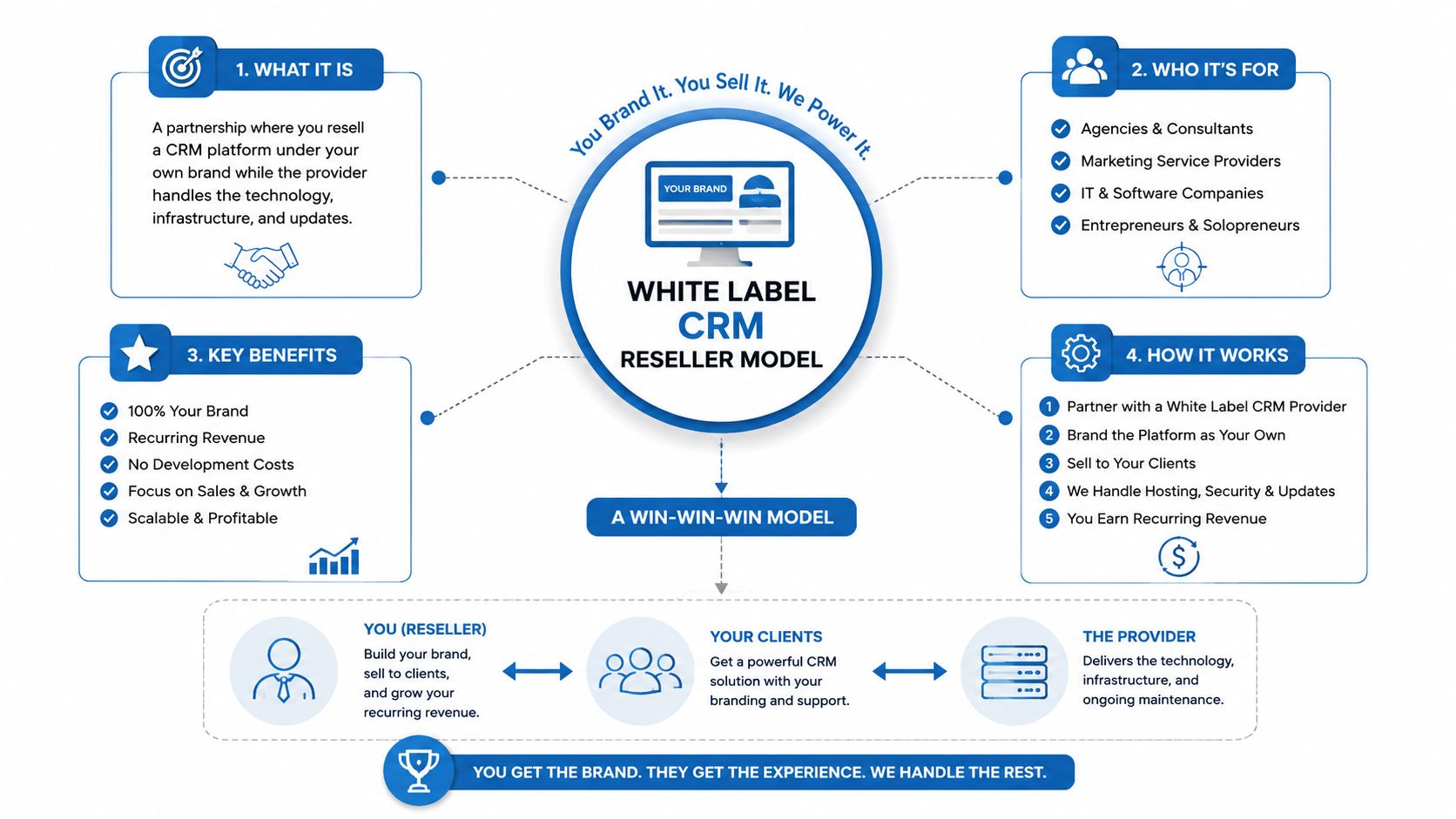
Why agencies are drawn to this model
The reason this category keeps expanding is simple. Agencies already have client relationships, implementation experience, and recurring billing muscle. A white label CRM reseller setup lets them package those strengths into a software offer without building infrastructure from scratch.
Practical rule: if you can already explain the client's problem, you're halfway to selling the CRM that solves it.
This is also why the model differs from affiliate programs and ordinary software licensing. Affiliate programs reward referrals. Licensing gives you usage rights, but not the client-facing ownership you need to create a real product brand. A white-label reseller business sits in the middle, because you operate as the seller, the support front line, and the packaging owner, while the vendor handles the technical base.
That shift matters for operations. Agencies and consultants can launch software businesses without engineering teams by using a pre-built platform plus service-layer customization, but the business only works if the offer is narrow enough to support and broad enough to sell. The bundle usually includes CRM, pipelines, automation, email and SMS, calendars, funnels, and reporting, so the market treats white label CRM as a broader SaaS reseller category rather than a narrow software license.
What you own and what you don't
You own the customer relationship, the brand presentation, the offer design, and the pricing strategy. The vendor owns uptime, core product updates, and the underlying code path.
That split makes the model workable, but it also creates a discipline problem. If you promise custom behavior the core platform cannot support, you inherit support work you never priced in. The same issue shows up in onboarding and retention. A reseller business runs best when the product promise stays close to what the platform does well, and the packaging stays tight enough that clients understand what they are buying on day one.
Setting Up Your Branded SaaS Platform
Branded setup isn't about making the dashboard pretty. It's about eliminating every cue that says, “this is a borrowed tool.” The setup sequence should start with the most visible trust signals first, then move into the quieter pieces that affect email deliverability and client confidence. The order matters because prospects judge the product in seconds, not after they've clicked through the admin tabs.
Start with the public-facing surfaces
The first pass is always the client's visual experience. Configure the custom domain, upload your logo, set brand colors, and make sure the login page reflects your own identity rather than the vendor's. In a platform like HighLevel, that means using the white-label options for the agency dashboard, custom login domain, logo, and brand colors, while keeping your client workspace presentation consistent from the first click onward.
If you're comparing implementation choices, HighLevel for agency founders is useful because it frames the setup as an agency workflow, not just a software toggle list. The important part is to make the branded URL and login flow look intentional, because that's what clients remember when they share access internally.
A clean launch sequence usually looks like this:
- Set the custom domain first. The domain anchors the rest of the branding work.
- Apply visual identity next. Logo, color palette, and login screen come before advanced settings.
- Align outbound email branding. If the platform emails still look generic, the illusion breaks fast.
- Check the sub-account experience. Every client tenant should feel like its own workspace.
Don't leave the email layer looking generic
Email is where many resellers get sloppy. The login page may look branded, but welcome messages, reminders, and notifications still carry weak defaults that undermine trust. Branded outbound email should match the rest of the platform, and the sending domain should be set up with care so messages don't feel improvised.
If the email feels like it came from a third-party SaaS tool, clients start questioning every other promise you made.
That's also why you shouldn't overbuild on day one. Branded mobile app options, custom CSS for portals, and deeper visual tweaks are useful, but they're secondary to basic credibility. Get the core surfaces right before you spend time polishing edge-case presentation.
Use the platform's agency structure correctly
The cleaner white-label rollouts rely on sub-accounts, not one giant shared workspace. Each client needs separation, because that's what lets you standardize support, reporting, and delivery without cross-contaminating data or workflows. In practice, that means one branded system, many isolated tenant spaces, and a simple internal process for moving clients into the right environment.
The safest way to avoid looking amateur is to remove friction before the demo. If a prospect sees a half-branded portal, inconsistent menus, or an email sender name that doesn't match the company name, they'll assume the back end is just as messy. That's a trust problem, not a design issue.
Pricing Your White Label CRM for Maximum Margin
Pricing is where new resellers either build a durable recurring model or accidentally create a support-heavy low-margin job. The economics can work quickly if you structure the offer correctly. One 2026 industry guide puts the base SaaS Pro white-label CRM plan at $497 per month, with typical reseller pricing ranging from about $197 to $997 per client per month depending on niche and services, and its own example shows break-even at just 2 clients when each client pays $297, because that brings in $594 against the $497 platform cost. The same guide also shows a common retail band of $97 to $497+ per month, which reinforces that the model is built for recurring revenue, not one-off licensing. HighLevel review for agencies
The tier structure that actually holds up
Flat monthly pricing works better than usage-based pricing for most resellers because it keeps expectations simple. Once you start billing for every little action, clients ask too many questions, and support turns into a metering dispute. A tiered offer lets you sell outcomes and boundaries instead of arguing about how many notifications or automations were “fair.”
| White Label CRM Pricing Tiers | |||
|---|---|---|---|
| Tier | Monthly Price | Included Features | Best For |
| Basic | $197 to $297 | CRM access, email, core pipeline setup | Clients who need the essentials and want a simple monthly plan |
| Growth | $497 to $697 | CRM plus automation, funnels, SMS, and broader workflow support | Agencies and businesses that need more operational depth |
| Premium | $997+ | Done-for-you setup, training, and higher-touch onboarding | Buyers who want implementation help, not just software |
Those prices line up with the reseller guide's recurring-revenue framing, and they give you room to package the offer without tying your margin to usage caps. The point isn't to be the cheapest CRM in the room. The point is to make the offer easy to understand and profitable to support.
What belongs in each tier
The entry tier should feel deliberately narrow. It needs to solve one clean problem, usually lead tracking or basic follow-up. The growth tier earns its higher price by combining automation and client communication into a more complete workflow. The premium tier should include real implementation work, because setup calls and training are where many clients finally get value from the product.
Margin lives in boundaries. If every tier includes unlimited hand-holding, your support load grows faster than your revenue.
The right package also keeps your sales conversations grounded. Instead of saying, “We have a CRM,” you're saying, “We have a branded system that fits your operation and includes the level of support you need.” That shift reduces price shopping and makes the offer feel like a service business with software attached, which is where the strongest reseller margins usually sit.
Templated Onboarding with Snapshots
The difference between a reseller who scales and one who drowns in setup calls is the snapshot library. A snapshot turns a new client install into a repeatable deployment, not a custom build. The vendor-side guidance here is consistent: select a platform with unlimited subaccounts and full branding, configure the brand, then clone pipelines, automations, and funnels into each new tenant in seconds. That templated deployment process is the key moat because it removes the need to rebuild the same foundation for every new account. platform for scaling client operations
Build one master snapshot, then branch into niches
Your base snapshot should include the boring but necessary pieces. Think pipelines, core automations, form configurations, appointment routing, and a basic follow-up path. Once that foundation is stable, build niche-specific versions for verticals like dental, real estate, or home services so you're not manually editing every new account from scratch.
The rule is simple. Keep the base snapshot broad enough to reuse, then layer in only the niche logic that changes the client experience. If you try to make every snapshot a one-off masterpiece, you'll lose the operational benefit that made white-label reselling attractive in the first place.
Onboarding should feel scripted, not improvised
The client's first week needs structure. A welcome email sets expectations. A short Loom video answers the common questions. Premium-tier clients can get a setup call, but that call should be gated behind the higher package so you're not giving away implementation labor at the cheapest price point.
A strong onboarding flow usually includes:
- Welcome sequence: confirms access, purpose, and next steps.
- Loom walkthroughs: handle the top questions without repeating yourself live.
- Setup checklist: tells clients exactly what to complete before the call.
- Premium setup call: reserved for clients who paid for hands-on help.
The gating matters more than most owners expect. Clients who start in a half-configured workspace often blame the product when the core issue is their own unfinished setup. When you control onboarding, you reduce that confusion before it turns into cancellation.
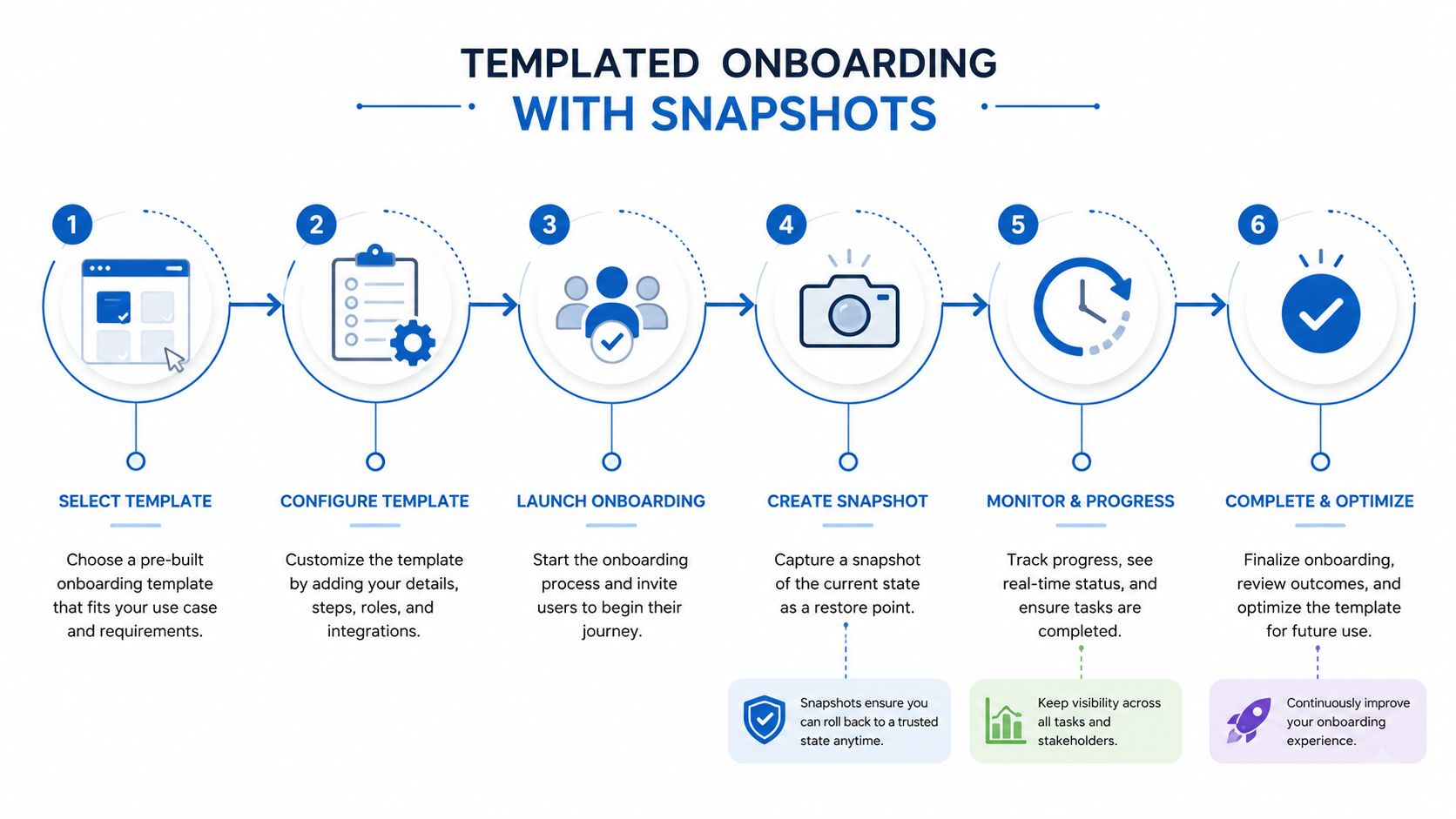
A practical onboarding library also protects your team from repeat support work. Instead of answering the same question ten times, you route people to a help article or a quick screen recording. That's not a shortcut, it's the only sane way to keep the business healthy once clients start stacking up.
Client Acquisition Strategies That Actually Work
A branded CRM doesn't sell itself. The resellers who win usually lead with a pain-point offer, not the full platform. One of the strongest moves is the Trojan Horse approach, where you lead with a single high-value feature, like missed-call text-back or reputation management, then expand into the larger platform once the client sees a result in their own business. That works because it's easier to sell relief from one obvious problem than to pitch a broad software suite to a skeptical owner.
Start with the pain the prospect already feels
The best niche opportunities sit where businesses are already frustrated with fragmented tools or clunky follow-up. Local service companies, small agencies, and owner-led businesses often don't need a grand software narrative. They need faster response, cleaner lead handling, or a simple way to stop dropping inquiries.
Your outreach should sound like a diagnosis, not a demo invite. A line such as, “I noticed your lead response flow could be tightened up, especially around missed calls,” is more credible than a generic pitch about automation. The first message should point to one concrete leak in their current process.
For a broader marketing stack perspective, how HighLevel helps agencies is useful because it shows how the CRM can sit inside a larger delivery system instead of being sold as a standalone gadget.
Use the platform to open, not to overwhelm
A full-feature demo often creates more resistance than interest. By contrast, a narrow offer gives you a reason to start a conversation and a clear path to the upsell. You can show the branded CRM after the prospect already understands the immediate value.
There's also a legal and operational angle here. If you're handling service promises, subscriptions, and client terms, it helps to keep your paperwork tight, and an AI legal assistant for business owners can be a useful reference point when you're tightening basic business documents before launch.
Choose channels that match your speed
Cold outreach works when the pain point is specific and the offer is narrow. Organic content works better when you want to build trust in a niche over time. Paid ads can work, but only after your positioning is sharp enough that the offer reads like a solution instead of a feature list.
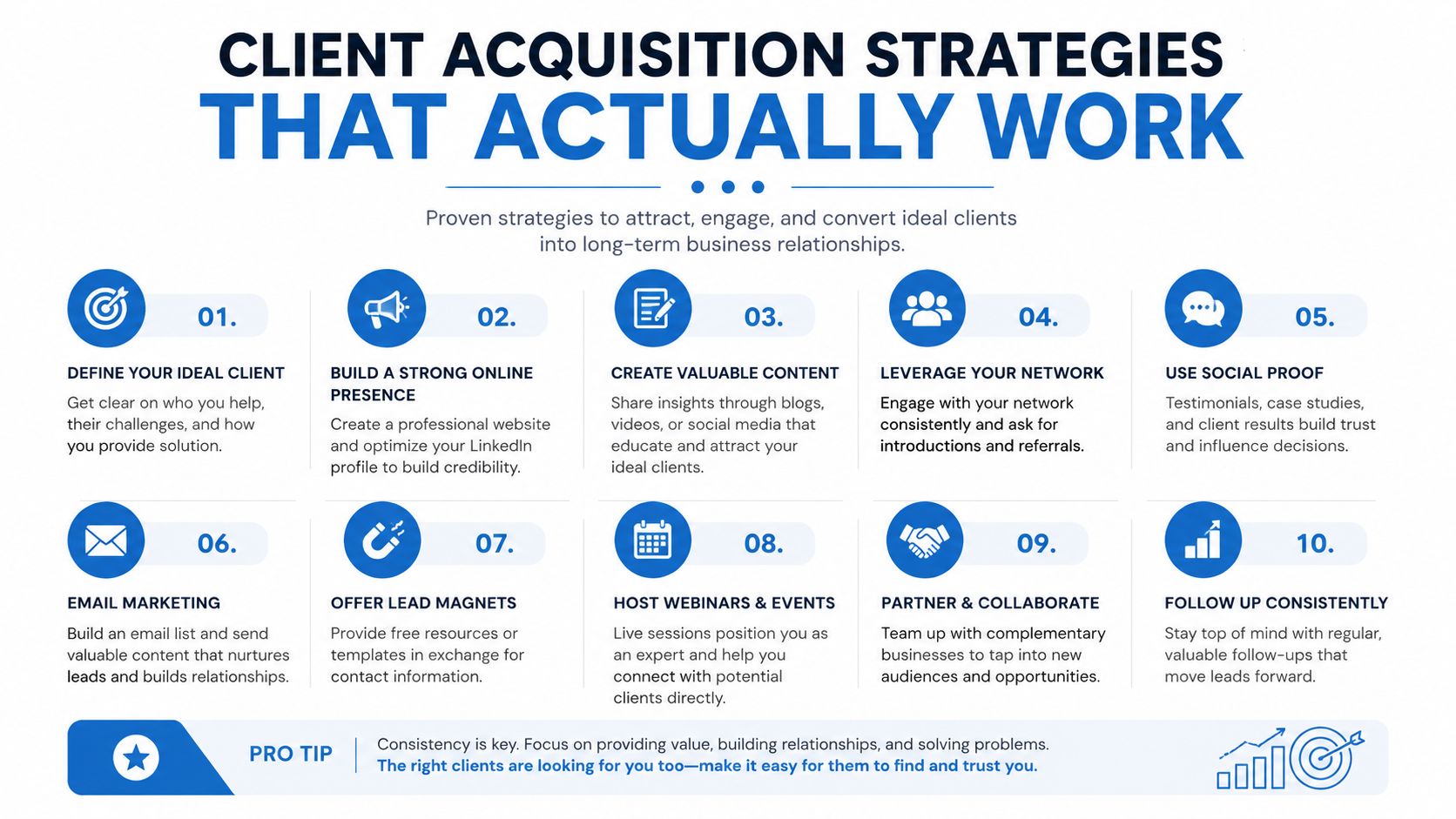
The mistake to avoid is trying to sell the platform before you've earned the conversation. The platform is the delivery system. The sale is the business outcome your prospect thinks they're buying.
Avoiding the Mistakes That Kill Reseller Businesses
Most reseller businesses don't fail because the software is bad. They fail because the operator turns the model into a support trap. The three usual killers are inconsistent support, onboarding friction, and pricing that attracts clients who never intended to stay. If you solve those three issues early, you buy yourself room to grow without constantly firefighting cancellations.
Support has to be owned, not outsourced emotionally
If a client has a problem and you immediately punt them to the vendor, the white-label illusion breaks. That's why support needs to look and feel like it comes from your company. A self-service help center, short Loom walkthroughs, and a clean set of first-response procedures do more for retention than a long list of shiny features.
Unlimited live support at entry-level pricing is usually a trap. You end up serving people who need training, not software, and that workload never shows up in the proposal. The better move is to reserve deeper support for premium clients and use documentation to handle the repeat questions that drain your day.
Clients don't usually churn because a platform is missing one feature. They churn because they feel stuck and unsupported.
Don't let every account become a custom project
The temptation to over-customize is strong, especially when a prospect asks for one extra workflow or a special dashboard layout. If you keep saying yes without standardizing those requests, your snapshot library stops being an asset and turns into a maintenance burden.
The fix is to treat custom requests as exceptions, not defaults. Document what can be added, what requires a higher tier, and what isn't part of the product. That keeps your margins intact and prevents the “just this once” work from becoming your entire operating model.
The warning signs of churn are usually visible early. A client who doesn't complete setup, ignores onboarding emails, or repeatedly asks for the same basic help is telling you the implementation is weak. Step in early with a reset call, a tighter checklist, or a simpler configuration before frustration hardens into cancellation.
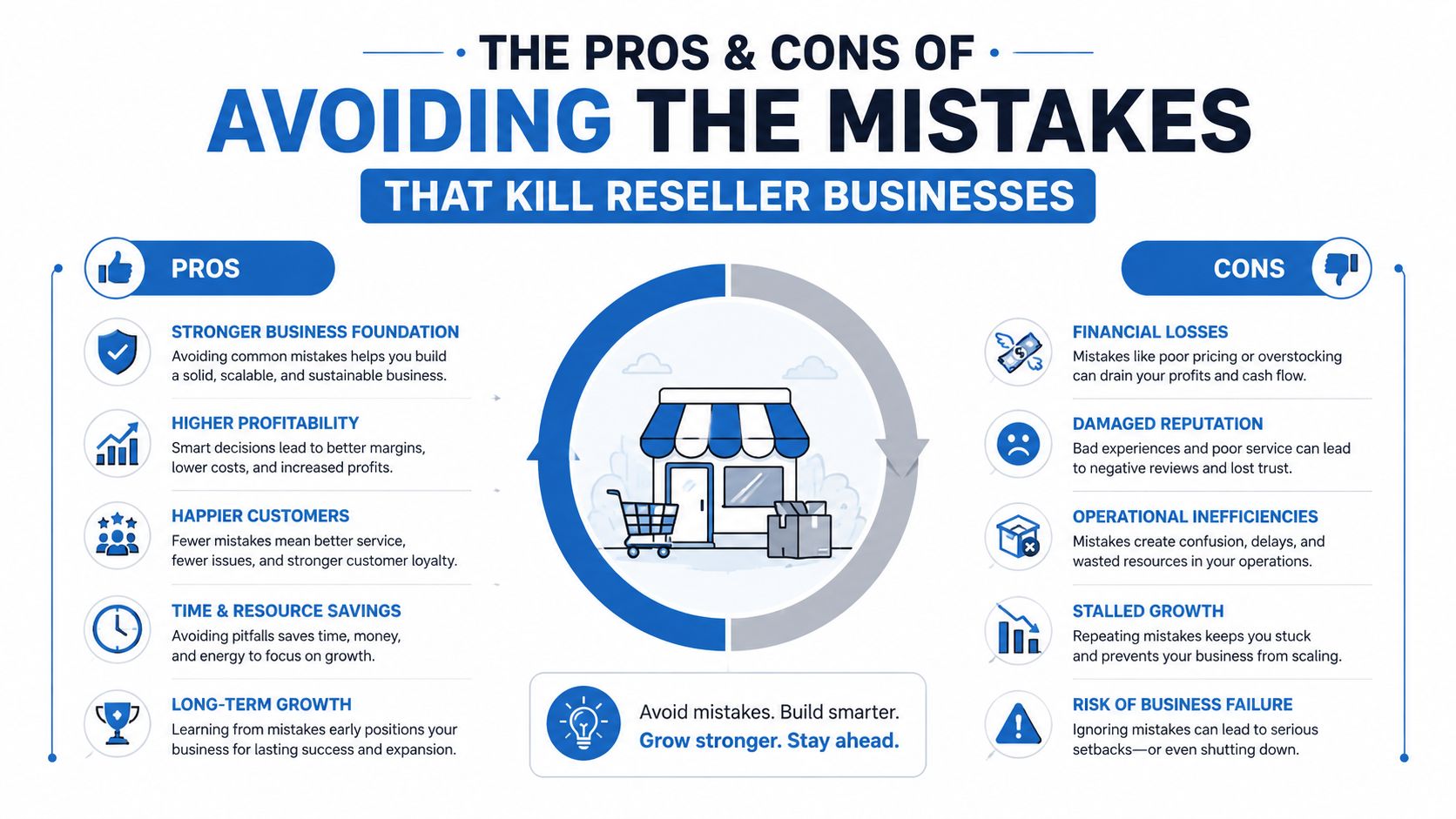
The most reliable reseller businesses behave more like disciplined service firms than software vendors. They standardize what can be standardized, personalize only where it pays, and keep the client experience calm enough that people stay long after the excitement of the sale fades.
Your 90-Day Launch Plan for Reseller Success
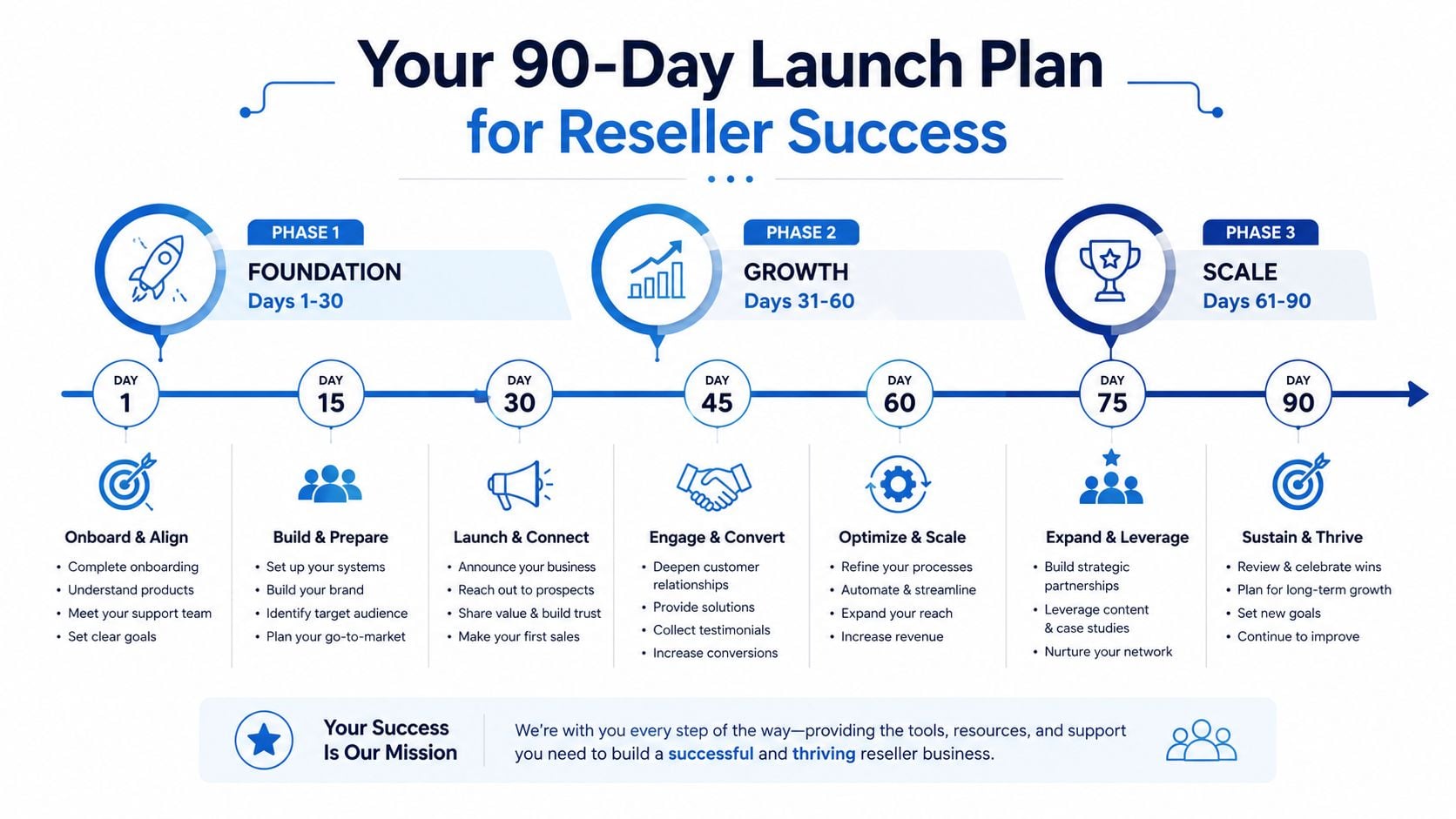
The first 90 days should be about building a system you can repeat, not chasing every possible lead. The first month is for setup and packaging, the second is for acquisition, and the third is for tightening the machine based on real client behavior. That sequence keeps you from selling too early or polishing too long.
Days 1 to 30
Lock in the branded platform, create your core offer, and build your first three niche snapshots. Don't wait to finish every possible customization before you start, because the first real client feedback will show you which settings matter and which ones don't.
During this phase, your goal is simple. Have a working brand, a clean login experience, and a snapshot library that can produce a new client workspace without improvisation. If that base is stable, everything else gets easier.
Days 31 to 60
Launch the Trojan Horse offer and start direct outreach. Use the pain point your niche already feels, then show a short path from problem to result. This is also the period where your first clients should move through your templated onboarding so you can see where the process breaks.
A practical milestone here is your first handful of onboarded clients, because that's when pricing, support, and delivery all get tested at once. If the onboarding flow is messy, you'll feel it immediately.
Days 61 to 90
Refine support, expand your help center, and look for upsells inside your current client base. You'll usually find that the same clients who bought the entry offer are the best candidates for a higher tier once they've used the system. That's where the recurring model starts compounding.
If you want a clean starting point, build your offer around a branded platform, one clear niche, and a snapshot-driven onboarding flow that you can repeat without burning out. Open a HighLevel account, map your first tiered offer, and spend the next 90 days turning setup work into a productized reseller business you can scale.
