


If you're replacing several recurring subscriptions, GoHighLevel is usually worth it at $97/month or $297/month. If you're not already spending $200+ per month on scattered tools, the math gets a lot weaker fast.
Asking this question often means you're not looking for another feature list. You're staring at a messy stack, CRM in one tab, email in another, SMS somewhere else, booking in a third app, reviews in a separate login, and you're wondering whether one platform can finally stop the bleeding.
Table of Contents
- The Real Question Behind the Search
- What a Modern CRM and Marketing Stack Actually Does
- How HighLevel Maps to the Five-Stage Customer Lifecycle
- Three Real Use Cases That Show the Platform in Action
- The True Cost of Going All-In
- When an All-In-One Platform Becomes a Liability
- A Go or No-Go Decision Framework
- The Verdict in One Line
The Real Question Behind the Search
The wrong way to judge this platform is to ask whether it has “enough features.” That's the trap. The core question is whether consolidation lowers your total cost of ownership enough to justify the migration and the learning curve.
A lot of teams don't have a software problem, they have a handoff problem. One person owns the CRM, another owns email, someone else handles SMS, a calendar lives in another app, and reputation requests happen only when somebody remembers to send them. That's not a stack, it's a series of loose ends.
What you should actually be asking
Start with three questions, and be blunt about them.
- What does it replace? If the platform is only overlapping one or two tools, the savings may be thin.
- What does it really cost to move? Migration time, training, and rebuilding automations all count.
- Where will it create friction? A single platform can simplify operations, but it can also concentrate risk and slow down teams that need specialized tools.
The platform's business case is strongest when it replaces a CRM, funnel builder, email tool, SMS tool, booking calendar, reputation manager, and automation stack under one login, with the $97/month Starter plan including unlimited contacts and the $297/month Unlimited plan adding unlimited sub-accounts for agencies, as independent reviews note. The point is not that the software is cheap, it's that the stack often costs more than the subscription once you count the junk drawer of point tools sitting around it. CRMDuel's review lays out that consolidation case clearly.
Practical rule: if you're only replacing one tool, don't bother. If you're replacing several, start doing the math.
What a Modern CRM and Marketing Stack Actually Does
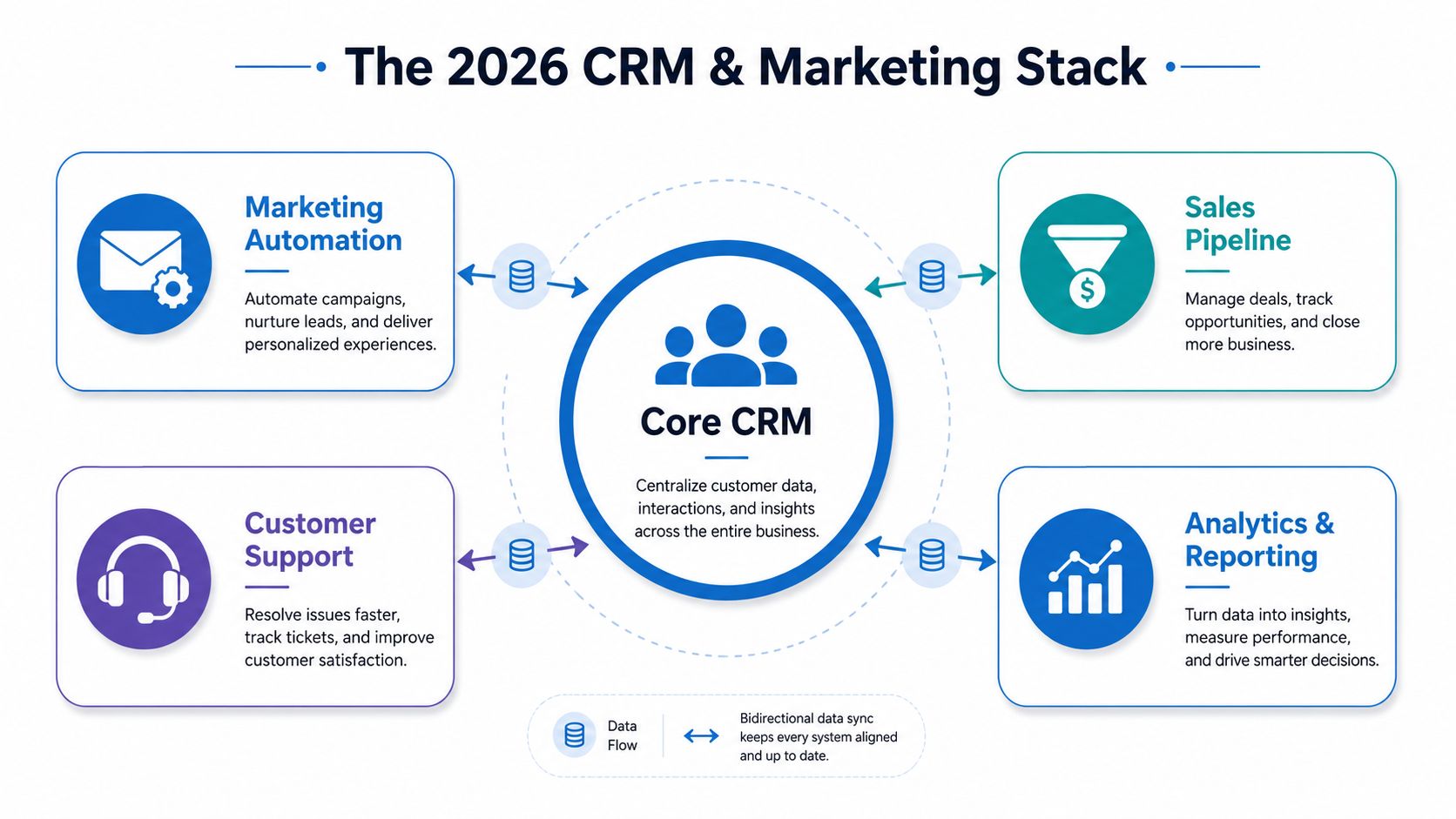
A serious CRM in 2026 isn't a contact list. It's the control center for the whole customer lifecycle, from the first click to the repeat purchase, and it has to move information cleanly across the business without people babysitting every handoff.
Capture, nurture, close
At the front end, you need forms, landing pages, chat widgets, and booking entry points that turn attention into named leads. Then those leads need follow-up, ideally through two-way conversations, pipeline stages, reminders, and automations that don't depend on someone remembering to click the next thing. If that sounds basic, that's because it is, but most stacks still fail here.
Think of the CRM like a restaurant host. The host greets the guest, checks the reservation, knows whether the table is ready, and hands the guest to the right server without making them repeat themselves. That's what a CRM should do with lead context.
Good systems reduce repetition. Bad systems make customers re-explain themselves every time the conversation changes channels.
Evangelize and reactivate
The lifecycle doesn't end at the sale. You also need review requests, referrals, reactivation campaigns, and service follow-up, because the easiest next sale is usually the one that comes from someone who already bought once. That means the stack has to talk to payments, reputations, and post-sale messaging, not just sales pipelines.
A useful checklist for any all-in-one platform looks like this:
- Lead capture: forms, pages, chat, and booking.
- Conversation management: SMS, social DMs, email, and a unified inbox.
- Sales execution: pipelines, tasks, reminders, and follow-up triggers.
- Revenue handling: invoices, payments, estimates, and appointment-to-cash flow.
- Post-sale growth: reviews, reactivation, and customer retention.
If a platform can't cover those stages without forcing you into a patchwork of integrations, it's not really all-in-one. For a broader view of how agencies assemble these parts, the agency software stack guide from HighLevel is worth reading.
How HighLevel Maps to the Five-Stage Customer Lifecycle
The best way to judge the platform is to map it to the lifecycle, not the feature page. That's where the overlap with a fragmented stack becomes obvious, and where the platform's value starts or stops.
Capture and nurture without glue tools
The unified inbox is the first big consolidation point. It pulls SMS, Messenger, Instagram DM, WhatsApp, and live chat into one place, which means the sales team isn't bouncing between tabs to answer the same lead twice. The visual workflow builder also matters here because it can trigger on form submissions, missed calls, or pipeline-stage changes and chain together SMS, email, waits, and internal notifications without external glue tools, as noted in the Sales on Demand review.
That native flow matters because response time is only useful if the lead gets a response in the right channel. A missed-call text-back is a small mechanic on paper, but in service businesses it keeps leads from going cold while someone is still on another job.
Close, book, and collect
On the revenue side, paid calendars, Text-2-Pay, and Tap-2-Pay shorten the gap between “yes” and money in the bank. That's a better setup than forcing customers through three different systems just to book and pay. The less friction between booking and payment, the less likely a lead is to stall out.
The reputation side is just as practical. Automated review requests and AI review replies turn post-sale follow-up into a system, not a reminder that sits in someone's head. MarTech Do's revenue engine guide is a good companion read if you want the bigger marketing-ops view of why these handoffs matter.
For teams trying to replace a messy tool chain, the question is simple. What can you retire in the first month after migration, and what still needs a separate specialist tool because the platform only matches it, not exceeds it? That answer determines whether you're simplifying your stack or just moving the clutter into a new dashboard.
Three Real Use Cases That Show the Platform in Action
The right test is not “Can it do marketing?” The right test is “Does it fit the way this business runs on Monday morning?”
A digital agency managing client work
An agency with many client accounts needs one login, many workspaces, and a clean way to keep automations separated. The platform's multi-tenant architecture is the key advantage here, because each sub-account can function like a separate CRM, automation hub, calendar, funnel, and reputation workspace without the agency rebuilding the same setup from scratch every time. That's why the GoHighLevel for marketing agencies angle matters so much for this audience.
The agency version of the workflow is straightforward. Lead comes in, pipeline updates, follow-up triggers, calendar booking happens, and client reporting stays inside the right sub-account. The win isn't just convenience, it's fewer places for attribution and lead routing to break.
A local service business that lives on response speed
For HVAC, plumbing, dental, med spa, and similar local businesses, the platform's value is less about fancy funnel design and more about follow-up discipline. Missed-call text-back, reminders, and automated review requests help the business look faster and more organized than the bigger competitor down the street. That's also why many owners want to automate follow-ups with HighLevel instead of relying on a receptionist's memory.
The journey is simple. Lead calls, nobody answers, text goes out automatically, booking link gets sent, appointment is confirmed, and after the job, a review request follows. That sequence is where the platform earns its keep.
A coach or creator selling through offers
For coaches and course sellers, the platform can replace a patchwork of checkout, onboarding, and membership tools. The funnel can take an order form into an upsell, then into a membership area or course portal, while the CRM keeps the contact history tied to the buyer. That's not as deep as a dedicated course platform in every respect, but it's enough for many creator businesses.
If your business model depends on recurring communication, upsells, and repeat engagement, the fit is stronger. If you just need a simple one-time checkout and a newsletter, the stack may be more system than you need.
The True Cost of Going All-In
A consolidation play only looks cheap at the subscription line. The bill shows up in migration work, admin overhead, onboarding, and the time your team burns while the new system replaces the old one.
The subscription is only one line item
Independent reviews note that the platform's pricing starts at $97/month and moves to $297/month for the agency tier, while one review estimates a typical local business can often cover SMS and email usage for roughly $10–$20 per month on top of the subscription, and businesses already spending $200+ per month on scattered tools can reach breakeven quickly. That is the cleanest way to judge the economics, because software cost by itself never tells the full story. The founder-focused breakdown makes the agency math clear, and the same logic applies when you are comparing platform sprawl against a single operating layer.
For a deeper look at how agencies structure their tech, see HighLevel's agency CRM solutions.
A cluttered stack wastes money in obvious ways, duplicate subscriptions, duplicate automations, and broken handoffs. A lean stack can still be the better choice if your team is small and your process is already tight.
Fragmented stack vs GoHighLevel All-In-One
| Tool Category | Standalone Estimate (USD/mo) | HighLevel Coverage |
|---|---|---|
| CRM | $25–$150/user/mo, depending on vendor and plan | Built in |
| $20–$300/mo, depending on volume and sending needs | Built in | |
| SMS | $10–$50/mo plus usage, depending on provider | Built in |
| Booking | $10–$50/mo for scheduling tools | Built in |
| Funnel Builder | $50–$300/mo, depending on page and funnel features | Built in |
| Reputation Management | $30–$200/mo, depending on review monitoring and response tools | Built in |
The point of the table is not perfect accounting. It is the operational drag that comes with every separate tool. Each one adds setup time, another login, another handoff, and another place for a lead to disappear.
For local café and gym operators evaluating simpler recurring software, pricing for local cafés and gyms is a useful reminder that some businesses are better served by a narrower toolset. If the workflow is simple, fewer moving parts usually beat a bigger system.
My take: if you need one person just to keep the stack stitched together, you are already paying the hidden tax of fragmentation.
When an All-In-One Platform Becomes a Liability
Consolidation isn't magic. In the wrong hands, it becomes a bottleneck, and that's the part many gloss over when they compare feature lists.

Who should hesitate
Solo operators with light lead flow usually don't need this much system. If a business only gets a handful of leads and the owner can answer them directly, a simpler CRM plus calendar may be enough. The same goes for regulated industries with stricter compliance, data residency, or policy constraints, where a generic all-in-one stack may not fit neatly.
Businesses that win through specialization should also be careful. If your edge depends on a deep helpdesk, a custom data warehouse, or a very specific vertical workflow, a broad platform can flatten your process into something more generic.
Where the friction shows up
The biggest hidden cost is admin capacity. The platform can centralize a lot, but someone still has to configure it, test it, maintain it, and train the team. If that person disappears into setup work for weeks, the company pays twice, once in software, once in lost execution.
A second issue is concentration risk. One platform can be a single point of failure if your whole process sits inside it. That's why teams should treat consolidation like a systems project, not a software purchase.
The 2026 marketing automation playbook for agencies is useful reading if you're trying to judge whether your team is ready to own that kind of operational depth. The answer matters more than the logo on the dashboard.
A Go or No-Go Decision Framework
Use this as a hard filter, not a vibe check. If the answer is “no” to most of these, the platform is too much software for the business you run today.
Four questions that decide the fit
- Are you replacing three or more paid tools? If not, the consolidation story is probably weak.
- Are you already sending a meaningful amount of SMS or email? If communication volume is low, you may not use enough of the system to justify the switch.
- Does your team have bandwidth for a 30-day migration? If nobody can own setup, the rollout will drag.
- Is your revenue model built on recurring follow-up? If you live on one-off transactions, the platform's depth may go unused.
These questions tie directly back to platform value. More tools replaced means more savings. More communication volume means more use of the automation engine. More recurring follow-up means the unified inbox and workflow logic matter.
A 30-day rollout that doesn't waste time
- Set up sub-accounts or workspaces first. Get the structure right before building workflows.
- Move the domain and calendar next. Those are the first places customers notice friction.
- Build two automations only. One for speed-to-lead, one for post-sale follow-up.
- Track a baseline dashboard. Use it to watch response speed, bookings, and review activity.
- Train the team on one inbox. If people keep jumping back to old tools, the migration didn't stick.
If you can't get through that list with enough internal capacity, wait. The software won't rescue a team that isn't ready to operate it.
The Verdict in One Line
Agencies with multiple clients should treat it as a default option, local service businesses should pilot it carefully, and solo operators with light lead flow should stay on simpler tools until the stack pain is real. The clearest reasons to migrate are rising subscription fatigue and missed follow-ups. The clearest reason to wait is inconsistent lead flow and no one available to own the rollout.
If you're ready to replace a messy stack with one system, start a trial at HighLevel, map your current tools against the lifecycle, and test the first automation before you commit.
