


You’re probably staring at a cluttered inbox, a half-built automation, and a client asking why leads from yesterday still haven’t gotten a reply. That’s the point where a white-label CRM stops being a nice-to-have and becomes the thing that keeps your agency from leaking revenue through slow follow-up, inconsistent branding, and broken handoffs.
GoHighLevel entered the market in 2018, and by 2026 it’s still the platform most closely associated with the all-in-one white-label model for agencies, bundling pipelines, SMS and email automation, appointment scheduling, and reputation management into one branded system (GoHighLevel’s agency-focused white-label history). That matters because the modern agency stack isn’t just about re-skinning a database. It’s about running capture, nurture, booking, and follow-up from one client-branded workspace, with help from tools like generate branded SEO reports when you need reporting that looks native to your offer. If your agency is still stitching together tools, the more useful question is how to centralize the work without losing control, which is why many teams also map their stack against marketing automation strategies for agencies.
Table of Contents
- Introduction to Automated Email Workflows
- Identifying Triggers in HighLevel
- Designing Workflow Automations with Workflow Builder
- Crafting Personalized Email Templates
- Scheduling Campaigns and Managing Deliverability
- Testing Monitoring and Optimizing Workflows
- Conclusion and Best Practices for Agencies
Introduction to Automated Email Workflows
A local service client submits a form on Friday afternoon. Your team sees it, means to reply, then gets pulled into three other priorities. By Monday, the lead has already booked with someone else, and the email that should have gone out in minutes never left the draft folder.
That is the failure mode automated email workflows are meant to fix. They turn repeatable client events into structured follow-up, so each contact gets a timely response, a relevant next step, and the same branded experience every time. For agencies, the key benefit is not just speed. It is control over timing, tone, and deliverability, so a campaign can run without depending on someone remembering to hit send.
The strongest agency setups treat email as one layer inside a larger client journey. A form fill, missed call, booking, or no-show can each route into a different sequence, with message copy shaped to the client’s voice and offer. That usually means combining workflow logic with marketing automation strategies for agencies so the follow-up matches the way the agency sells, qualifies, and retains accounts.
Deliverability matters just as much as the message itself. Agencies that send from shared inboxes, ignore list hygiene, or stack too many links and images into a first-touch email often see opens suffer before they notice a formatting problem. A good workflow gives you room to tune sender identity, stagger sends, and personalize the opening line without making every campaign feel hand-built.
The same applies to reporting. Clients want evidence that the system is doing work, not just sending mail. Agencies that also generate branded SEO reports via generate branded SEO reports usually take the same approach with email, they present the automation as part of the service, not as a vendor feature buried behind the scenes.
If you are comparing the best white label CRM for agencies, the practical question is simple. Can it capture the lead, trigger the right sequence, protect inbox placement, and keep the client experience on brand without adding extra manual work?
Identifying Triggers in HighLevel
The cleanest automations start with a trigger that matches the client’s actual revenue flow. If the trigger is wrong, the workflow feels late, irrelevant, or both. A lead who submits a contact form needs a different follow-up path than someone who already booked a call or completed a purchase.
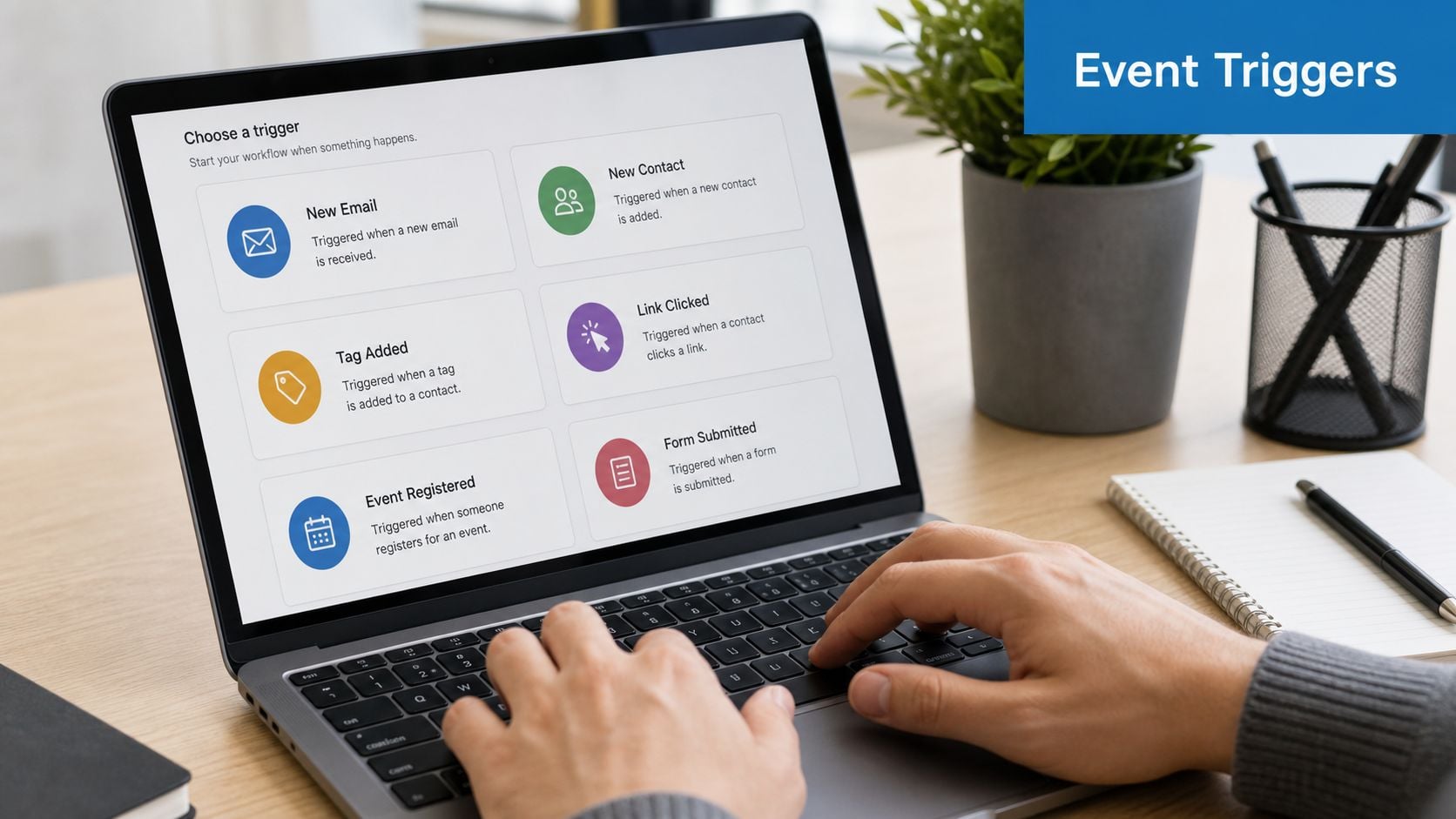
Match the trigger to the business moment
A new lead inquiry should usually kick off an immediate acknowledgment, plus a routing step if the agency manages multiple reps or locations. A no-show appointment needs a different path, often a calm reschedule sequence rather than a hard sell. A completed purchase belongs in an onboarding or retention sequence, not the same nurture stream you’d use for an unqualified prospect.
The strongest setups in a white-label CRM use event-based triggers first, then time-based checks only where timing matters. For example, a missed call can trigger a text-back sequence quickly, while a form submission can start an email workflow that adds context, sets expectations, and nudges the lead toward booking. That aligns with the kind of automation density agency CRMs are built around, where capture, auto-assignment, reminders, and nurture all live in one chain, a setup associated with conversion gains of up to 40% in the provided research (automation density and conversion impact).
Practical rule: if the trigger doesn’t map to a real sales event, it’s probably just adding noise.
Three agency examples that work
A dental client can use form submission as the trigger, then send a short confirmation, a booking prompt, and a reminder if the contact doesn’t schedule. A home services client might use a missed call trigger, then push a fast response with a direct scheduling link. A coaching client can use purchase completion, then move the buyer into a welcome sequence that frames next steps and reduces refund risk.
For agencies that rely on phone lead capture, HighLevel’s missed call system is a good example of how trigger choice affects response speed. The key is to keep the logic specific enough that each contact feels recognized, not dumped into a generic drip.
Designing Workflow Automations with Workflow Builder

Workflow Builder is where the agency stops thinking in one-off messages and starts thinking in systems. A good build reads like a map, with one entry point, a few branching decisions, and a clear finish line. A bad build is a pile of overlapping sequences that nobody trusts after the second client onboard.
Build the lead-to-booking path first
Start with a single event node, usually a new form submission or inbound lead tag. Add a condition for lead quality, such as booked versus unbooked, and route hot leads toward an immediate booking prompt while cold leads get a slower nurture sequence. Insert delay timers carefully, because they control pacing as much as content does.
Then add actions in a sequence that feels human. Send the first email fast, follow with a reminder if there’s no response, and use SMS only when the client’s brand and consent model support it. A workflow that links capture, assignment, reminders, and follow-up is exactly the kind of structure described in agency CRM guidance, especially when the platform combines CRM, messaging, and reporting in one database (multi-tenant agency CRM structure).
Keep the account structure clean
If you’re running unlimited sub-accounts, the workflow naming convention matters more than people think. Use client name, workflow purpose, and stage in every title so your team can scan quickly without opening each automation. That’s one of the easiest ways to reduce cross-account confusion when multiple clients share similar service lines.
A white-label CRM has to isolate client workspaces cleanly, or the whole model becomes fragile. The practical risk is data leakage, and the fix is permissioning discipline, standard sub-account setup, and reusable workflow modules that don’t need rebuilding from scratch every time. The complete guide to GoHighLevel for agencies is useful here if you’re deciding how deep to standardize your operational structure.
Build once, then clone carefully. The agency gains speed only when the reusable parts stay readable.
Crafting Personalized Email Templates
Generic blasts get ignored because they read like they were written for nobody in particular. The better agency setup uses tokens, conditional text, and a few carefully chosen variables so each email feels like it came from a person who knows the contact’s stage and source.
Make the first line do real work
A template should start with context, not a fluffy greeting. If the lead came from a Facebook ad, the subject line can reflect that source. If the contact is already in the pipeline, the opening line should reference the next step they’re closest to, such as scheduling or onboarding.
HighLevel’s Content AI can help draft variations, but its core value comes from how you constrain it. Feed it the client’s tone, the pipeline stage, and a handful of approved phrases, then keep fallback text ready for missing fields so the email never breaks when data is incomplete. That matters in white-label environments because agencies often manage uneven CRM records across multiple clients and locations.
Use a sample structure that stays flexible
A strong agency email often looks like this:
- Subject line: mention the lead source or the exact action they took.
- Opening line: use the contact’s name and one meaningful detail.
- Body copy: match the stage, such as booked, interested, or inactive.
- Fallback text: replace missing company or source fields with neutral wording.
- Signature: keep the sender identity aligned with the agency brand or client brand.
Agency note: personalization should feel useful, not noisy. One accurate detail beats three awkward ones.
If a lead submitted a pricing form, the email can acknowledge the request and point them to the next step. If they just downloaded a guide, the message should stay lighter and focus on education. The point is to move the contact forward without making the automation obviously mechanical.
Template libraries also matter. Keep one library per client or campaign, then clone and adapt instead of rewriting from scratch. That saves time, preserves brand voice, and makes it easier to improve deliverability later because the structure stays stable even when the copy changes.
Scheduling Campaigns and Managing Deliverability
A polished email that lands in spam is still a failed email. Scheduling and deliverability are where agencies protect both the client’s brand and their own operational credibility, because inbox placement shapes how every workflow performs.
Use scheduling with restraint
Single sends work best for urgent announcements or time-sensitive offers. Batch campaigns fit segmentation, especially when different audiences need different messaging. Recurring broadcasts are useful for newsletters or steady client updates, as long as the audience expects them.
The mistake agencies make is overloading a list with too many sends in too short a window. A workflow can be technically correct and still hurt results if the audience starts ignoring the pattern. Match send timing to the audience’s local time and the client’s normal communication rhythm, then keep the broadcast schedule predictable.
Treat authentication as a baseline, not an afterthought
A new sending domain needs proper authentication, and that means handling SPF, DKIM, and CNAME records correctly before the first campaign goes out. New addresses also need warming up, especially if the client is moving from a low-volume inbox to a more active campaign environment. Bounce monitoring matters because bad data and poor list hygiene will hurt sender reputation fast.
The deliverability problem is rarely one thing. It’s usually a combination of weak authentication, stale contacts, and send habits that don’t match the list. If an agency is reselling email as part of a white-label CRM package, those details affect perceived platform quality just as much as the design of the portal.
A good operational rule is to separate list management from campaign urgency. The more carefully you segment, authenticate, and pace sends, the less you rely on rescue tactics later.
Testing Monitoring and Optimizing Workflows
Automation isn’t something you launch once and forget. A workflow that looked strong in staging can underperform in live use because subject lines, timing, or branching logic don’t match real contact behavior.

Test in controlled layers
Send test emails to an internal list first so you can read the actual rendering and inspect the headers before anything reaches a client audience. Then check the activity log for opens, clicks, and replies once the workflow goes live. If a branch isn’t being used, the issue may be the trigger, the timing, or the offer itself.
A/B tests should stay narrow. Change one subject line, or one send time, or one call to action, not all three at once. That keeps the lesson clear and avoids false confidence when one tweak masks another problem.
Track what changes, not just what happened
The most useful metrics are the ones tied to a decision. If a nurture sequence underperforms, don’t just note the open rate and move on. Look at where the sequence drops off, which branch gets ignored, and whether the timing is too aggressive for the audience.
Test one variable, fix one bottleneck, then retest. That’s how agencies avoid turning a live workflow into an uncontrolled experiment.
Use those results to tighten the sequence over time. If a reminder email works better after a delay, keep that delay. If a CTA gets ignored when it’s too early in the sequence, push it later. The goal is to make the workflow feel more useful with each revision, not more complicated.
Conclusion and Best Practices for Agencies
The agencies that win with a white-label CRM don’t chase feature lists, they build repeatable client journeys. They start with clean triggers, wire the workflow logic carefully, write templates that sound like the client, and keep testing until the system feels boring in the best possible way.
A few habits separate scalable teams from fragile ones. Keep workflow names consistent, document every automation, and review deliverability on a regular cadence. If you’re still comparing platforms, the essential CRMs for agency growth lens is useful because it forces you to ask whether the software supports the business model, not just the demo.
The other issue most guides skip is ownership. White-label CRM buyers are really making a reseller decision, so export workflows and lock-in risk matter more than most vendors admit. That concern shows up clearly in Pipedrive’s white-label CRM guidance, which notes that migration and data portability deserve real attention if you care about agency margins and client data control.
If you’re building a full-service offer, a guide to choosing a full service agency can also help you think about how email automation fits into the broader service structure. The better the system is documented, branded, and portable, the easier it becomes to sell, support, and eventually move if your needs change.
