


Most advice on the best CRM for financial advisors starts in the wrong place. It treats CRM choice like a feature contest, when the decision is about your operating model, how your firm captures client data, automates follow-up, and keeps supervision tight enough to satisfy a regulated practice. If you pick the wrong system, you don't just buy clunky software, you create more admin work, more context switching, and more compliance blind spots.
The market has also narrowed in a way that makes the old “compare everything” approach less useful. Recent 2026 advisor-tech comparisons keep circling back to the same platforms, Wealthbox, Redtail, Practifi, Salesforce Financial Services Cloud, and Microsoft Dynamics 365, which tells you the category has matured into a relatively stable set of options for different firm sizes and operating styles. The right answer is not “which CRM has the most features.” It's which CRM reduces advisor admin time without creating supervision risk.
| Platform | Starting Price | Compliance Focus | Automation Depth | Best-Fit Firm |
|---|---|---|---|---|
| Wealthbox | $59, $75, and $99 per user/month | Strong household tracking and compliance-aware workflows | Good for everyday automation | Solo and small-to-mid RIAs |
| Redtail | Varies by plan | Mature advisor-market recordkeeping habits | Solid, practical workflows | Firms that want a long-standing advisor CRM |
| Practifi | Not stated in the verified data | Workflow-heavy and compliance-oriented | Strong for process management | Growing RIAs and more complex teams |
| Salesforce Financial Services Cloud | Roughly $325-$750 per user/month | Deep financial-services data model and control | Very strong, enterprise-grade | Large wealth-management organizations |
| Microsoft Dynamics 365 | Not stated in the verified data | Highly customizable, depends on implementation | Powerful when configured well | Firms that need customization-heavy architecture |
Table of Contents
- Why the Best CRM for Financial Advisors Is Really an Operating Model Question
- The Six Criteria That Actually Matter When Choosing an Advisor CRM
- Meet the Five Platforms Every Advisor Should Evaluate
- Side-by-Side Comparison of the Top Advisor CRMs
- Which CRM Fits Which Advisory Firm Profile
- Where AI Helps in an Advisor CRM and Where It Creates Risk
- Implementation and Migration Path for Switching Advisor CRMs
- FAQ on Choosing and Switching an Advisor CRM
Why the Best CRM for Financial Advisors Is Really an Operating Model Question
The wrong way to buy a CRM is to ask which platform has the longest feature list. That's how firms end up with a system that looks impressive in a demo and feels like extra admin work six weeks later. The better question is whether the CRM supports the way your team serves households, documents activity, and moves work through the firm.
For advisors, the CRM has evolved from a contact database into a specialized operating layer for prospecting, client servicing, and follow-up. That matters because the market is no longer split just by brand preference, it's split by firm size and complexity, with boutique RIAs, mid-market teams, and enterprise wealth organizations needing very different levels of structure and control. Independent RIAs often want speed and adoption. Enterprise firms usually want deeper data modeling and governance.
The pressure behind this choice is real. One 2026 guide notes that 28% of advisors lack client time and spend 41% more on compliance and admin. That's why the buying process now has to include implementation readiness, not just software selection. If a CRM doesn't reduce handoffs, simplify note capture, and support repeatable service workflows, it's not helping.
Practical rule: If a CRM doesn't make your next client review, onboarding sequence, or follow-up process easier to execute, it's the wrong CRM, no matter how polished the demo looks.
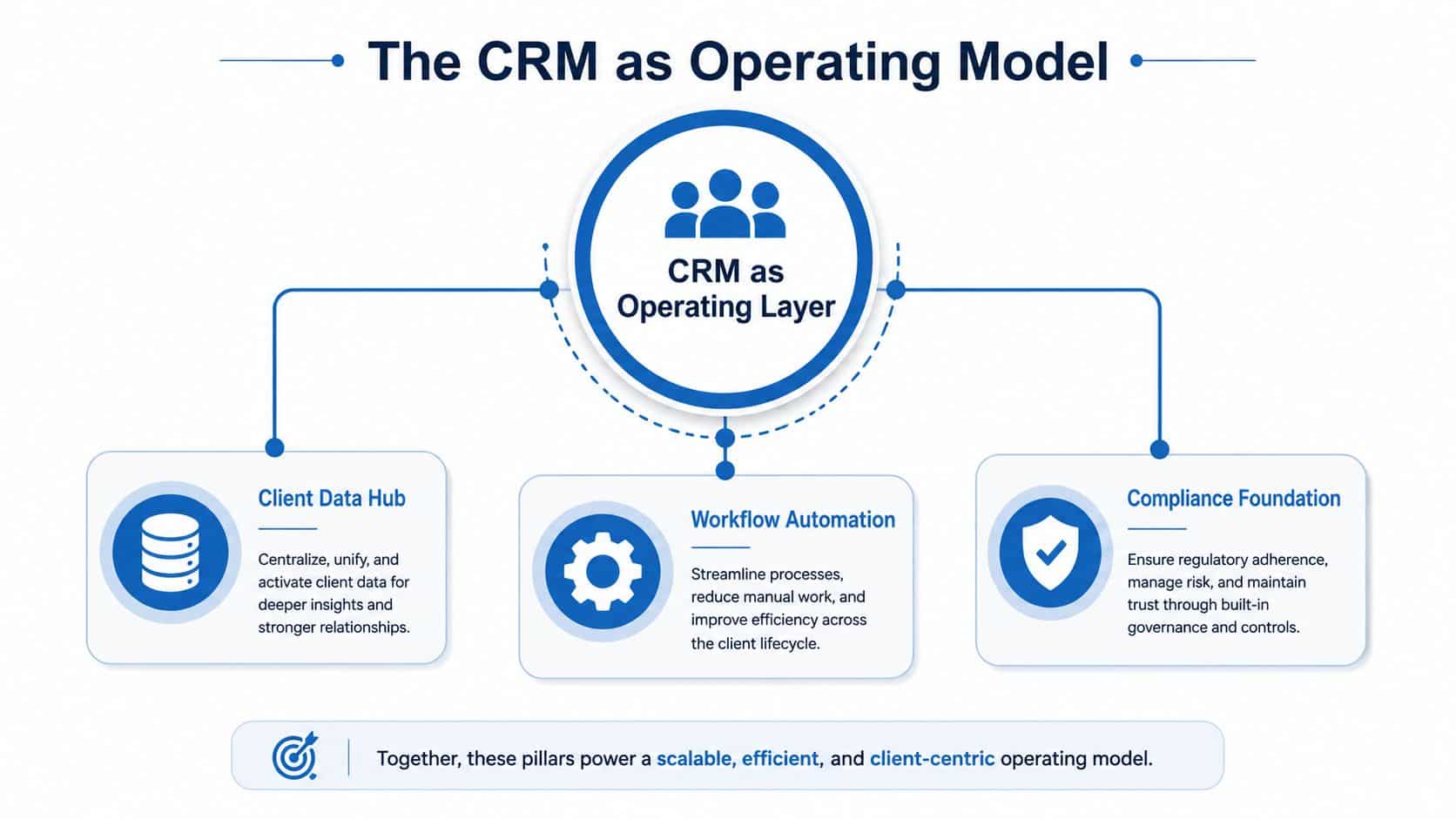
A useful way to think about the decision is through three pillars, Client Data Hub, Workflow Automation, and Compliance Foundation. If one of those pillars is weak, the whole system becomes harder to trust. For teams looking at adjacent automation stacks, the logic behind financial industry AI automation is similar, the system only works when the workflow is governed, not just automated.
The Six Criteria That Actually Matter When Choosing an Advisor CRM
The shortlist gets much clearer once you stop asking for “the best CRM” in the abstract. For advisory firms, six criteria do the separating, and they matter more here than they do for generic sales teams because advisors live inside client households, compliance documentation, and recurring service calendars.
Security and compliance
A generic CRM can track contacts. An advisor CRM has to support audit trails, permissions, and recordkeeping discipline. That's essential in a regulated environment, because the system isn't just organizing business, it's helping shape what can be reviewed later.
Client communication
Advisors need more than email logging. They need a single view of conversations, meeting notes, and household context so the team can serve consistently. If communication sits in scattered inboxes, the CRM becomes decorative instead of operational.
Workflow automation
Time gets won back. Automation should handle onboarding steps, review reminders, task assignment, and reactivation sequences without forcing staff to rebuild the same process every time. If your CRM can't standardize recurring work, it won't scale with the firm.
Calendar and payments
Scheduling is part of the service model, not a side feature. Appointment flow, reminders, and payment handling reduce friction before a client meeting even starts, and that matters when admin pressure is already high.
Integrations
Advisors rarely run on one tool. Planning software, document signing, custodial systems, and reporting platforms all have to move data cleanly. If the CRM can't connect well, staff end up doing duplicate entry and reconciliation.
Pricing and implementation burden
Sticker price is only part of the bill. The cost includes setup, training, workflow design, and the time it takes for advisors to use the system. If a team is already stretched, a cheap CRM that nobody adopts is more expensive than a pricier one that gets used daily.
For a closer look at how marketers structure automation around lead qualification, HighLevel's guide on lead scoring is useful because it shows how scoring logic maps to workflow decisions.
Bottom line: The best CRM for advisors is the one your team will use consistently, because usage beats theoretical depth every time.
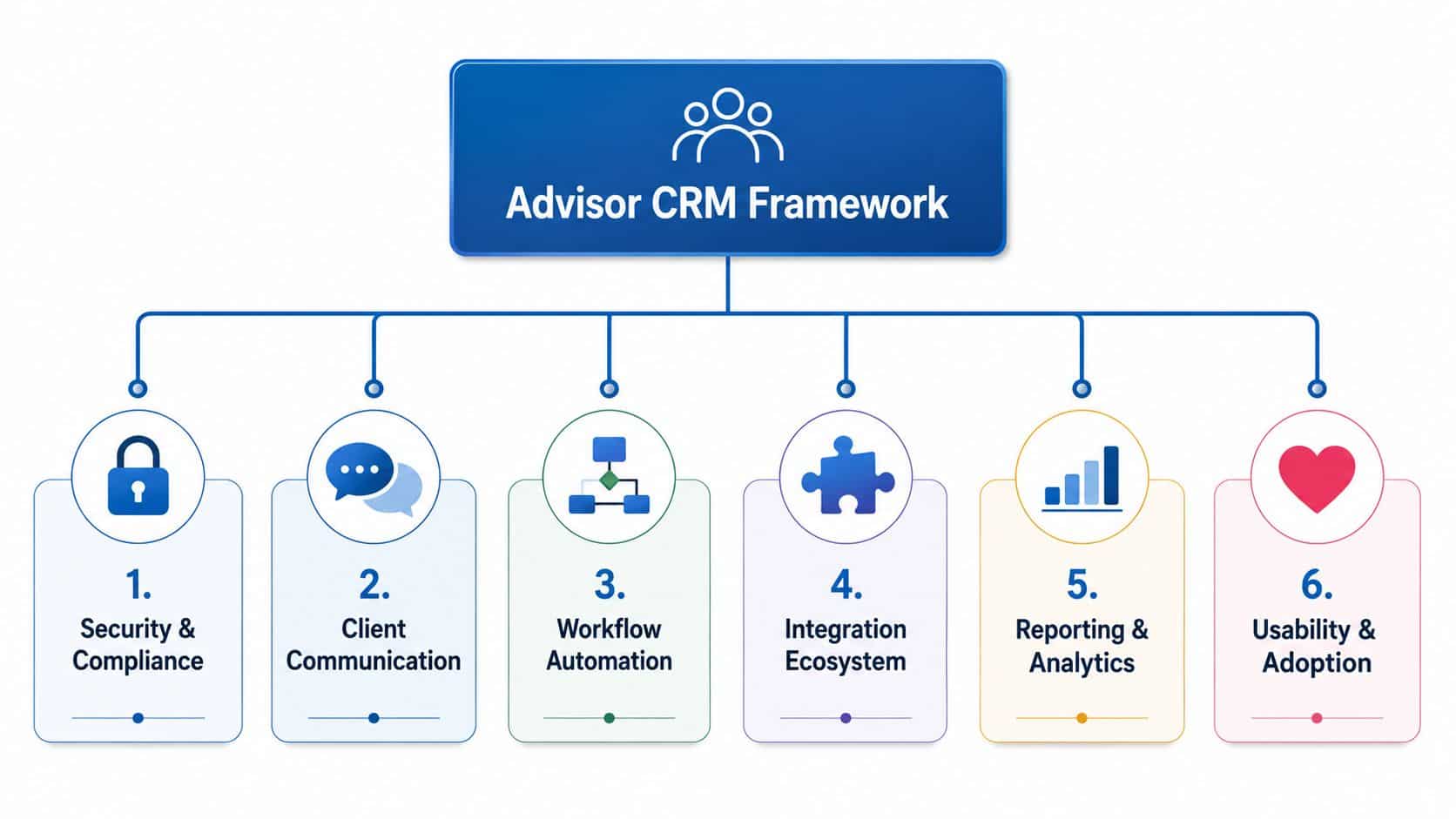
A good vendor demo should prove each of those six points with your real workflows. If it doesn't, keep moving.
Meet the Five Platforms Every Advisor Should Evaluate
Wealthbox
Wealthbox is the clearest pick for independent RIAs that care most about usability and quick adoption. Its modern activity-stream interface feels built for advisors who want a CRM that's easy to live in, not a system that requires a long internal rollout. The transparent per-seat pricing, $59, $75, and $99 per user/month, also makes the budget conversation simpler than it is with enterprise CRMs.
Its strength is fit. Wealthbox is the kind of platform that helps a small or mid-sized advisory firm get organized fast without asking for a big admin team to babysit the system. The tradeoff is depth. Firms that want heavy customization, deep predictive analytics, or enterprise governance will eventually bump into the ceiling.
Redtail
Redtail still matters because it's familiar to a lot of advisors and has long lived in the US advisor market. That familiarity can make migration and adoption easier for teams that want a known quantity instead of a fresh interface. It's especially relevant when a firm values continuity and long-standing advisor workflows.
The watch-out is that familiarity can hide stiffness. Redtail works best when a firm wants stable routines and doesn't need a highly adaptive architecture. If your team wants richer workflow design or a more modern operational feel, you'll notice the difference quickly.
Practifi
Practifi is the workflow-heavy option in the advisor CRM group. It's built for firms that need process control and are willing to invest in implementation to get it. That makes sense for firms growing in complexity, especially when service consistency and role-based execution matter.
The tradeoff is time. Practifi tends to ask more from the firm up front, which means it rewards teams that have the operational discipline to define their processes before they automate them. If your firm is still figuring out its standard workflows, it can feel like too much structure too soon.
Salesforce Financial Services Cloud
Salesforce Financial Services Cloud is the enterprise benchmark, not the default advisor choice. It adds financial-services data models, 360-degree client and household views, Einstein AI predictive analytics, Flow Builder automation, Data Cloud integration, and MuleSoft connectivity. Its price band of roughly $325-$750 per user/month places it in a different category from the boutique tools.
That capability comes with a tradeoff that advisors should take seriously. Salesforce is powerful because it can be shaped around almost anything, but that flexibility usually demands more internal resources, more admin discipline, and more implementation patience. It's the right answer when the firm already operates like a platform company.
Microsoft Dynamics 365
Microsoft Dynamics 365 is the customization-heavy outlier. It appeals to organizations that want a highly configurable environment and already think in terms of broader enterprise systems, not just advisor-specific software. When implemented well, it can support workflows and deep internal control.
The downside is obvious to anyone who has migrated firms before. A customizable system can also become a maintenance burden if the firm doesn't have the operational maturity to govern it. If you want speed and simplicity, this usually isn't the first stop.
The pattern is clear. Wealthbox and Redtail are about adoption. Practifi and Salesforce lean into process depth. Dynamics 365 sits in the customization lane.
Side-by-Side Comparison of the Top Advisor CRMs
| Platform | Starting Price | Compliance Focus | Automation Depth | Best-Fit Firm |
|---|---|---|---|---|
| Wealthbox | $59, $75, and $99 per user/month | Strong household tracking, permissions, and advisor-friendly workflow support | Good for standard service automation | Solo advisors and small-to-mid RIAs |
| Redtail | Not stated in the verified data | Long-standing advisor-market recordkeeping orientation | Solid everyday automation | Firms that want familiarity and stable workflows |
| Practifi | Not stated in the verified data | Workflow and process control for more complex teams | Strong | Growing RIAs with more structured operations |
| Salesforce Financial Services Cloud | $325-$750 per user/month | Deep financial-services data model and enterprise governance | Very strong | Large wealth-management organizations |
| Microsoft Dynamics 365 | Not stated in the verified data | Highly configurable, implementation-dependent | Strong when customized | Firms that need enterprise-level customization |
If you want a broader buying lens for adjacent platforms, you can also compare Salesforce vs HubSpot alternatives to see how non-advisor CRMs stack up against more specialized choices.
The table makes two things obvious. First, there's a real price gap between boutique tools and enterprise platforms. Second, the more customization a system offers, the more implementation discipline it expects from your team. That's why the wrong CRM feels “powerful” in sales and exhausting in production.
The right takeaway isn't that the cheapest tool wins. It's that fit beats raw capability when the team needs a system people will use every day.
Which CRM Fits Which Advisory Firm Profile
A solo RIA or small boutique firm usually needs one thing above all else, fast adoption. The staff is small, the owner wears too many hats, and the CRM has to make household visibility easy without forcing the firm into a long buildout. For that profile, Wealthbox is the cleanest recommendation because it combines modern usability with straightforward pricing and a structure that doesn't overwhelm a small team.
A growing mid-market firm is a different problem. By then, the issue isn't whether people can remember client details, it's whether the firm can standardize service, keep integrations clean, and reduce admin drag as headcount and households grow. For that profile, Practifi is the better fit if the firm is ready to define its workflows, while Redtail can still work when the team wants continuity and a known advisor-market environment. If you're trying to streamline operations with HighLevel CRM, the lesson is the same, centralization only helps when the process design is real.
Enterprise wealth-management organizations need a different level of control. They care about data models, permissions, cross-team coordination, and analytics that go beyond a standard advisor CRM. For that profile, Salesforce Financial Services Cloud is the strongest recommendation because it's built for deep customization and enterprise-grade architecture. Microsoft Dynamics 365 belongs in the same conversation when the firm wants even more flexibility and already has the internal capability to manage it.
The cleanest rule is simple. Choose Wealthbox for usability, Practifi for workflow depth, and Salesforce FSC for enterprise complexity. Everything else is a variation on those three operating priorities.
Where AI Helps in an Advisor CRM and Where It Creates Risk
AI is useful in an advisor CRM when it removes repetitive work that a human still reviews. That means note capture, follow-up drafting, household segmentation, and recurring task generation. Used well, it trims admin time without changing the advisor's judgment call. Used badly, it creates another layer of content that nobody supervised carefully enough.
The risk is not theoretical. In a regulated setting, AI can muddy the line between assistance and unsupervised communication. That's why the best use cases are the ones where a human can review the output before it leaves the firm. If AI drafts a meeting summary or follow-up note, a staff member should verify it before it becomes part of the record or gets sent to a client.
A practical governance model helps more than enthusiasm does.
- Review every outward-facing AI draft: Don't let generated text go straight to a client without human sign-off.
- Set retention and access rules: If the AI touches notes or summaries, define how those records are stored and who can see them.
- Use AI for support, not substitution: Let it save time on preparation and organization, not make final decisions about client communications.
For firms that want to see how AI is being positioned in CRM software more broadly, the HighLevel AI CRM platform shows how automation, messaging, and follow-up can be combined inside one system. The advisory use case is narrower, though, and that's the point, regulated workflows need tighter control than generic business automation.
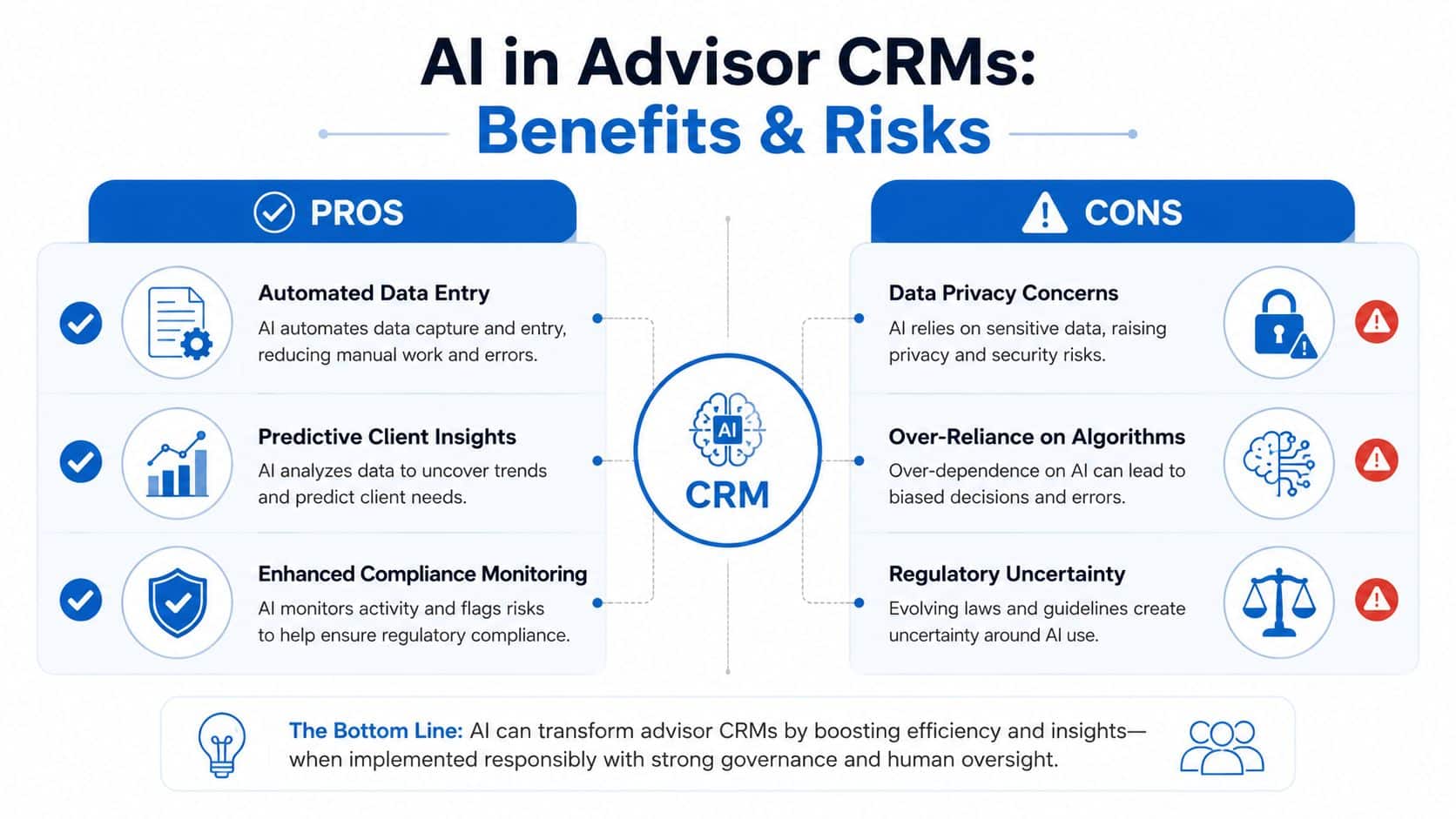
The firms that win with AI in CRM don't chase the flashiest feature. They govern it like any other production workflow.
Implementation and Migration Path for Switching Advisor CRMs
The migration is where a lot of firms lose momentum. They choose the right CRM, then underestimate the cleanup, mapping, and training required to make it usable. The fix is to treat migration like an operations project, not a software install.
Start with a data audit. Clean out duplicate contacts, stale households, and inconsistent naming before you import anything. Then map fields to the new household model so you're not trying to force old habits into a new structure. After that, test the workflows with sample households in a sandbox so the team can see how tasks, notes, and follow-up sequences really behave.
Migration rule: If the pilot doesn't work with a sample household, it won't work at scale.
A controlled rollout matters more than a fast one. Train by role, not by job title only, because advisors, service staff, and operations leads use the CRM differently. Keep the old system alive long enough for a parallel period, then decommission it only after the new workflows are stable and compliance has signed off.
For teams evaluating the rollout economics of an automation-heavy stack, this GoHighLevel ROI breakdown is a useful comparison point for thinking about adoption, setup effort, and operating payoff.
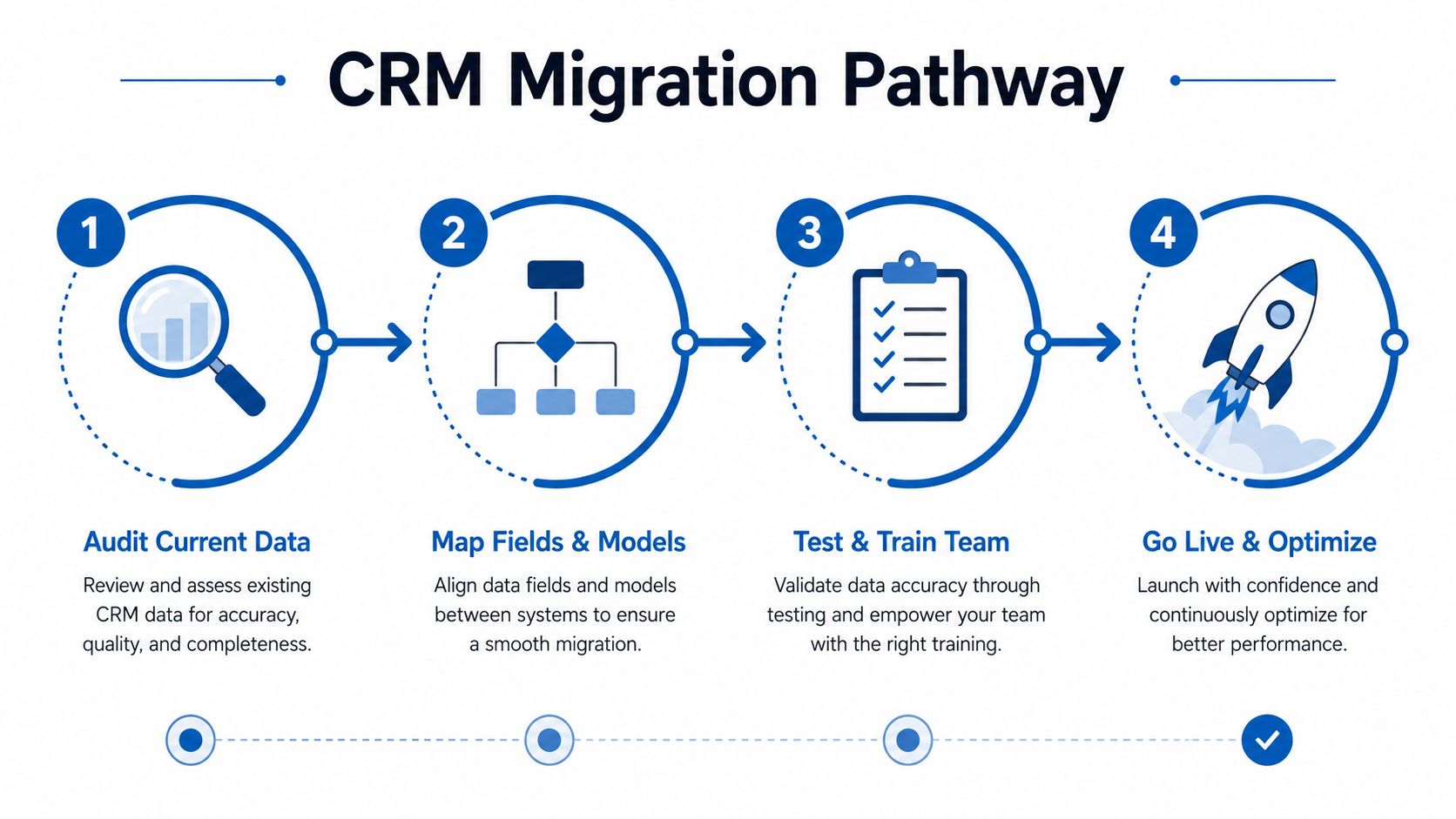
The biggest mistakes are predictable. Teams underclean the data, skip compliance review on new automation, and try to launch the entire firm at once. Don't do that. Slow, deliberate rollout beats a flashy go-live every time.
FAQ on Choosing and Switching an Advisor CRM
How long do CRM contracts usually run? It varies by vendor, so don't sign before you understand the renewal terms, exit clauses, and support obligations.
Who owns the data if the firm leaves? The firm should, but verify export rights and format before implementation. If that's unclear, stop there.
What does switching really cost? More than licenses. You're paying for cleanup, migration, training, and lost time during the transition, which is why cloud modernization projects fail when teams ignore the operating burden. A useful framework for that risk is explained in why cloud modernization projects fail.
How should AI be evaluated safely? Treat it like any other workflow that creates records or client-facing content. Review the output, define retention, and make sure supervision is explicit.
If you want a CRM that gives your advisory firm more structure without turning daily work into a maintenance project, HighLevel is worth a look as one operating system for CRM, scheduling, follow-up, and automation. Visit HighLevel to see how its workflow tools can fit into a client service model that still needs oversight, speed, and clean handoffs.
