


You're probably living in the same mess most small business owners are. Leads come in through email, texts, Instagram DMs, web forms, and phone calls, then the follow-up lives in a spreadsheet, a notebook, and a team inbox that nobody really trusts. That's usually the moment people start shopping for the best AI CRM for small business, when what they really need is a cleaner operating system for revenue.
The problem isn't just having too many tools. It's that every extra handoff creates delay, and every delay gives the prospect time to go quiet. If you've been wondering whether your CRM is underpowered or whether your whole stack is the issue, this buyer's guide will give you the blunt answer and the budget reality behind it.
Table of Contents
- Why Small Businesses Are Rethinking Their CRM in 2026
- What an AI CRM Actually Does for a Small Team
- The Five Criteria That Matter When Choosing
- Comparing the Leading AI CRMs Side by Side
- Why an All-in-One Revenue OS Changes the Math
- Turning AI Features Into a Revenue Playbook
- A 30-60-90 Day Rollout Plan and KPI Checklist
- How to Decide This Week and What to Ask First
Why Small Businesses Are Rethinking Their CRM in 2026
A lot of owners do not have a CRM problem. They have a follow-up problem. A lead comes in, someone replies late, the contact gets logged twice, and by the time the team sorts out the next step, the buyer has already talked to someone faster.
That is why the CRM conversation has changed. Small businesses are no longer choosing only on feature lists, they are choosing on price, fit, and whether the system can handle messy day-to-day work without adding more admin. A review of SMB-friendly AI CRMs found that many options sit in the $13 to $29 per user per month range, with examples like Zoho CRM at $14/user/month, Pipedrive at $15/user/month, Freshsales at $19/user/month, and Nutshell Foundation at $13 to $19/month. HubSpot also offers a free tier before paid plans begin at $50+ per month. That pricing pattern matters because the right tool for a small business has to automate enough work to justify itself without pushing the budget into enterprise territory. Source review
Practical rule: if your current stack makes simple follow-up feel complicated, the CRM is part of the bottleneck.
Price is only half the shift. Small businesses are buying CRMs to capture leads, respond faster, and cut down the manual cleanup that slows everything else down. For agencies, local service firms, and solo operators, the question is whether a platform can centralize the work that currently gets scattered across inboxes and point tools. A HighLevel contractor follow-up tool shows that operating-model shift clearly, because follow-up stops being a separate task and becomes part of the system.
The test is simple. If your CRM only organizes information, it is behind. If it helps the team act on that information, you are looking at the right products.
What an AI CRM Actually Does for a Small Team
An AI CRM is not just a contact database with a fancy label. It's a system that stores customer data and also helps write replies, rank leads, suggest the next move, and automate follow-up across channels like SMS, email, chat, and voice. Think of it as a sharp office manager who never sleeps and doesn't forget who needed a callback.
The old CRM model was mostly a digital rolodex. You stored names, maybe added notes, and hoped someone on the team remembered to check the record before replying. The newer model acts more like a revenue assistant. It reads the situation, nudges the team, and reduces the number of places where lead context can get lost.
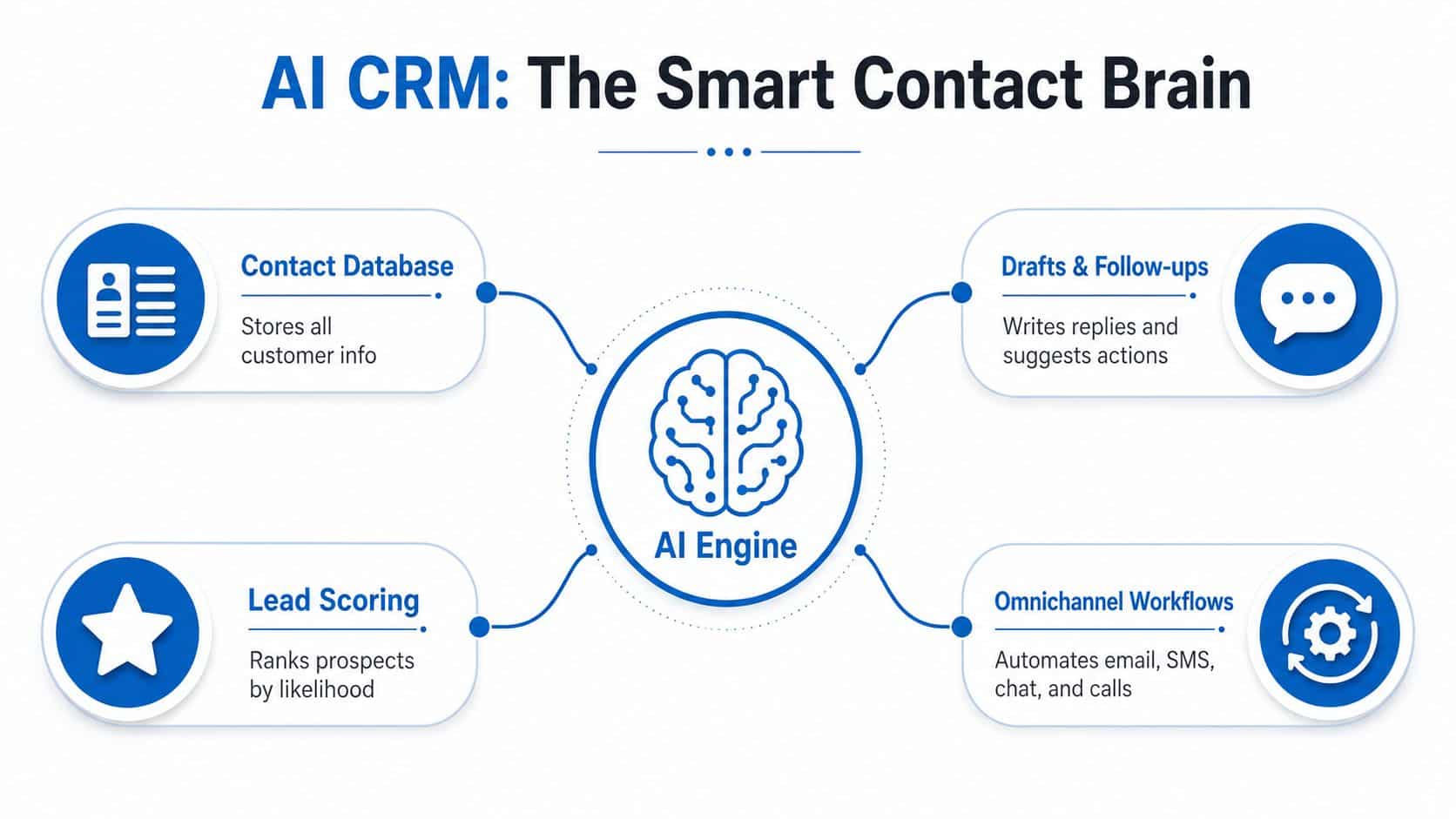
The catch is that AI only works as well as the data it can see. If your records are half-finished, duplicated, or spread across tools, the output will be weak no matter how polished the vendor's demo looks. That's why the most useful AI in small business CRM often isn't prediction first, it's capture and consolidation first. The system has to collect the conversation before it can improve the conversation.
That's also why features like missed-call routing matter more than most homepage copy suggests. A platform can't help you recover a hot lead if the call disappears into voicemail and nobody follows up. HighLevel missed call routing is a good reminder that the best CRM features are often the ones that reduce human forgetfulness, not the ones that sound most futuristic.
What to screen for
Use this mental model when vendors start throwing around AI language:
- Capture first means the platform grabs calls, chats, forms, and emails without extra admin work.
- Assist second means it drafts, summarizes, and recommends the next action.
- Automate third means it sends the follow-up or triggers the workflow without waiting on a rep.
If a tool only does the middle layer, you're still paying for storage with a nicer interface.
The Five Criteria That Matter When Choosing
A small business owner usually gets distracted by feature lists, integration logos, and polished dashboards. Those things look good in a demo. They do not tell you whether the CRM will hold up when leads come in messy, tags are inconsistent, and follow-up depends on a team that is already stretched.
The decision comes down to five practical checks.
The scorecard I'd use
| CRM | Starting Price | Free Tier |
|---|---|---|
| HubSpot | Paid plans begin at $50+ per month | Yes |
| Zoho CRM | $14/user/month | Not highlighted in the verified data |
| Pipedrive | $15/user/month | Not highlighted in the verified data |
| Freshsales | $19/user/month | Not highlighted in the verified data |
| Nutshell | $13 to $19/month | Not highlighted in the verified data |
Start with seat cost. For many small teams, the market band sits around $13 to $29 per user per month, so that is the range to compare against, not the headline price on a landing page. Next comes built-in AI depth. AI that is native to the CRM is easier to trust than AI stitched together through extra tools, especially when the team wants one place for capture, follow-up, and pipeline management. That is the pattern the market keeps rewarding, especially for teams that need practical affordability and ease of use more than flashy demos. 2026 SMB AI CRM review
The third check is channel coverage. If the CRM cannot handle SMS, email, chat, and voice in one place, the team keeps jumping between tabs and losing context. The fourth is automation power, because a weak workflow engine leaves AI stuck as a suggestion box. The fifth is whether payments, reviews, and funnels live inside the same system or sit outside it. Every extra app adds another point where data can break, and small teams feel that pain fast.
A good filter is to look at how teams run the system day to day. Practical community CRM best practices focus on naming, ownership, and follow-up discipline for a reason. If those basics are sloppy, even a strong CRM will produce sloppy results. If those basics are tight, a simpler CRM can outperform a fancier one.
If you want a cleaner benchmark for service businesses, the same logic shows up in best agency CRM tools. Agencies care less about pretty charts and more about whether the platform keeps lead sources, tasks, and client communication aligned. That is the standard small businesses should borrow.
A good SMB CRM should make the next action obvious. If your team needs training just to know what to do after a lead comes in, the platform is too heavy for the job.
My view is simple. If a platform wins on price but loses on follow-up speed, data capture, or workflow clarity, it is not cheaper. It just moves the cost into missed deals and extra admin work later.
Comparing the Leading AI CRMs Side by Side
HubSpot is the easiest starting point for early-stage teams. Its free CRM includes unlimited contacts, deal tracking, email templates, live chat, and basic reporting, and the paid tiers add generative AI, chatbots, and automation. That makes it attractive when you need something friendly and familiar, especially if marketing and sales live close together. But once you need more serious AI and automation, the price ladder gets steeper than many small teams expect. 2026 AI CRM analysis
Zoho is the budget workhorse. It brings predictive lead scoring, workflow automation, and broad all-in-one coverage without feeling like a toy. If you care about squeezing a lot of capability out of a lower entry point, it belongs on the shortlist. Pipedrive is cleaner for pipeline discipline. It's built for teams that want a visual sales motion and don't want the CRM to get in the way of selling. Freshsales sits in a similar lane, but its appeal is the built-in phone and sales focus, which suits reps who live in direct outreach.
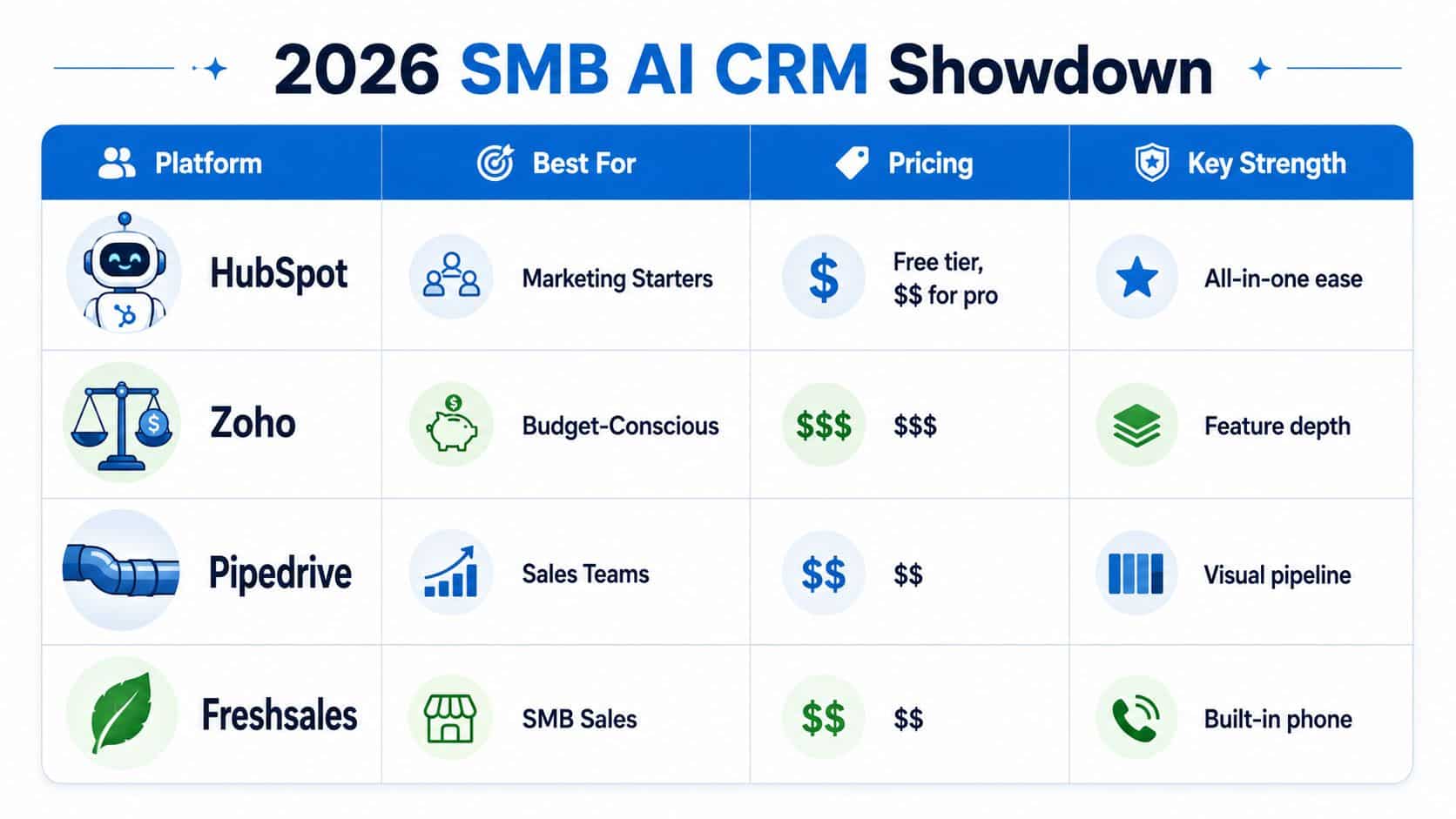
Nutshell is the lightweight challenger. It earns its place because it's simple, affordable, and quick to adopt, which matters more than fancy reporting when you've got a small team that just wants to stay organized. That said, lightweight also means limited reach if your business needs deeper revenue operations inside one workspace.
The all-in-one category changes the comparison. HighLevel is built as a revenue OS, not just a CRM, so it pulls together CRM, funnels, conversations, calendars, payments, reviews, and broadcast campaigns. It also ships with unlimited contacts on published plans, which matters because contact storage stops being a scaling concern when you're trying to consolidate the business instead of patching it together with point tools. That's the difference between buying software and buying a system. Guide to eliminating fragmented agency tools
My honest shortlist
- Pick HubSpot if you want the gentlest entry point and your team needs a familiar interface.
- Pick Zoho if budget discipline matters and you still want meaningful AI and breadth.
- Pick Pipedrive or Freshsales if your team is sales-led and pipeline clarity is the top priority.
- Pick Nutshell if ease of use beats everything else.
- Look at HighLevel if your real problem is fragmented operations, not CRM storage.
best agency CRM tools is a useful rabbit hole if you're deciding from the agency side, because the buying criteria shift once you're managing client accounts instead of one internal sales process.
Why an All-in-One Revenue OS Changes the Math
The biggest mistake small businesses make is buying a CRM for one function and then bolting on everything else around it. That works until the data starts living in five places and nobody can tell which source is right. Once that happens, the AI features lose value because the system can't see enough of the customer journey to be useful.

A better model is capture, nurture, close, collect, and reactivate in one workspace. That's where a revenue OS earns its keep. HighLevel centralizes CRM, conversations, funnels, calendars, payments, reviews, and broadcast tools, so the team isn't constantly stitching together handoffs. It also supports unlimited contacts on published plans, which makes the platform's value less about database limits and more about how well it keeps the full revenue loop visible.
That visibility matters because AI can't clean up what it can't inspect. A platform that only sees email but not calls, or sees form fills but not missed calls, can't give reliable next steps. The ShortGenius AI ad generator is a good example of a tool that becomes more useful when it sits inside a broader operating stack, because content and follow-up stop being separate jobs.
A strong revenue OS also helps with speed to revenue. Paid calendars shorten the booking path. Text-to-pay and invoices reduce friction around collection. Review requests help build proof without extra manual chasing. Those functions are not glamorous, but they remove the little delays that kill conversion.
If you want a simple way to think about it, standalone CRMs organize work, while an all-in-one OS moves work forward. That distinction is why platform choice matters more in 2026 than another integration badge ever will.
Turning AI Features Into a Revenue Playbook
AI CRM features only matter if they tie to a revenue lever. That means every shiny feature should map to conversion, acquisition cost, retention, average revenue, or reactivation. If it doesn't touch one of those, it's noise.
Use the feature for the metric
- Lead scoring and pipelines help you raise conversion because reps stop wasting time on cold contacts and start prioritizing real buyers.
- Missed-call text-back and Conversation AI improve speed to lead, which is one of the cleanest ways to stop opportunities from going stale.
- Broadcasts and workflow automation support retention, because you can keep existing customers warm instead of waiting until they disappear.
- One-click upsells and order bumps push average revenue per customer higher by making the next offer easier to accept.
- Win-back campaigns and loyalty programs recover revenue that would otherwise sit in the dead pile.
That's the playbook. Not “use AI because it's modern,” but “use AI where the customer already showed intent and your team is most likely to drop the ball.”
In a platform like HighLevel, the revenue logic is straightforward. Pipelines and lead scoring help the team work the best opportunities first. Missed-call routing and automated follow-up help reduce response lag. Review requests and reactivation workflows keep the relationship alive after the first sale. The point is not to add more software, it's to connect the moment a lead appears with the moment money gets collected and the moment that customer comes back.
Operational rule: if a feature doesn't reduce manual chasing or make the next revenue step easier, it's probably decoration.
Use that rule when your team debates every new automation. A tool is useful when it shortens a path. It's fluff when it just adds another dashboard.
A 30-60-90 Day Rollout Plan and KPI Checklist
A CRM rollout fails when teams try to do everything on day one. Keep it simple, get the data in, then automate the right sequences after the team is already using the workspace.
Days 1 to 30, foundation
Start by importing contacts, connecting email and SMS channels, and standing up the basic pipelines. Turn on missed-call text-back and review requests early, because those are easy wins that prove the system is working. If you're comparing rollout cost and plan structure, the GoHighLevel subscription breakdown is worth reviewing before you commit to a setup path.
Days 31 to 60, optimization
Train the team on AI drafts and follow-up prompts. Launch the first lead scoring rules, automate a core follow-up sequence, and set up reporting dashboards that show what's moving. If payments are part of your process, connect them now so the team doesn't keep bouncing between tools.
Days 61 to 90, scale and reactivate
Add a reactivation campaign, implement review automation, and expand into voice channels if calls are part of your sales motion. At this point, the CRM should be doing more than storing records. It should be helping the business recover lost attention and create repeat business.
KPI checklist
- Lead-to-book rate tells you whether follow-up is getting meetings on the calendar.
- Show rate tells you whether reminders and confirmations are doing their job.
- Retention rate shows whether your post-sale workflows are helping keep customers active.
- Average revenue per customer shows whether upsells and reactivation are paying off.
If you want a cleaner planning meeting, screenshot this checklist:
- Import every active contact
- Connect every live channel
- Assign one owner per pipeline
- Turn on missed-call recovery
- Track one revenue KPI per phase
How to Decide This Week and What to Ask First
A small business usually does not need a longer vendor shortlist. It needs a clear view of where revenue is leaking now. Start with the three problems that slow money down most often, slow response time, inconsistent follow-up, and weak reactivation. Then match each problem to one feature that fixes it. If a platform cannot handle at least two of those areas well, keep it off the list.
HighLevel makes the most sense for agencies, local services, coaches, and multi-location operators that want one workspace instead of a pile of disconnected tools. HubSpot, Zoho, and Pipedrive still fit very early-stage teams or tightly sales-led businesses that do not need a broader operating layer yet. The wrong pick is the one that looks polished in a demo and sends your team back to spreadsheets a few weeks later.
If you are choosing this week, ask one simple question. Can this CRM handle messy, real-world small-business data without breaking the workflow? That is the test that matters, not the feature page.
Quick FAQ
How much should a small business expect to pay?
Many serious AI CRM options for small businesses sit in the lower monthly per-user range, while HubSpot's paid plans start higher. The exact fit depends on whether you need simple contact tracking or a system that also runs follow-up, routing, and reactivation. 2026 SMB CRM review
Is migration risky?
It becomes risky when the data is messy and nobody owns the cleanup. It stays manageable when you migrate clean records, assign ownership before launch, and test one workflow at a time.
Can I trust AI replies and scoring?
Only if the CRM has clean data that is captured consistently. AI is useful when it can read real activity, not when it is guessing from half-filled records.
Is a free CRM enough?
Sometimes. It works if you only need basic contact storage and simple deal tracking. It falls short if your business depends on fast follow-up, cross-channel communication, or automated reactivation.
A CTA for HighLevel.
