


The first sign that your call process is leaking revenue usually isn't a dashboard. It's a Slack message from a rep saying a prospect called after hours, no one picked up, and by the time anyone followed up, the deal had already cooled off. That's the moment when teams start looking for call logging software, but the underlying problem isn't the missed call itself. It's the absence of a system that captures the call, standardizes what happened, and pushes the next action into the same workflow that already runs the rest of the business.
For agencies, that matters because phone calls don't just represent conversations. They represent lead source, intent, timing, and follow-up obligation. A basic phone system can route and record calls, but a proper logging setup turns those events into usable operational data, especially when you pair it with call forwarding, missed-call handling, and CRM workflows. If you want a practical primer on routing decisions before you choose a logging stack, a solid phone call forwarding guide helps frame the operational side.
The temptation is to shop features. That's the wrong order. The better sequence is to decide what must be standardized, what needs to trigger action, and what your team can keep clean under pressure. If you're comparing platforms, the call tracking tools comparison is useful context, but the bigger question is whether the software can support the data model you'll use.
Table of Contents
- What Call Logging Software Really Does for Agencies
- The Core Definition and Anatomy of Call Logging
- Business Benefits That Show Up on the P&L
- Choosing the Right Call Logging Software for Your Stage
- Setting Up Call Logging the Right Way
- How Call Logging Connects to HighLevel Workflows
- KPIs, ROI, and the Metrics That Justify the Spend
- Common Pitfalls and How to Troubleshoot Them
What Call Logging Software Really Does for Agencies
A few months into a campaign launch, a prospect calls at 7:30 p.m. The ring goes unanswered, voicemail never gets checked, and the lead slips away before anyone can recover it. That's a familiar agency failure mode, and it's why call logging software exists in the first place. It doesn't just record that a call happened, it captures the event, organizes the details, and gives you a place to build the follow-up that should have happened immediately.
At the agency level, call logging isn't just about visibility. It's about turning phone activity into a repeatable operational process. The log becomes the evidence trail for who called, when they called, what happened next, and which campaign or pipeline stage that call should be attached to. That's what lets an account manager, SDR, or operations lead answer a simple question quickly, did this call move revenue forward or not?
Why agencies care more about structure than storage
A lot of teams start by asking whether a platform can record calls. That's the easy part. The hard part is making sure the log is rich enough to support routing, QA, reporting, and follow-up without forcing reps to do admin work twice. If the same call can't be tied to the contact record and the next workflow step, you're just building a transcript archive.
That's why it helps to think of call logging as the center of a workflow, not the edge of one. A missed call can trigger a text-back, a tracked inbound call can update source attribution, and an answered call can move a deal forward. If your stack already handles capture and nurture, call logging is the connective tissue that keeps those stages from operating as separate systems. The top phone system tools for 2026 roundup is useful if you're comparing how different platforms handle that handoff.
Practical rule: if a logged call doesn't create a next step for somebody on the team, it's probably just documentation, not operations.
What the agency team actually gets
In practice, call logging gives agencies three things they can defend in a client review or internal ops meeting. First, it shows whether calls are being answered and followed up on. Second, it creates a searchable record for coaching and compliance. Third, it gives the team a common structure for outcome tracking, which matters more than free-text notes when you need clean reporting later.
That's also why this topic keeps growing in importance. The global call tracking software market was estimated at USD 10 billion in 2023 and is projected to reach USD 20.3 billion by 2032 at a CAGR of 8.2% from 2024–2032 (Dataintelo market report). Agencies are clearly spending on systems that turn phone activity into something measurable. The question is whether your setup can do that without creating more noise than signal.
The Core Definition and Anatomy of Call Logging
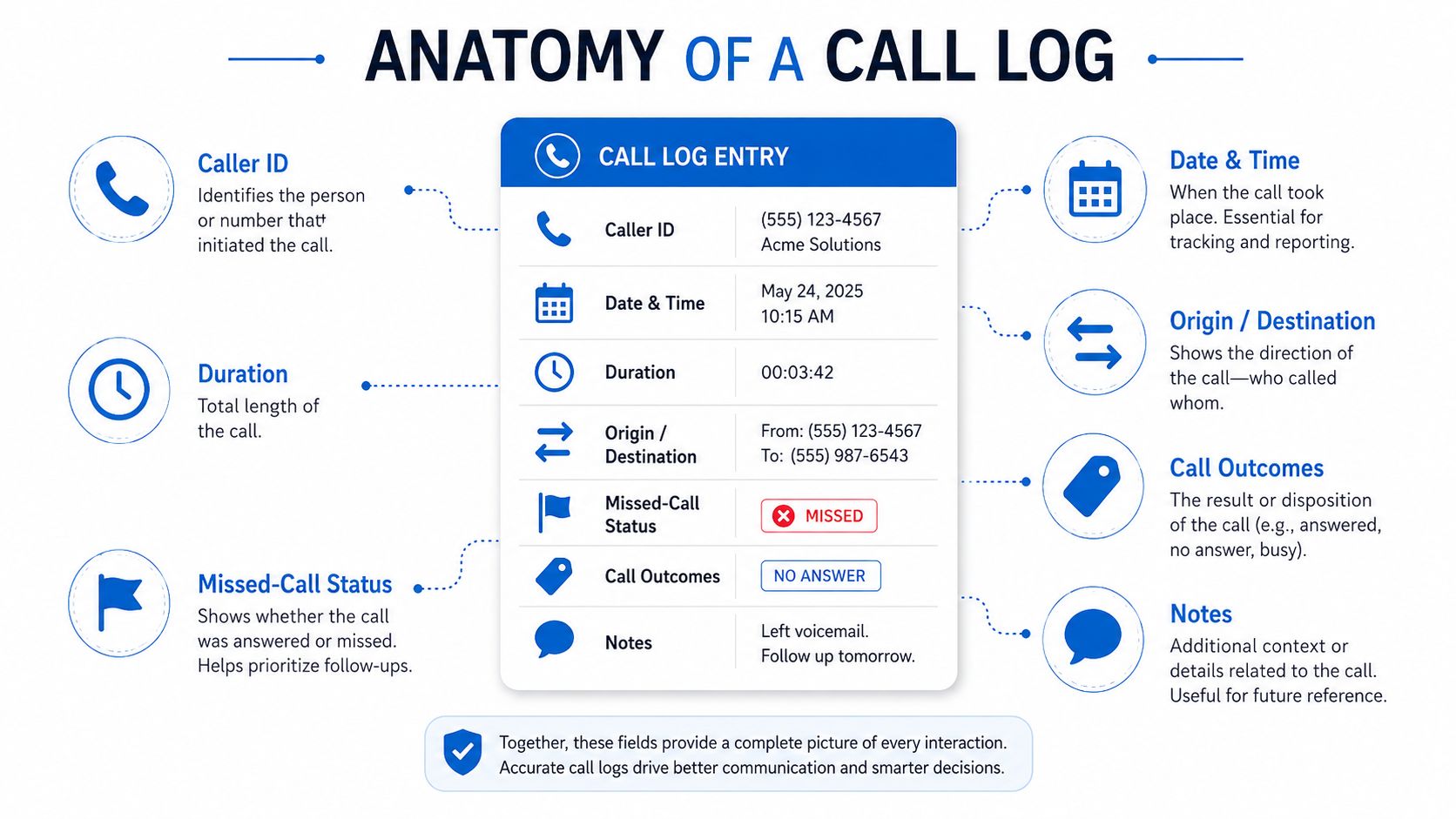
Call logging software is a structured way to capture telephone data, not conversation content. It records fields like caller ID, date and time, duration, origin, destination, missed-call counts, and call outcomes, then turns those fields into reports that help teams manage staffing, service levels, and performance (Tel-Electronics). If your team has been treating calls as one-off events, this is the change in mindset. The log becomes a standard record, not a loose note.
A shipping label and a sticky note solve different problems. A shipping label tells you who sent the package, where it came from, where it is going, and whether it arrived. A scribbled note may remind someone that a package existed, but it will not help you run a warehouse.
The fields that make a log usable
A useful log entry has to answer basic operational questions. Who called, when they called, how long the call lasted, where it originated, where it landed, whether it was missed, what outcome was assigned, and which notes matter enough to survive after the conversation ends.
That sounds simple, but it is where teams lose quality. If one rep writes “lead,” another writes “sales inquiry,” and a third leaves a paragraph of free text, the reporting layer stops being trustworthy. Structured fields make downstream analysis possible because they let the team sort, filter, and compare calls without re-reading every note manually.
Standardization matters most on day one. Pick a small set of outcome values, define what counts as a missed call, and make sure every rep uses the same field names before you worry about extra detail.
What gets layered on top
Once the log structure is clean, other features become useful instead of decorative. Transcription helps with search and QA. Tagging helps with categorization. Reporting turns raw call events into operational metrics like average handle time, first call resolution, average speed to answer, and abandonment rate. Those metrics only matter if the underlying fields stay consistent, because no amount of dashboard polish can fix inconsistent inputs.
Modern systems also need to ingest call data across phone infrastructure, not just from one simple app. Enterprise-grade setups often support SMDR/CDR ingestion over IP, file, or serial connections, which is how reporting stays accurate across PBX environments (Tel-Electronics). For agencies handling multiple client numbers or distributed teams, that ingestion flexibility keeps logs complete instead of fragmented.
If you are comparing platforms, the top phone system tools for 2026 roundup is useful for seeing how different systems handle capture, routing, and downstream reporting.
Business Benefits That Show Up on the P&L
The strongest call logging setups do not win because they look advanced. They win because they change how the team works fast enough to show up in a review cycle. The clearest gains usually appear in follow-up speed, coaching, and operational visibility. Compliance matters too, but it behaves more like insurance, something you want in place before a dispute lands on your desk.
Faster follow-up beats cleaner theory
The most obvious business gain is turning a missed call into an immediate follow-up instead of a lost lead. A text-back or callback trigger gives the team a chance to re-engage while intent is still warm, which is why missed-call handling is worth setting up early. If your agency wants that loop to close itself more reliably, the missed call follow-up guide is a useful operational reference.
Data discipline decides whether that automation helps or creates noise. If the logging system cannot separate a sales inquiry from a support issue or a wrong number, follow-up will be inconsistent. A clean disposition model lets workflows react differently depending on what the caller was trying to do.
Coaching and staffing depend on clean outcomes
Outcome-tagged calls are one of the simplest ways to improve coaching without building a separate QA process from scratch. Managers can review how often calls resolve on the first touch, what kinds of calls take longer, and which teams are getting hit hardest at certain times of day. Those patterns make staffing decisions and performance reviews less subjective because the log shows behavior instead of anecdotes.
A team can live with imperfect routing for a while. It cannot live with bad labels, because bad labels make every report look more certain than it really is.
Compliance trails are slow-burn value
Recording, retention, and searchable call history matter when disputes happen, but many teams do not feel that value on day one. Still, the audit trail is part of why call logging became foundational in telecom and contact centers. The catch is that compliance records only stay useful when the logs are standardized and the storage rules are clear, otherwise you end up with a lot of retained data and very little usable context.
Choosing the Right Call Logging Software for Your Stage
The right vendor is the one that fits your operating model, not the one with the longest feature page. Agencies should filter options the same way they'd qualify a lead, by asking what must be true for this tool to work in their stack. That means looking at fields, integration depth, storage economics, and how much manual cleanup the team will have to tolerate.
Here's a simple way to score vendors in a demo.
| Criterion | What to Test in a Demo | Why It Matters |
|---|---|---|
| Standardized fields | Can you force consistent dispositions, tags, and call outcomes? | Clean inputs make reporting and automation reliable. |
| CRM sync | Does the call log write back to the contact and deal record automatically? | If it doesn't, reps will log twice or skip it. |
| Follow-up triggers | Can a missed call trigger an SMS, task, or workflow? | That's how the log turns into action. |
| Ingestion depth | Can it handle PBX data, not just a single cloud line? | Multi-system teams need complete reporting. |
| Storage behavior | How are recordings compressed, retained, and retrieved? | Archive size and QA fidelity affect long-term cost. |
| Searchability | Can you find calls by outcome, tag, source, or agent? | Search is what makes logs operationally useful. |
What to test before you sign
If transcription matters, don't just ask whether it exists. Ask how it handles noise, accents, and short clipped conversations. If call quality review matters, ask whether recordings can be accessed without waiting on exports. If your agency uses multiple sources of lead traffic, make sure the platform can tie logs back to campaign context, not just to a phone number.
Storage deserves more scrutiny than buyers usually give it. One vendor specifies 480 KB per minute for WAV recordings, while another voice-logger spec notes 8× recording-file compression and hardware/software compression modes for multi-line capture (DAC Solution). Those choices change archive sizing, backup costs, and retrieval fidelity, so codec decisions are not just an IT concern. They affect whether QA can hear what was said months later.
Match the tool to the operating stage
Smaller agencies can often get by with a simpler stack if it writes cleanly into the CRM and supports basic reporting. Larger teams need tighter PBX ingestion, better governance controls, and stronger archive discipline. In both cases, the best fit is the tool that reduces manual cleanup, because manual cleanup is where signal gets lost.
The agency workflow CRM guide is worth keeping nearby if your buying decision depends on how the logs will behave inside the rest of your stack.
Setting Up Call Logging the Right Way
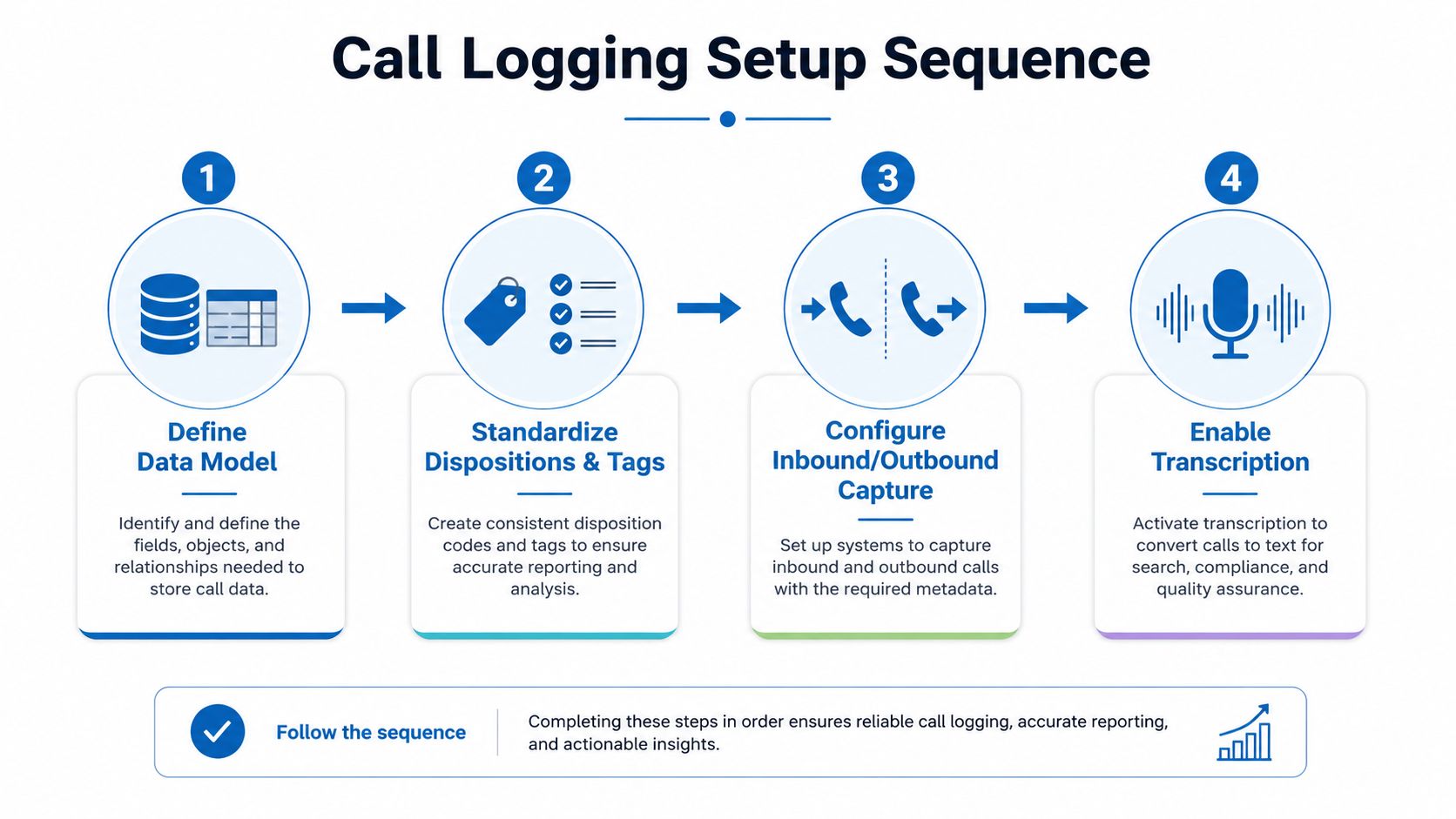
The cleanest rollouts start with the data model, not the user interface. If the team decides on the structure first, everything downstream gets easier. If agents are left to invent their own outcomes and note styles, the reporting problem shows up later, and by then the cleanup is expensive.
1. Define the fields you'll actually use
Start with the minimum structure required for reporting and action. That usually means standardized dispositions, tags, owner assignment, and a short list of outcomes that everyone can choose from. The goal isn't to capture everything. It's to capture the same important things the same way every time.
2. Decide what agents can type freely
Free-text notes are useful, but they shouldn't carry the reporting burden. Let reps add context, objections, or next-step reminders, then keep the critical fields structured. If you don't, your pipeline reviews will turn into interpretation exercises instead of performance reviews.
3. Configure inbound and outbound capture together
Inbound-only logging creates blind spots, especially for agencies whose teams call leads back after missed connections. A consistent system should capture both directions so you can compare how prospects respond when they initiate contact versus when your team follows up. That's also where call forwarding and queue handling need to be predictable, because a missed transfer is still a missed event.
4. Add transcription only where it adds value
Transcription helps when you need QA, search, or call review, but it also adds noise if the audio quality is weak or the team assumes the transcript is the source of truth. For documentation-heavy workflows, a clean call log with a reliable disposition can be more useful than a messy transcript. The scrape markdown api is relevant if you're building internal tools or documentation pipelines around call data and need structured text extraction alongside your workflow design.
Practical rule: standardize outcomes before you automate anything. If the fields are messy, automation just spreads the mess faster.
If you're using a broader operations platform, a system that can centralize client operations with can reduce tool switching, because the log, the workflow, and the follow-up all live in one place.
How Call Logging Connects to HighLevel Workflows
A call log is only useful if it can trigger something useful. In a HighLevel-style workflow, the log isn't a static record sitting off to the side. It becomes the event that updates the contact, nudges the pipeline, and decides who needs to act next. That's the difference between tracking calls and operating on them.
Here's a simple agency scenario. A lead calls after hours, the system logs the missed call, and an SMS text-back goes out automatically. If the lead replies, the workflow can open a pipeline opportunity, assign ownership, and alert the right rep before the next morning starts. The call itself is no longer just a record. It's the first step in a recovery sequence.
What the log should trigger
A tracked inbound call should write source attribution to the contact record so sales and marketing can see where the conversation came from. An answered call should update the deal stage, create a reminder, or move the conversation into a follow-up path. A missed call should kick off a callback or text-back without waiting for someone to notice the voicemail later.
The point of this design is not just speed. It's consistency. Once the log is attached to the contact and pipeline, everyone sees the same customer history instead of separate versions of the truth scattered across inboxes.
Where this helps the most
Agencies feel the difference most when leads are moving quickly through the same conversation patterns. The rep can see that a caller came from a specific campaign, the pipeline gets updated automatically, and the follow-up doesn't depend on memory. That's where the unified inbox matters too, because the call context sits next to SMS, email, and other messages instead of being stranded in a separate system.
Why this matters for reactivation
Once call outcomes are structured, they can feed later segmentation too. A no-answer, a booked appointment, and a support call don't belong in the same follow-up bucket. In practice, that means call logging can support broadcast lists, reactivation campaigns, and pipeline automation without rebuilding the data later. The cleaner the log, the less your team has to guess about the next move.
KPIs, ROI, and the Metrics That Justify the Spend
ROI is easiest to defend when each call has a clear path from source to outcome. If the logged call can be tied to a campaign, a pipeline stage, and eventually a closed deal, the software pays for itself on paper before anyone even starts debating the interface. If the data model was never standardized, every ROI conversation gets fuzzy fast.
The metrics worth tracking
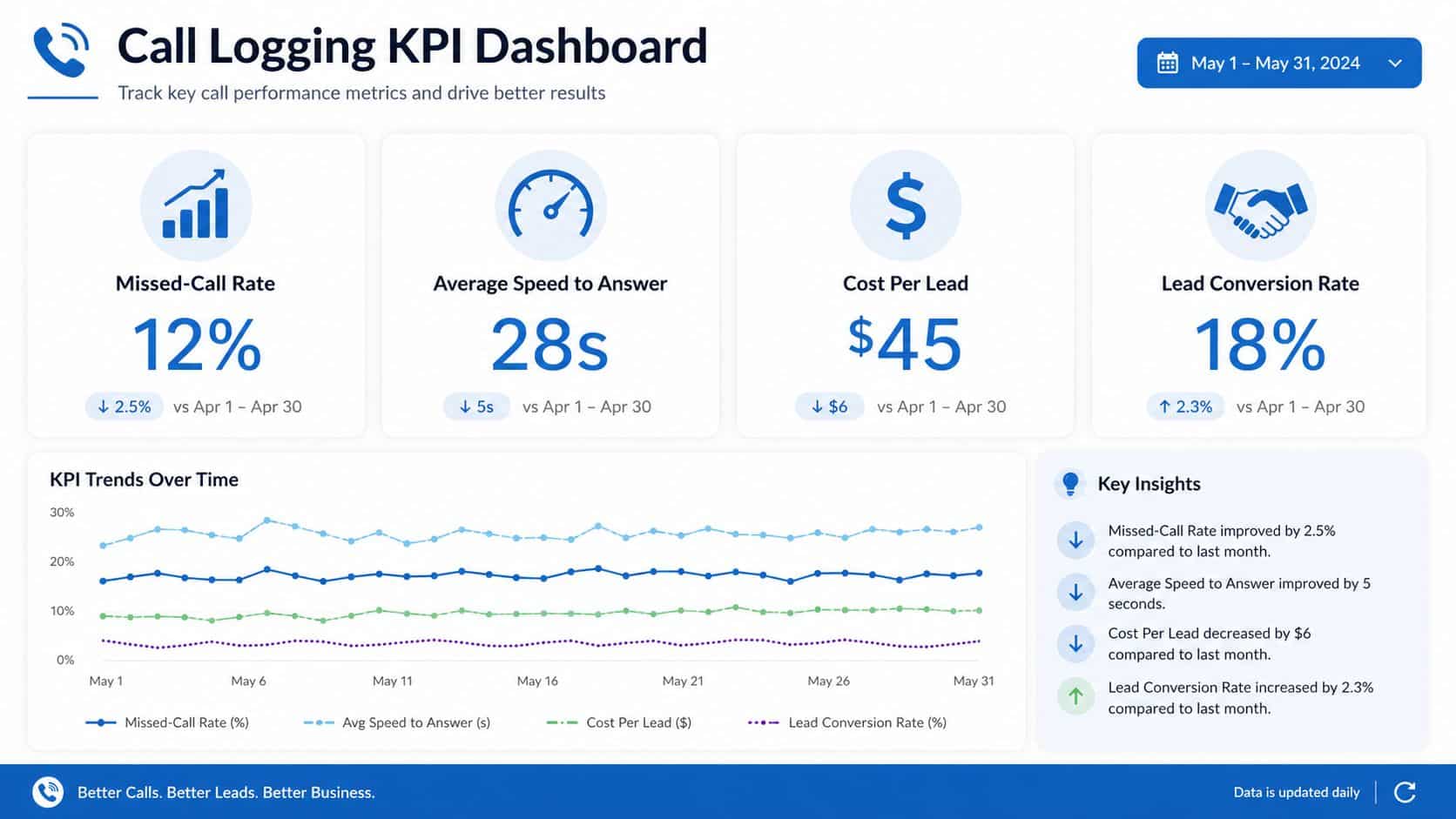
The basics are straightforward, missed-call rate, speed to answer, follow-up completion rate, conversion by call source, and average handle time. If the team has the attribution layer in place, you can also trace revenue influenced by tracked calls without relying on vanity metrics. Those numbers matter because they connect the logging system to actual operating decisions, not just reporting aesthetics.
A good transcription workflow can help here too, but only if it's evaluated for utility. The evaluation criteria for transcription tools are useful when you're deciding whether transcription should be a core layer or a supporting one, especially if you need searchable records for QA and coaching rather than full conversation analysis.
How to read ROI without fooling yourself
If missed calls drop, that's a workflow win. If speed to answer improves, that usually reflects routing and staffing discipline. If follow-up completion rises, the automation is doing its job. The strongest ROI stories tie those operational gains to actual revenue paths, not to usage statistics inside the software.
Useful test: ask whether one logged call can be traced from source to closed loop without a manual spreadsheet in the middle.
The problem with weak governance is that it makes ROI look softer than it really is. Teams often have the right tools but no shared structure, so they can't prove the value cleanly. That's why the log design from setup matters more than the dashboard later.
Common Pitfalls and How to Troubleshoot Them
The first 90 days usually expose the same mistakes. Dispositions drift, attribution breaks, recordings pile up, and integrations log the call but never trigger anything useful. None of those failures require a platform migration to fix. They usually need tighter rules and a shorter feedback loop.
The problems to check first
- Inconsistent dispositions: Review ten random calls and see whether the same type of outcome is being labeled differently. If it is, shrink the list of allowed outcomes and make the definitions visible to the team.
- Missing attribution: If calls are logging without source data, check whether the number assignment or CRM mapping is incomplete. A call that doesn't carry source context can't support clean reporting.
- Bloated storage: If archive costs are creeping up, look at recording format and retention policy before assuming usage is the issue. Compression and file handling drive storage economics more than teams expect.
- No action after logging: If the call appears in the CRM but nothing happens next, the workflow is probably too passive. The fix is usually a trigger, not a new report.
- Transcript noise: If the transcript is hard to trust, treat it as support material, not the source of record. The disposition and structured fields should still carry the operational weight.
The contrarian part is simple. More logging can produce weaker analytics if the team captures inconsistent fields, free-text notes, and partial context across reps. The best setup starts with standardization, then logging, then automation. Anything else just creates more data to clean up later.
If you're building this inside a single system instead of stitching tools together, HighLevel gives agencies call logging, missed-call text-back, workflows, CRM records, and follow-up automation in one place. If you want to see how that looks in practice, visit HighLevel and map the call log to the rest of your client workflow before you add another disconnected tool.
