


Your phone rings while you’re elbow-deep in a job, a quote, or a payroll run. By the time someone checks the voicemail, the caller has already moved on, and your team is left guessing which lead was urgent, which one was casual, and which one just became a competitor’s new customer. That’s the pressure behind an ai powered business phone system, it’s not about sounding futuristic, it’s about stopping revenue from leaking out through unanswered calls and slow follow-up.
For agencies, that pressure shows up in client churn, missed opportunities, and too many “we’ll call them back later” moments. For owners, it shows up in the simplest possible question, what happens to the next caller who doesn’t wait around?
Table of Contents
- The Missed Call That Cost a Local Business $4,800
- What an AI Powered Business Phone System Actually Does
- Core Features That Move the Revenue Needle
- How HighLevel Turns a Call Into a Booked Appointment
- Picking the Right Deployment Model for Each Client
- A Vendor Selection Checklist Beyond the Feature List
- Proving ROI With Metrics You Can Actually Baseline
- Deployment Risks and Buyer Questions Answered
The Missed Call That Cost a Local Business $4,800
A plumbing owner comes back after a long holiday weekend and finds a voicemail stack that looks harmless at first glance. Three of those calls were homeowners with urgent leaks, and by Monday morning those same homeowners had already left reviews for a competitor who answered faster. That is the kind of moment that makes a basic business line feel expensive.
Practical rule: if a call can become a booking, a quote, a payment, or a review, silence is not neutral, it is a sales event in the wrong direction.
This is the point where many owners start comparing AI answering options, not because they love new software, but because the current setup has a built-in delay. A missed call text back setup guide can fix the first response problem with an automatic text that goes out the moment the call is missed, which is useful if your goal is to stop leads from drifting away. It still leaves the rest of the handoff untouched, including qualification, routing, reminders, and follow-up that keep the lead moving toward a real outcome.
A basic business line can ring all day and still leave money on the table if nobody owns the next step. The cleaner example is a connected setup that sends the missed-call text, logs the contact, and pushes the lead into a queue where someone or something can respond before the prospect keeps shopping.
That is why this guide is aimed at agency operators and small business owners who are deciding whether to move beyond a basic line and into a connected phone stack. You will see the moving parts first, then the features that matter, then how HighLevel-style workflows turn a call into a calendar event or follow-up, and finally how to judge vendors, ROI, and deployment risk without getting distracted by feature noise.
A guide to buying AI-based CRM helps you think about the phone layer as part of the wider customer system instead of an isolated add-on.
What an AI Powered Business Phone System Actually Does
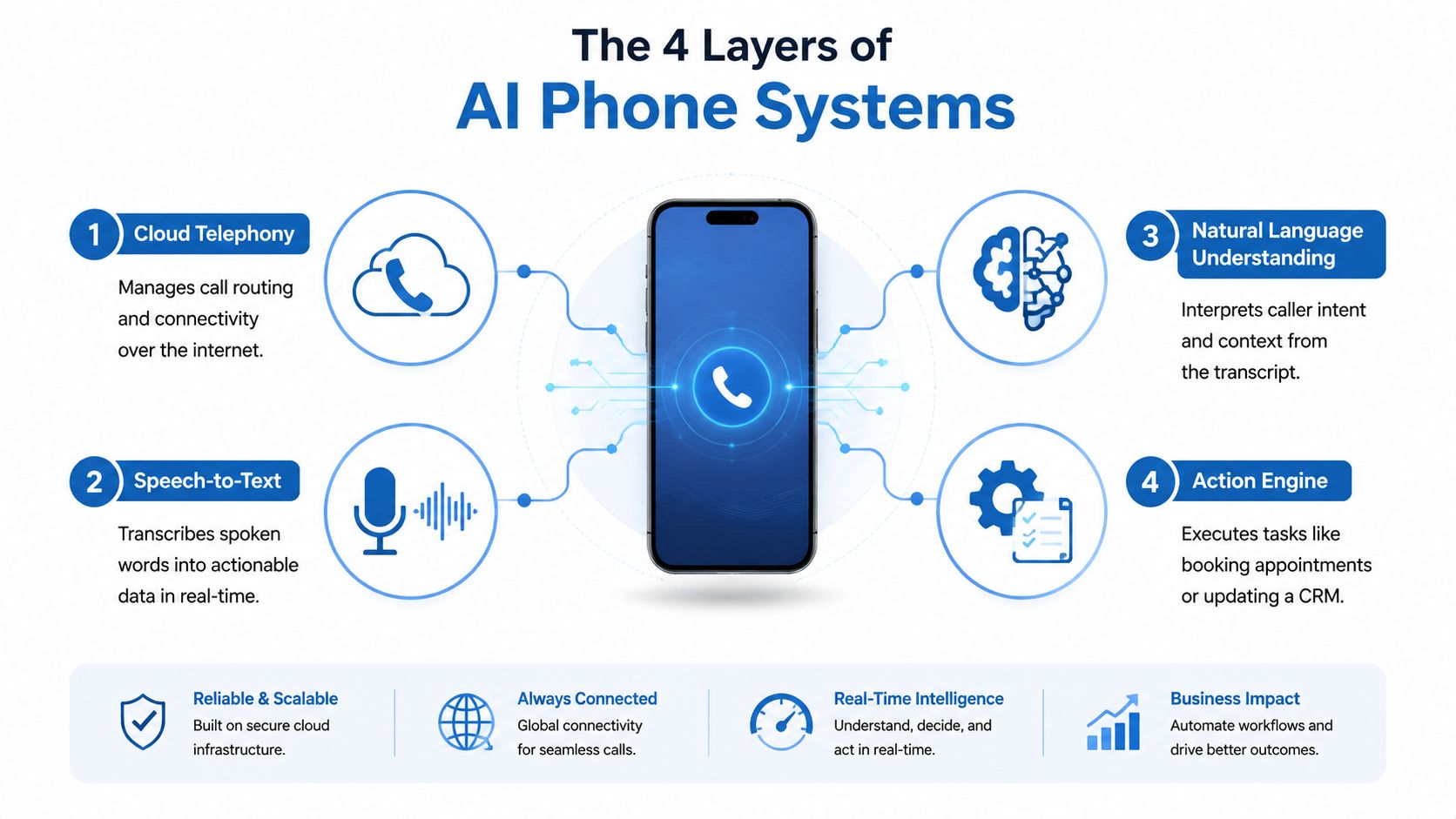
An AI powered business phone system is not just a nicer auto-attendant. It stacks four layers, and each one solves a different problem, the phone network carries the call, speech-to-text captures what was said, natural language understanding interprets what the caller means, and an orchestration layer turns that meaning into an action.
Think of a restaurant. The cloud telephony layer is the kitchen’s plumbing, the line that brings orders in and keeps the place running. Speech-to-text is the waiter writing the order down. Natural language understanding is the chef who knows that “gluten-free, extra sauce, no onions” changes the ticket. The action engine is the expo line that sends the right order to the right station and then updates the system when it’s done.
The visible outputs buyers notice first
From the outside, this stack shows up as transcription, intent detection, summaries, and routing. A caller says they need a quote, the system hears it, understands the intent, and moves the call toward the right next step instead of forcing a keypad maze.
That’s why a true AI phone system is different from a smart IVR. IVR can only point people somewhere based on button presses. An AI system can listen, respond, qualify, and act during the call, which is why it fits so well in sales and service workflows.
The important distinction is simple, a phone tool can answer calls, but an AI phone system can carry context forward into the rest of the business.
Core Features That Move the Revenue Needle
The features that matter most are the ones that change what happens after someone dials in. Smart answering and routing help you stop losing the first touch, live call intelligence helps humans act faster and with better context, automation handles the follow-through, and analytics show whether the whole setup is working.
Smart answering and routing
This is the part that catches the call, understands what the caller wants, and gets them to the right outcome without wasting time. Natural language menus feel far less clunky than keypad trees because callers can speak like people, not like operators in a switchboard script.
A good version of this cluster should handle 24/7 pickup, intent-based transfer, and context-aware routing. For businesses that live on inbound leads, that’s the difference between a caller hearing “leave a message” and hearing “I can book that for you now.”
Live call intelligence
Transcription and summaries reduce the time teams spend replaying recordings or digging through messy notes. Sentiment cues can also help a manager spot friction early, especially when a caller sounds ready to buy, annoyed, or confused.
Workflow automation and analytics
The strongest systems do something after the call. They update the CRM, create the task, send the SMS, or book the calendar slot. Analytics then show which calls converted, which topics came up repeatedly, and where the handoff process broke.
Operational filter: if a feature doesn’t reduce manual follow-up, improve handoff quality, or clarify revenue attribution, it’s probably a nice-to-have rather than a core buying criterion.
For agencies, call tracking software for agencies is a useful comparison point because attribution matters as much as answering. The features that separate entry-level tools from platform-grade systems are usually the ones that combine low-latency call handling, workflow triggers, and usable reporting in the same environment.
How HighLevel Turns a Call Into a Booked Appointment
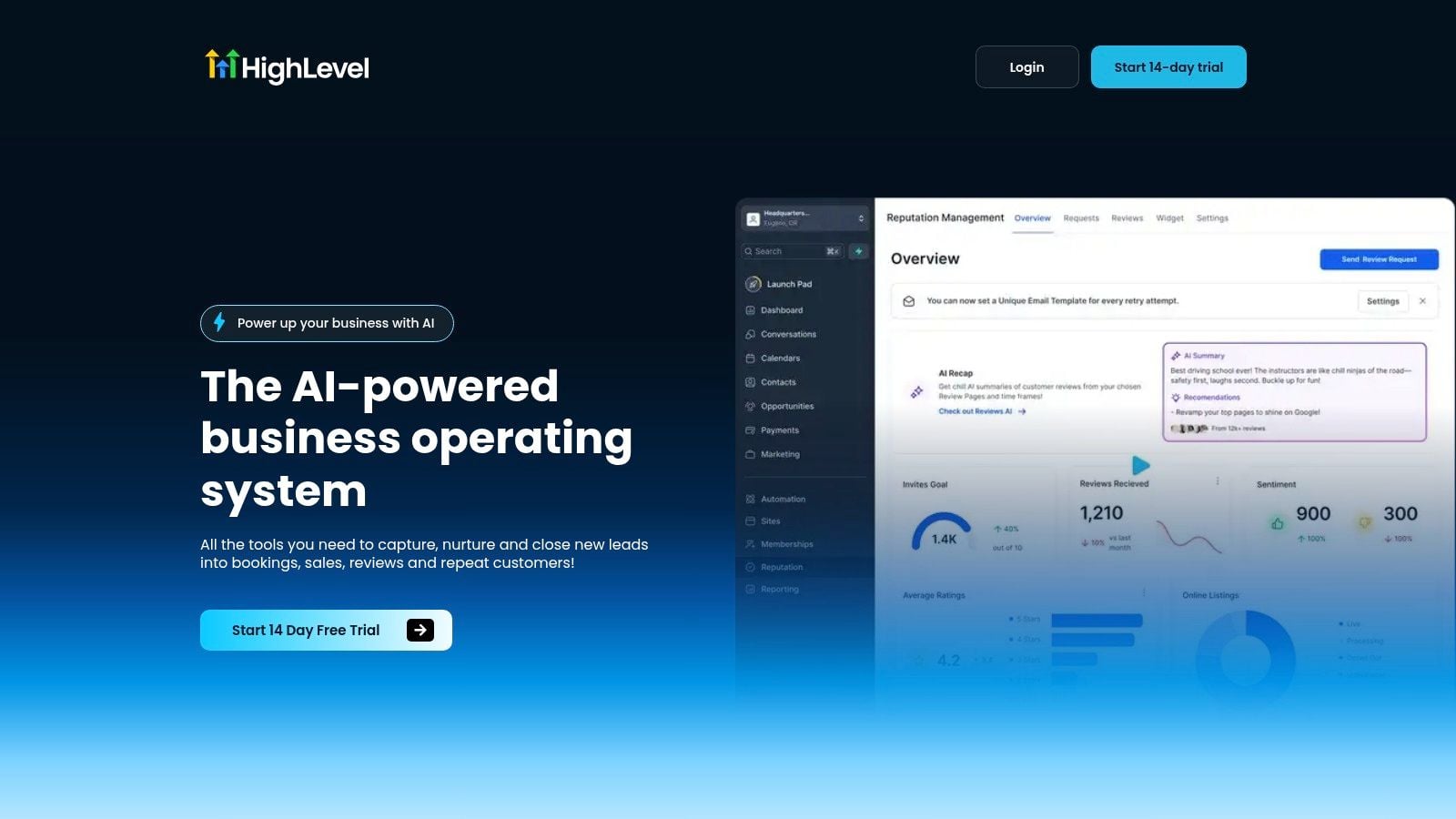
A lead dials a tracked number after hours, and the call lands in a system built around the CRM instead of a separate dialer. The AI voice agent answers, asks a few qualifying questions, and uses the caller’s intent to decide what happens next. If the lead is ready, the booking goes straight into a calendar, the confirmation goes out by text, and the contact record gets the transcript, call recording, and follow-up details.
That closed loop is the core of the story. In HighLevel, the phone layer sits alongside missed-call text-back, inbound call tracking, automated outbound call connect, and a unified conversation inbox that keeps SMS, Messenger, and other replies in one thread. The result is that the business doesn’t just “answer the phone,” it preserves context long enough for a meaningful next step to happen.
A second piece many teams overlook is how the mobile app and video messages fit into the same flow. When an appointment is booked, a rep can pick up the conversation from the inbox, see the call history, and send a video message without jumping between tools. That matters because the handoff between AI and human is where a lot of systems lose momentum.
Here’s the agency angle. HighLevel’s Unlimited plan supports unlimited sub-accounts, and it also includes rebillable phone and email capabilities with no markup, so an agency can roll the same calling workflow out across multiple clients inside one workspace. That’s useful when the underlying motion is the same, even if one client wants full inbound coverage and another only needs overflow handling.
The practical value isn’t any single feature. It’s the path from call to calendar to CRM record to follow-up, with no extra copy-paste step in the middle.
A platform like centralize marketing and sales becomes more valuable when the phone system is part of the same operational picture, because sales, support, reminders, and reputation work all share the same contact history.
Picking the Right Deployment Model for Each Client
Not every client needs the same phone setup. A high-volume service business wants the AI to do most of the first response work, while a smaller team may only want overflow handling or help for live agents who are already on the line.
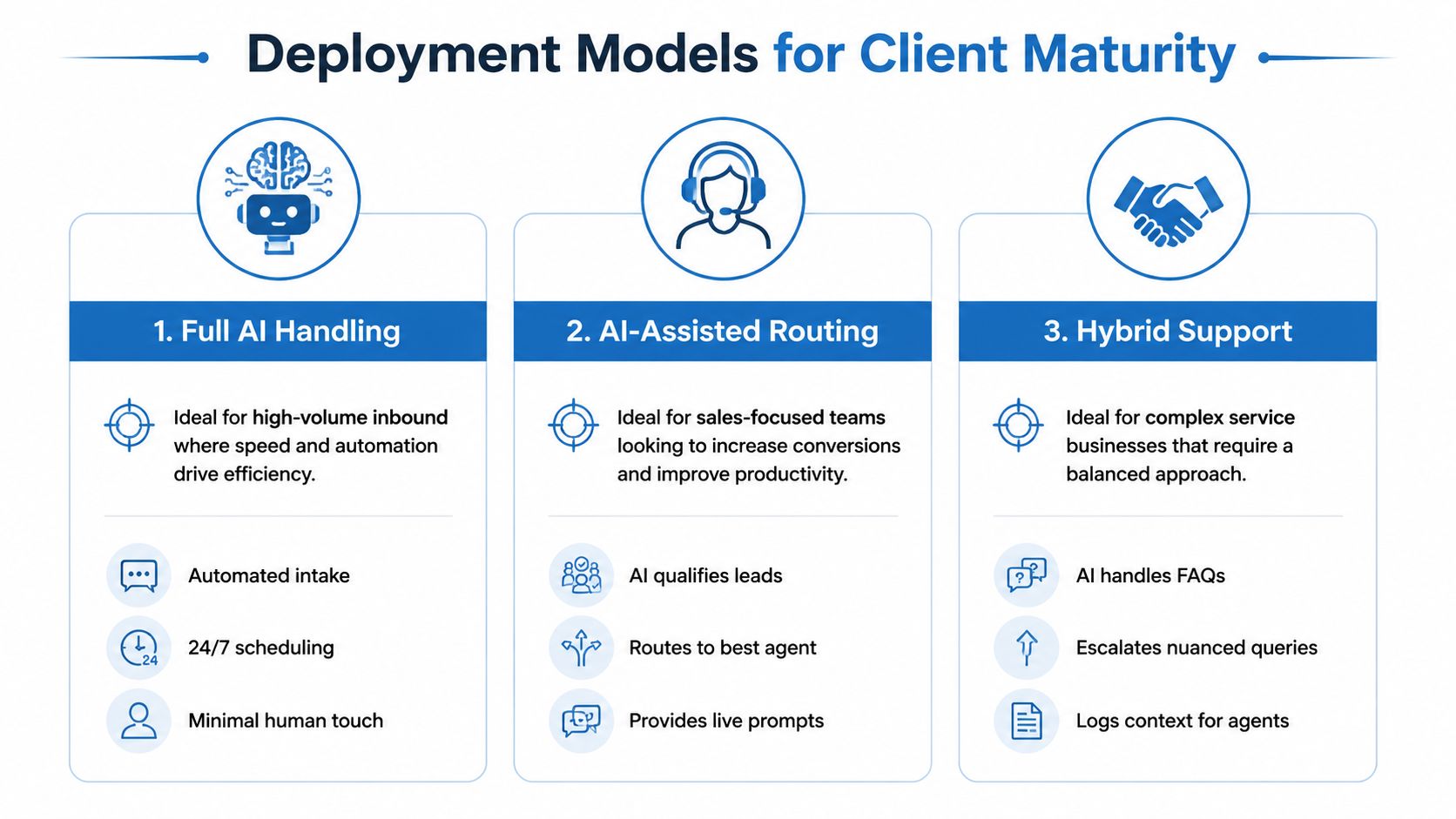
Full AI handling
A multi-location franchise is the clearest fit here. The AI answers, qualifies, routes, and schedules with minimal human touch because speed and coverage matter more than a personal receptionist greeting every caller.
AI as overflow coverage
A local dental clinic usually fits this model better. The front desk handles most calls during business hours, while AI picks up missed calls, after-hours calls, and busy periods, then warms the lead before staff follow up.
AI-assisted human calling
A high-ticket coaching business often lands here. A human still leads the conversation, but the AI helps with live transcription, suggested responses, and post-call summaries so the rep spends less time on admin and more time selling.
A single workspace can support all three models by changing workflows, routing rules, and triggers rather than switching platforms. That flexibility matters because the right setup in January may not be the right setup after call volume rises or the team changes.
Revisit the deployment model quarterly. A client that starts as overflow support can grow into a fuller AI handling motion once the team trusts the transcripts, the routes, and the booking flow.
A Vendor Selection Checklist Beyond the Feature List
Most demos look good until you ask what happens under load, under noise, or during a bad transfer. That’s why the checklist has to focus on operational fit, not just a feature grid.
First, check latency and uptime. Conversational flow starts to break down when response time creeps beyond roughly 100 milliseconds, and telephony downtime interrupts inbound revenue and follow-up workflows, so those service levels matter more than a flashy landing page. Then look at whether the system supports native CRM and calendar integrations, especially if you want the call to land cleanly in the same workspace your team already uses.
Second, test the messy parts. Accent handling, noisy environments, multilingual calls, and warm transfer quality tell you far more about real-world performance than a polished demo script. A platform also needs clear fallback rules, because AI should hand off when the call becomes too sensitive, too regulated, or too ambiguous for automation.
| Pricing Model | Typical Cost | Best Fit |
|---|---|---|
| UCaaS-style platforms | Roughly $15-$35 per user/month | Teams that want calling plus broader communications in one place |
| Flat-rate AI answering services | Roughly $79-$249/month | SMBs that need predictable overflow or receptionist-style coverage |
| Per-minute AI voice agents | Roughly $0.07-$0.15 per minute | Usage-based teams that want to tie spend to call volume |
The last filter is total cost of ownership. Setup, per-minute AI charges, and integration expenses can change the math faster than the headline price suggests, so procurement should compare the full bill rather than the intro offer. A strong agency reporting dashboard guide can help a client frame the decision around outcomes instead of software shopping.
Ask one question in every demo, what happens to the contact record, the calendar, and the follow-up task after the call ends?
Proving ROI With Metrics You Can Actually Baseline
The easiest way to oversell AI phone software is to talk only about fewer missed calls. That sounds good, but it doesn't tell you whether the system changed revenue, and it doesn't help you justify spend to a client or a finance lead.
Start with four baseline metrics before launch, missed-call rate, contact rate, booking rate, and cost per acquisition. Track average response time and call duration too, because those numbers tell you whether the workflow is speeding up or slowing down after the AI layer goes live. Then connect the dots through HighLevel pipeline stages, UTM-tagged call tracking, and source attribution so the call can be tied to a lead source and an outcome.
What the benchmark data means
One 2026 industry summary reports that enterprise adoption of AI phone calling reached 34% across industries, up from 18% in 2024, while early adopters reported 2.8× higher contact rates and 47% lower cost-per-acquisition than traditional call center operations. The same source attributes a median 312% ROI within 14 months to organizations using AI voice agents. Those figures don't guarantee anything for a single client, but they do show that buyers are now looking at AI calling as a measurable operating lever, not a novelty. The 2026 AI phone calling benchmark summary is the reference point for those figures.
How to build a simple dashboard
Use one monthly view that a non-technical owner can read in under a minute. Show the baseline, show the current month, and show whether appointments or qualified leads moved in the right direction after the phone workflow changed.
A few rows are enough:
- Missed calls before and after launch: shows whether the system is catching demand that used to disappear.
- Bookings from phone traffic: shows whether calls are becoming actual calendar events.
- Lead source by call: shows which campaigns or channels are worth funding.
- Cost per acquisition trend: shows whether the phone layer is improving efficiency or just adding another tool.
The point is payback, not vanity. If the phone system catches more callers, routes better, and shortens the path to booking, the financial story will show up in the pipeline even before a client notices the automation under the hood.
Deployment Risks and Buyer Questions Answered
Compliance matters first in regulated industries, because the AI should not improvise where policy demands caution. Multilingual performance and accent handling matter next, because callers won't slow down and simplify their speech just for your stack.
What happens when the AI should stop? The system needs escalation rules, and warm transfer should pass along context so the human doesn't start from zero. If the transcript syncs back into the CRM, the handoff preserves the caller's intent, history, and next action instead of leaving a gap between systems.
How do you roll this out without disrupting the team? Start with one workflow, usually overflow or after-hours coverage, then expand once the staff trusts the booking and handoff process. How do you handle noisy environments or poor mobile connections? Build in fallback paths, and keep the human route available when the line quality makes automation unreliable.
The safest pilot is small and measurable. Pick one metric, pick one workflow, and prove that the call is landing in the right place before you scale the rest of the phone tree.
HighLevel gives agencies and small businesses a way to connect calls, CRM records, calendars, workflows, and follow-up in one place, which makes it easier to turn a phone conversation into a booked appointment or a logged lead. If you're ready to evaluate how that fits your own process, visit HighLevel and map your next pilot around one call flow that matters most.
