


You're probably living in the gap between software and actual marketing work right now. The stack looks complete on paper, but in practice someone is still copying leads between systems, checking three dashboards for one answer, and chasing follow-up across email, SMS, ads, and a calendar that never seems to sync. That's where software for marketing stops being a convenience and starts becoming infrastructure.
The problem isn't a shortage of tools. It's that too many teams buy point solutions faster than they build a system, and every new app adds another place where data can drift, reporting can fracture, and follow-up can slow down. The result is a stack that feels busy, but doesn't always help you move faster.
Table of Contents
- Why Marketing Software Became Essential Infrastructure
- The Major Categories of Marketing Software Explained
- Core Features vs Advanced Capabilities
- How to Choose the Right Marketing Software for Your Business
- How All-in-One Platforms Solve Common Marketing Problems
- Implementation Checklist for Marketing Software Success
- Making Your Marketing Software Investment Pay Off
Why Marketing Software Became Essential Infrastructure
A lot of marketers know the feeling of managing eight to twelve tools at once. One tab holds the CRM, another the email platform, another the ad dashboard, another the analytics report, and somewhere in the middle a spreadsheet is acting like the source of truth. The annoying part isn't the number of logins, it's that a lead can move through the funnel without ever being visible in one place.
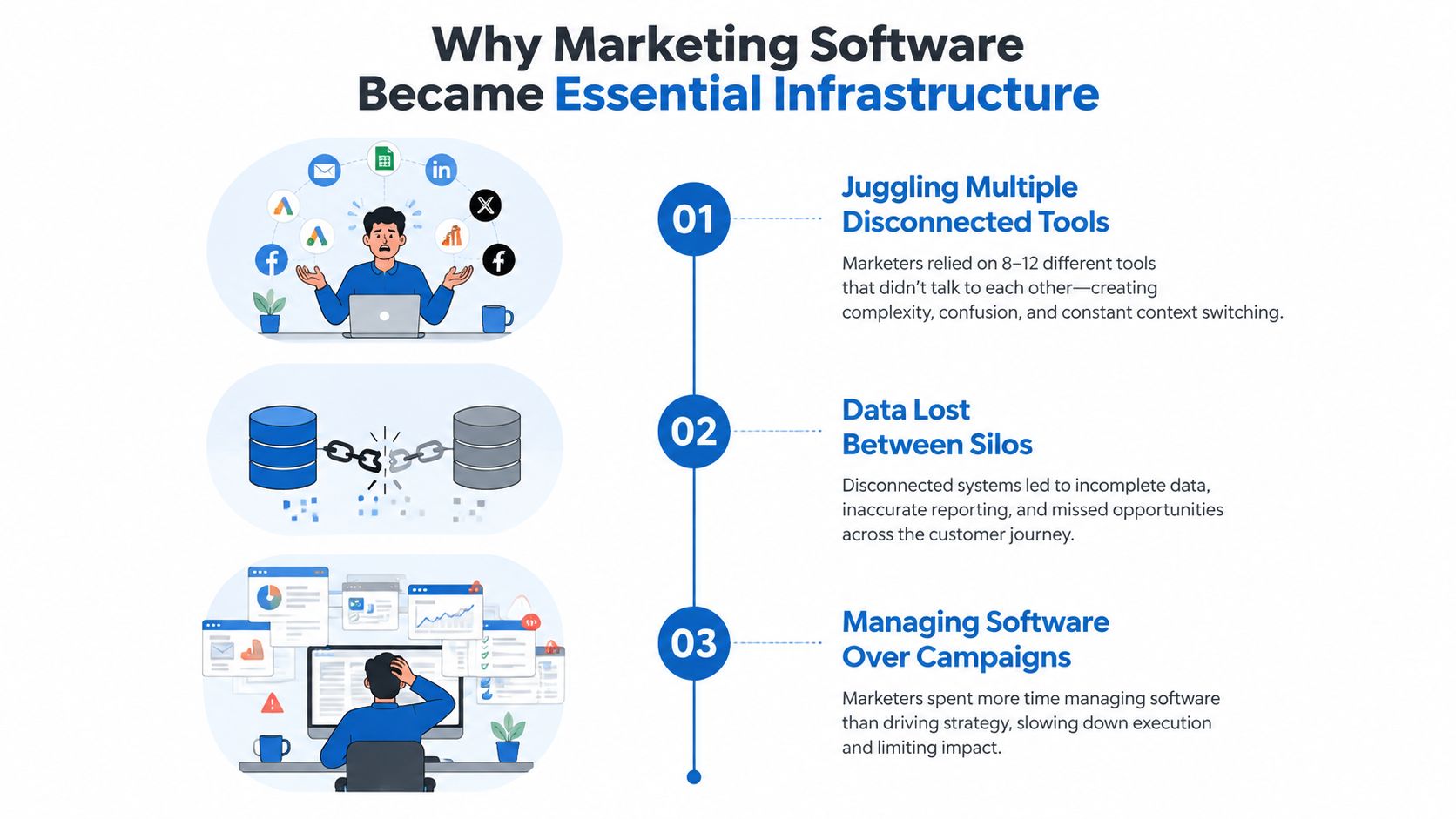
The category grew because the job changed. Domo defines a marketing analytics tool as software that captures, stores, and analyzes data related to marketing activities, and that definition now sits closer to the center of daily operations than it used to. HubSpot's 2026 marketing statistics show 92% of marketers use automation for data analysis and reporting, 88% use analytics or measurement tools, and 47% use automation to make marketing processes more efficient in their marketing workflows, which shows how tightly measurement and execution have become linked Domo, HubSpot.
From reporting layer to operating system
Early marketing software mainly answered one question, what happened. Modern platforms are expected to do more, they help teams capture leads, segment audiences, trigger follow-up, track attribution, and support retention without forcing every handoff through a separate tool. That shift matters because it moves marketing software from a dashboard you check at the end of the week into the system that shapes what happens next.
A practical example is the jump from manual reporting to event-based workflows. A lead fills out a form, gets tagged, enters a sequence, is routed to a rep, receives reminders, and can be reactivated later from the same system. That's a different job than exporting a CSV and making sense of it later.
Practical rule: if a tool can't help you act on the data it collects, it's probably adding more work than value.
For teams that want help building this kind of workflow layer, an agency for marketing automation can be useful when internal ops bandwidth is limited. The point isn't to buy more software for its own sake, it's to make sure the software supports a repeatable operating model.
Why the category keeps expanding
Digital channels became too measurable, and too expensive to leave disconnected. HubSpot reports an average email click-through rate of 2.5% and that the average conversion rate across all e-commerce sites is under 2%, while Salesforce cites industry data showing US paid search spending reached $124.59 billion in 2024, an 11.1% year-over-year increase HubSpot, Salesforce. Those conditions reward software that can connect spend, conversion, and follow-up across touchpoints.
HubSpot also reports that YouTube is used by 82% of marketers for video marketing HubSpot, which is another reminder that modern stacks have to handle more than one channel. Content, paid media, web behavior, email, and retention now need to speak the same language.
The Major Categories of Marketing Software Explained
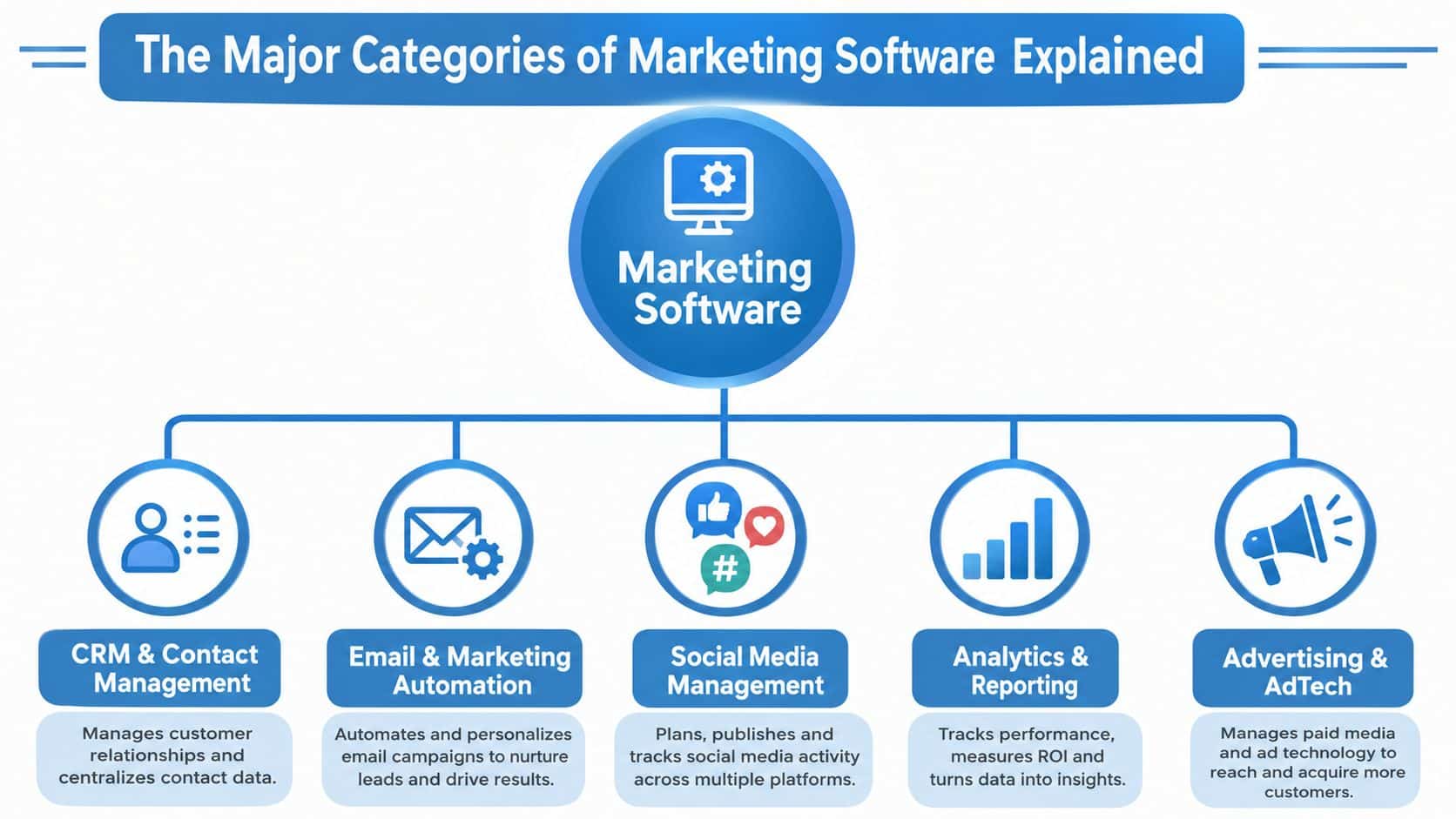
The fastest way to waste money is to buy tools by feature name instead of by job to be done. Most stacks map to a few categories, and each category solves a different bottleneck. If a team can name the bottleneck first, the buying decision gets a lot cleaner.
The core categories that actually matter
CRM and contact management keeps track of leads, customers, notes, and deal stages. Agencies lean on it to manage multiple clients and handoffs, while SMBs use it to keep follow-up from falling through the cracks. If your sales process is still being run in email threads and spreadsheets, this category is usually the first fix.
Email and marketing automation handles sequences, triggers, and segmentation. It's the category that turns a lead action into a response without someone manually pushing a button every time. That's why top marketing automation KPIs for 2026 matter less as vanity metrics and more as indicators of whether the system is driving next steps.
Social media management matters when posting cadence, approvals, and inbox monitoring are becoming operational headaches. For a local business, this can mean simple scheduling and engagement. For an agency, it can mean managing multiple brand calendars without losing the thread on comments or direct messages.
Where analytics, content, and ads fit
Analytics and attribution answer what's working, and what's not. This category becomes essential once you're spending meaningfully across channels and need to understand how one campaign influences another. If attribution is weak, the team ends up rewarding the loudest channel instead of the profitable one.
Content management and advertising platforms sit closer to execution than strategy. Content tools keep the publishing engine organized, while ad platforms manage spend, targeting, and optimization. They're necessary when campaigns are active across web, search, and social, but they're overkill if your demand generation is still light and mostly manual.
For a local business, the useful stack is usually narrower, because the goal is speed and consistency. For a multi-client agency, breadth matters more, but only if the tools don't create operational drag.
Buying rule: if two tools solve the same job and neither one owns the data cleanly, you're probably paying for overlap instead of capability.
If you're evaluating reporting-heavy platforms, a useful benchmark is streamline decision-making with HighLevel, because the test isn't whether a dashboard looks good, it's whether the data helps people act faster.
Core Features vs Advanced Capabilities
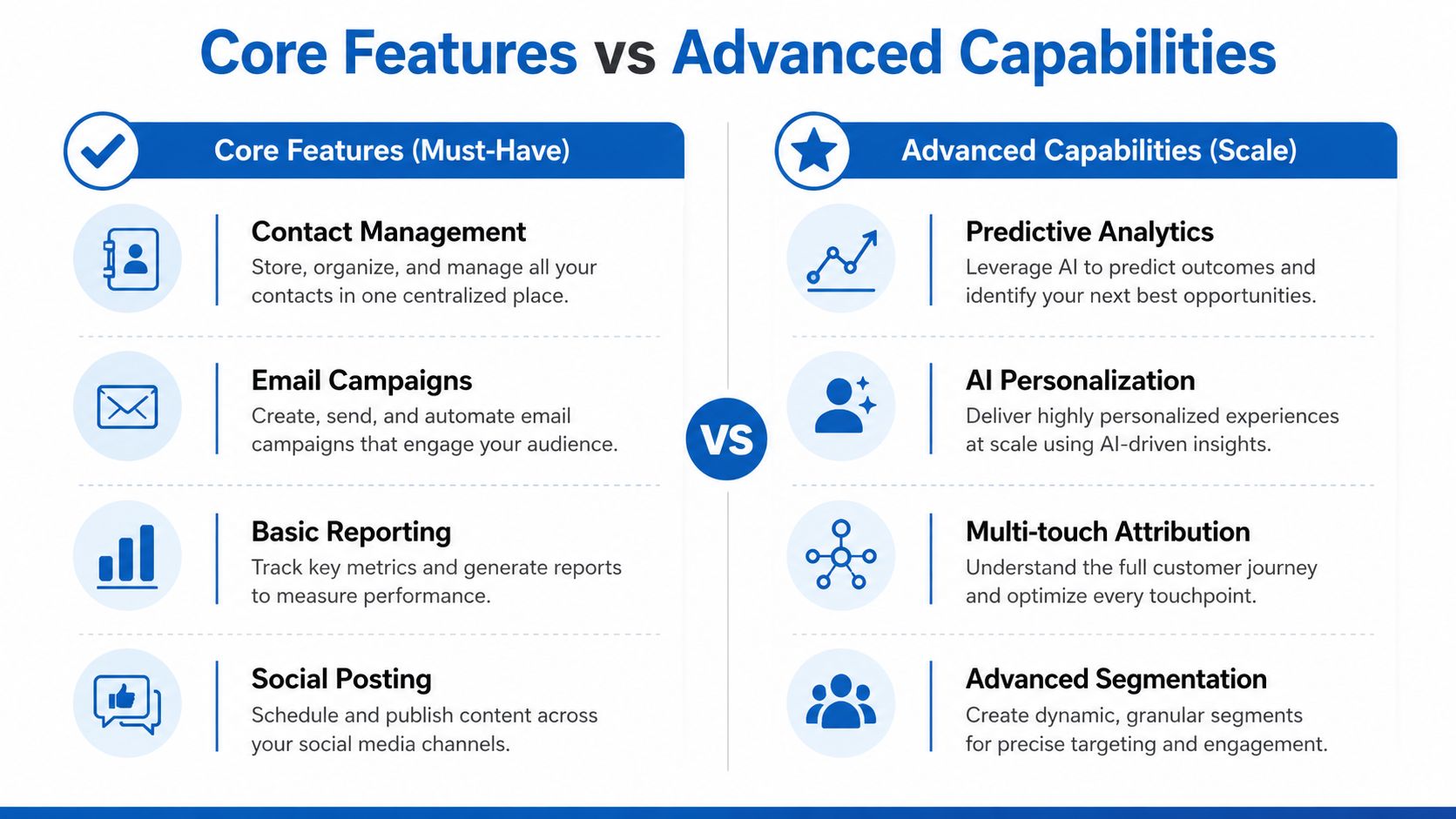
Most buying mistakes happen when teams confuse must-have features with scale features. A platform can be impressive and still be wrong for where the business is today. The goal is to buy what changes day-to-day execution first, then layer on more advanced capability only when the workflow can support it.
Core features should remove friction
The baseline features are usually easy to define. Contact management keeps records usable. Email campaigns handle outreach. Basic automation removes repetitive manual steps. Landing pages capture demand. Reporting shows whether campaigns are moving the business forward.
That's the layer that pays off first because it clears daily bottlenecks. If leads are being lost because nobody follows up, then even modest automation can have outsized value. If bookings are scattered across different calendars, the problem isn't sophistication, it's coordination.
A local SEO platform becomes relevant when location-based visibility and local demand are part of the business model, because category selection matters more than adding another disconnected app. Local service businesses often need fewer bells and whistles than they think, but they need the right workflow to keep inquiries from going cold.
Advanced capabilities matter after the basics work
Advanced features are useful, but only when the core process is already stable. Predictive analytics helps prioritize future action. AI personalization adapts messaging. Multi-touch attribution gives a better view of the path to conversion. Advanced segmentation lets teams split audiences more precisely.
Those features matter more at scale, when volume and complexity make manual judgment unreliable. A larger agency may need custom integrations and white-label options. A smaller team might never use them, and buying for them can slow rollout instead of helping it.
Advanced features don't rescue a broken workflow. They usually amplify whatever process is already in place.
Features like conversation AI, automated review requests, and unified inboxes solve real problems because they reduce response lag and keep work from scattering across channels. If the team can't answer fast, route cleanly, or follow up consistently, no amount of clever reporting will fix that.
For teams trying to improve reporting discipline, find the right AI CRM system is the kind of question worth asking only after the core use case is clear, not before.
How to Choose the Right Marketing Software for Your Business
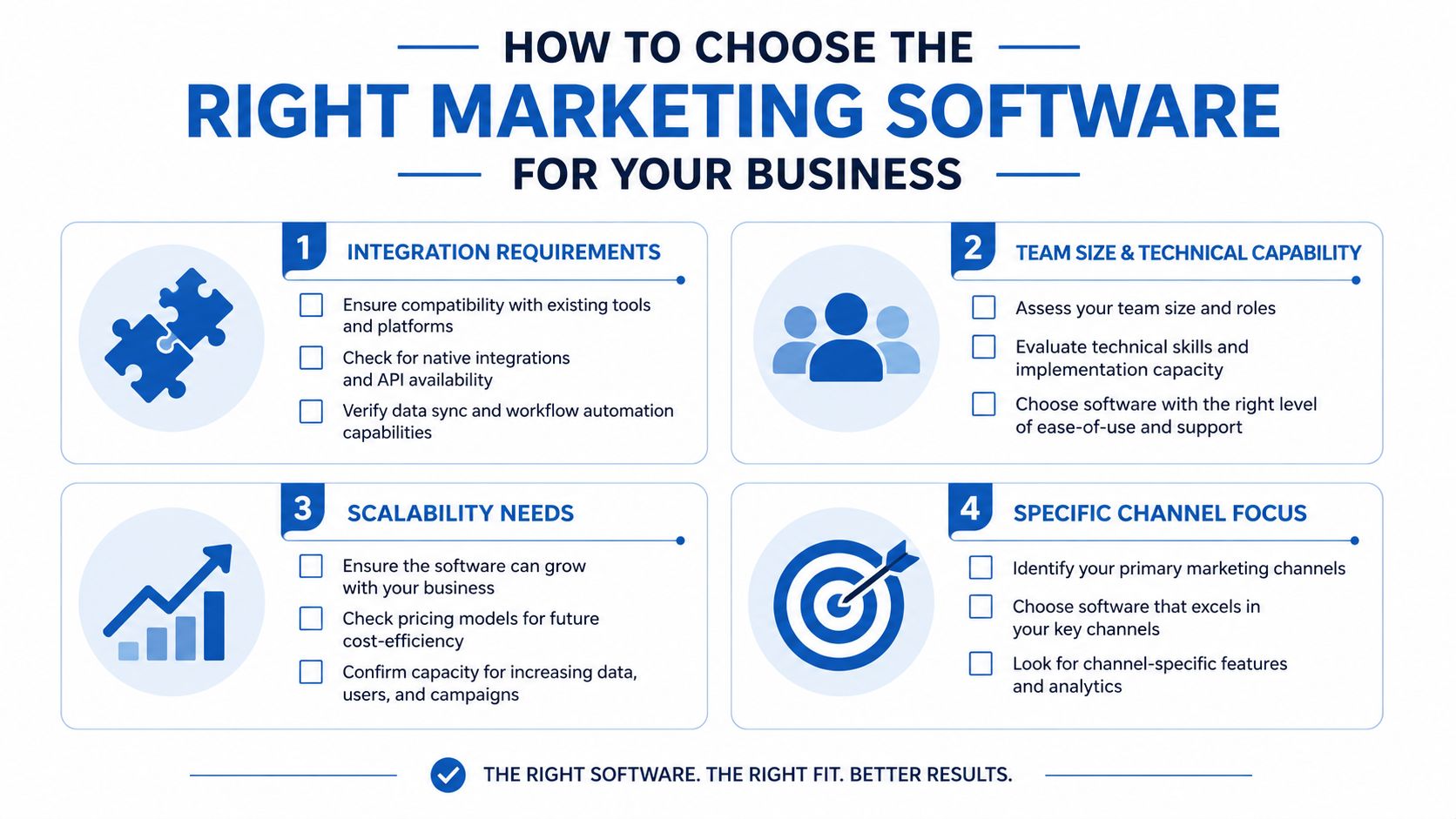
The best way to choose marketing software is to treat it like an operations decision, not a shopping decision. The questions that matter most are about integration, ownership, and workflow fit. Price matters, but hidden complexity usually costs more than the subscription line item.
Start with integration and ownership
Ask what has to connect on day one, not eventually. If the tool can't talk cleanly to the systems that hold your leads, bookings, payments, or reporting, you'll spend the next quarter compensating for that gap. For agencies, this question is even sharper because every extra integration becomes another support surface across clients.
Then ask who owns the data and how easy it is to move. If exports are limited or the vendor controls too much of the workflow, switching later becomes expensive. That's one reason stack bloat hurts, because it creates technical debt in places many teams never budget for.
Match the platform to the team that will run it
A small local business often needs usability and speed more than depth. An e-commerce team may care more about attribution and segmentation. Coaches and course creators usually need booking, follow-up, and payment flow to work cleanly. Agencies need multi-account structure, repeatable setup, and a system that doesn't collapse when client count grows.
Use this filter when reviewing vendors:
- Integration requirements: Which systems must sync without manual export work?
- Team capability: Can the team run this without a specialist?
- Scalability: Will the tool still make sense when volume increases?
- Consolidation potential: Which overlapping apps can be removed safely?
A useful resource for teams focused on automation-heavy workflows is the systematic approach to increasing conversions, because software should support conversion work, not distract from it.
Watch for red flags in demos
If a vendor answers every objection with “we integrate with everything,” press for specifics. If setup requires several add-ons before the platform becomes usable, the actual cost is higher than it looks. If the demo focuses on features but avoids workflow, assume the implementation burden will fall on your team.
A good demo should show how leads move, how data is stored, how follow-up is triggered, and how reporting is assembled. If those things stay vague, the software is probably more impressive in theory than in practice.
How All-in-One Platforms Solve Common Marketing Problems
Fragmentation creates problems that feature checklists don't capture well. A lead comes in, but the follow-up lives somewhere else. A payment clears, but the sales team never sees the context. Reviews get requested too late, or not at all, because the task sits in another app. Unified platforms make a strong case.
What consolidation changes in practice
An all-in-one system reduces the number of places a marketer has to look to understand what happened. Instead of stitching together CRM data, message history, booking data, and payment status, one workspace keeps the handoffs visible. That matters because visibility affects speed, and speed affects conversion.
HighLevel fits this model because it centralizes CRM, unified conversations, workflows, calendars, payments, reputation management, and reactivation in one environment. It also supports tools like Text-2-Pay, paid calendars, automated review requests, and a unified inbox, which means the team can move from capture to follow-up without bouncing through separate systems.
Where agencies and SMBs feel the difference
Agencies benefit when client management, messaging, and automation live together. That makes it easier to standardize setup, spot misses, and keep reporting tied to actual execution. SMBs benefit because lean teams don't have to maintain as much glue between tools.
The biggest operational win is consistency. If a lead submits a form, books a call, gets a reminder, receives a payment request, and later gets a review request from the same system, the business doesn't depend on someone remembering the next manual step. That's the advantage of consolidation.
If your current stack requires too many handoffs, the software is already asking for more management than it gives back.
The CRM advantage explained is really the story here. A unified platform doesn't just reduce logins, it reduces lost context, and lost context is where a lot of marketing revenue disappears.
Implementation Checklist for Marketing Software Success
Buying the software is the easy part. Getting teams to use it correctly is where the work starts. A weak rollout usually looks like this, a platform is purchased, a few workflows are built, and then everyone falls back to old habits because training and process design were underdone.
Build the rollout in phases
Start with data cleanup and workflow mapping. Decide which fields matter, which lists are messy, and which automations need to exist on day one. Teams that skip this stage usually recreate chaos inside a new platform.
Then move to a pilot. Choose one funnel, one client, or one campaign type and test the system end to end. That gives the team a chance to catch integration issues before the entire operation depends on the new setup.
Train people before you expand features
Training has to be specific. People need to know what to do when a lead enters, when a booking happens, and when a follow-up fails. If they only learn where buttons are, but not how the process works, adoption stays shallow.
For practical perspective on tied-in automation workflows, multiply ad spend with automation is a useful reminder that automation only pays off when the business is ready to operationalize it. More automation without process discipline just speeds up confusion.
Track a few simple indicators
The best implementation metrics are boring, and that's a good thing. Track whether leads are being captured cleanly, whether follow-up happens on time, whether bookings are coming through, and whether reporting is trusted by the team. If those four things improve, the rollout is working.
Don't launch every feature at once. Master the core workflow first, then add complexity only after the team proves it can keep up.
Small businesses can often pilot in days or weeks, while larger teams usually need a longer migration window because of approvals, integrations, and training layers. The exact pace matters less than the sequence, because rushed rollouts create cleanup work that lasts far longer than the launch itself.
Making Your Marketing Software Investment Pay Off
The right software choice usually isn't the one with the longest feature list. It's the one that removes the most friction from your real workflow. When teams consolidate overlapping tools, they usually gain back time, reduce context switching, and make reporting cleaner.
Start by auditing your current stack for overlap. Identify your top three operational bottlenecks, then compare two or three platforms against the same criteria, integration, ownership, team fit, and consolidation potential. If a tool doesn't directly solve one of those bottlenecks, it probably doesn't deserve a place in the stack.
Use a phased rollout, not a big-bang migration. If adoption is weak, data is still fragmented, or the team keeps reverting to old tools, the problem is probably the setup, not the software category itself.
A practical next move is to define the workflows you want to standardize, then choose the platform that supports them with the least amount of friction. If you want a single system to centralize lead capture, follow-up, booking, payments, and reputation work, visit HighLevel and evaluate whether it fits the way your team operates.
