


Process automation benefits show up first as time savings, but the true payoff is financial. One industry roundup says organizations using automation save about 30% more time on routine processes than manual methods, repetitive administrative error rates can fall by up to 75%, and many businesses report an average 200% ROI within the first year in the 2025 workflow automation statistics roundup. That's why automation shouldn't be treated like a small productivity upgrade. It's a lever that changes how fast revenue moves through capture, nurture, close, and retain.
For operators, the key question isn't whether a team can work faster with fewer clicks. It's whether the business can shorten the distance between a lead's first signal and a paid outcome, while reducing rework along the way. That's where automation starts compounding, because every avoided delay, mistake, and manual follow-up frees capacity for higher-value work.
Table of Contents
- Why Process Automation Is a Financial Lever Not Just a Time Saver
- The Six Core Categories of Automation Benefits
- How Automation Compresses Workflows From Days to Minutes
- Industry-Specific Automation Examples and Results
- Hidden Costs and Common Automation Pitfalls
- How to Evaluate Which Processes to Automate First
- Building Your Automation Strategy With the Right Platform
Why Process Automation Is a Financial Lever Not Just a Time Saver
Automation creates value by changing the economics of a workflow, not just the speed of an individual task. If a team spends less time on repetitive admin, less time correcting errors, and less time chasing handoffs, the business gets more capacity without adding proportional headcount. That's the difference between a convenience feature and a financial system.
McKinsey's automation guidance says effective automation can take service processing time from days to minutes, with labor savings of 20% or more, while digital workflows can deliver 100% traceability/quality control because every handoff and exception is captured in its automation and AI report. That matters because revenue rarely leaks from one giant failure. It leaks from small delays in follow-up, booking, invoicing, and internal approvals.
Why the return compounds across the customer lifecycle
A lead that gets routed instantly is more likely to reach a sales conversation. A booked appointment with reminders is less likely to fall through. An invoice that goes out on time gets paid sooner. Each stage improves the next one, so automation's financial effect compounds across the full customer lifecycle instead of sitting inside one department.
That's the practical way to interpret the reported 200% first-year ROI figure from the industry roundup above. It's not magic, it's stacked gains from faster cycle times, lower error correction, and better labor allocation. One workflow trimmed may feel modest. Ten workflows connected into a single operating system change cash flow.
If you want a useful benchmark for process selection, Haulier.AI's efficiency guide on read Haulier.AI's efficiency strategies is a good companion because it frames efficiency as a systems problem, not a one-off task fix. For teams building lifecycle-wide automation, that mindset matters more than chasing isolated shortcuts.
For teams evaluating their stack, SaaS marketing automation platforms are worth studying when the goal is to connect capture, follow-up, and retention in one motion. Disconnected tools can automate pieces of the process, but they don't always improve the economics of the whole journey.
Practical rule: if automation doesn't improve either cycle time, error rate, or labor allocation, it's probably not producing meaningful financial value.
The Six Core Categories of Automation Benefits
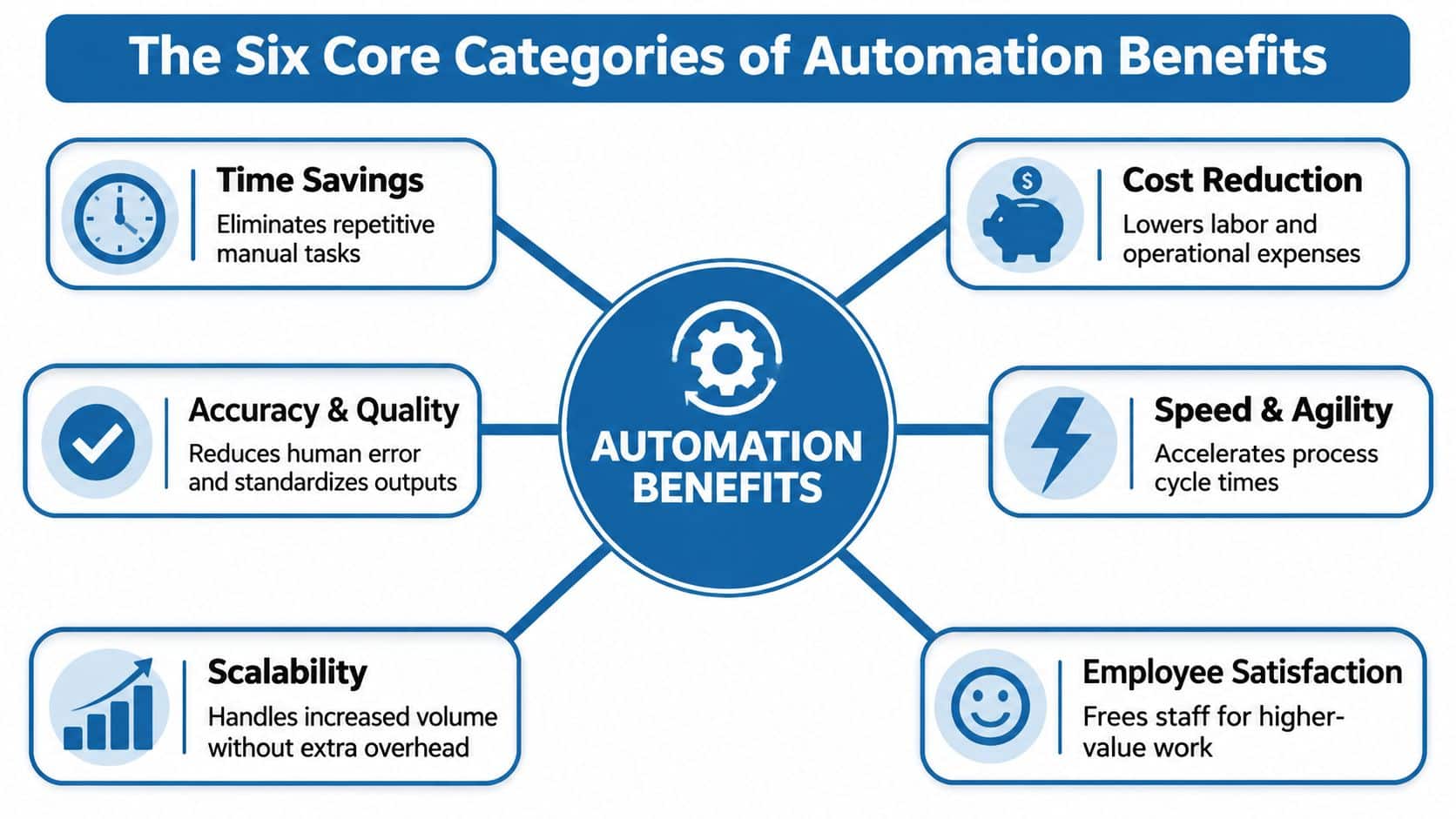
Automation benefits are easiest to understand when they're grouped by what changes in the operation. In practice, the gains fall into six buckets, and each one shows up in a different set of KPIs. If you're running an agency, a local business, or a service team, this is the lens that keeps automation decisions grounded.
Time, cost, and accuracy
The first three categories are the most visible. Time savings come from removing repetitive work like data entry, routing, and reminder sending. Cost reduction follows because labor is spent on fewer low-value tasks, while error-related rework declines. Accuracy and quality improve because digital workflows apply the same rules every time instead of relying on memory or individual judgment.
Useful KPIs here include response time, manual touch count, error correction volume, and cost per lead or cost per transaction. When those numbers move in the right direction together, you're seeing the mechanics of automation, not just a nicer dashboard.
Speed, scalability, and employee satisfaction
The next three benefits are often more strategic. Speed and agility show up when the team can react faster to inquiries, bookings, invoices, and customer requests. Scalability appears when volume grows without a matching rise in administrative overhead. Employee satisfaction improves when staff stop doing repetitive copy-paste work and start spending more time on judgment-heavy tasks.
A simple way to track these is to watch SLA attainment, throughput per rep, backlog size, and staff time spent on exceptions. If the operation is healthy, automation should reduce friction without turning managers into constant fire fighters.
For agencies and SMBs using a unified system, it helps to find unified marketing dashboard features that reduce context switching, because fragmented reporting often hides the true benefit. A cleaner view of activity makes it easier to see whether automation is helping the business or just moving data around.
What works: automate the tasks that repeat, touch multiple systems, and create downstream delay when they're late.
What doesn't: automating low-volume work just because it feels modern.
How Automation Compresses Workflows From Days to Minutes
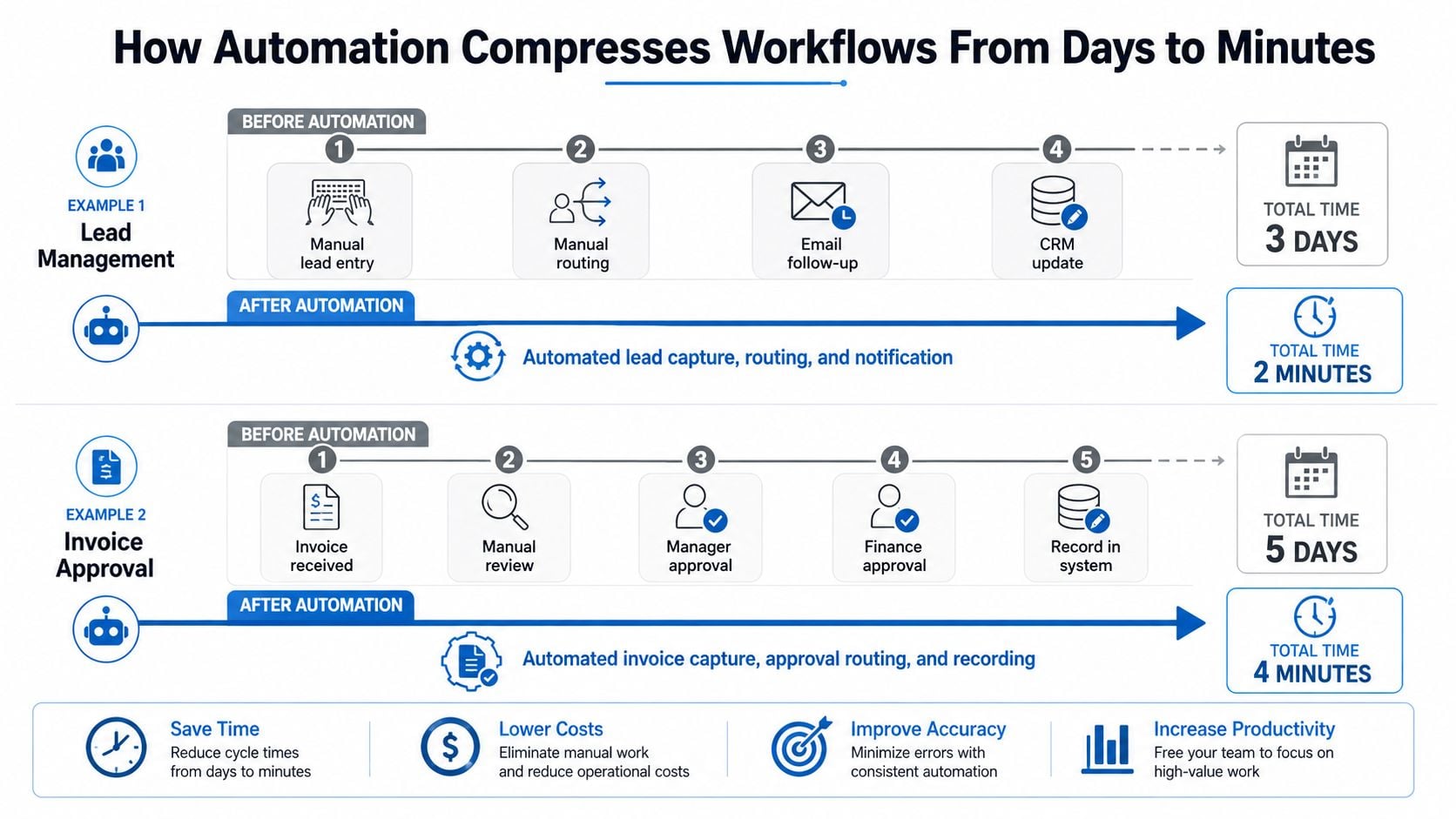
A workflow does not need to be redesigned from scratch to save time. It usually needs fewer handoffs, fewer inbox checks, and fewer places where work can sit idle. That is why automation compresses service work from days to minutes, especially in lead handling, appointment booking, invoicing, and review requests, the same pattern noted in McKinsey's automation reporting earlier in the article.
A manual lead workflow usually means someone enters the inquiry, decides who owns it, sends a message, then updates the CRM later. In an automated version, the lead is captured, routed, notified, and logged in one pass. The work still happens, but the queue shrinks because the team is not waiting on the next available person to move it forward.
Invoicing follows the same pattern. Manual approval often waits for inbox checks, missed reminders, and status updates spread across different people. Automated approval sends the right notification, records the event, and keeps the trail intact, which matters for SLA-driven businesses because every handoff stays visible instead of getting buried in email.
Where traceability becomes a business advantage
Microsoft notes that automation reduces mistakes, standardizes task routing, and strengthens audit trails because every task follows the same defined path in its Power Automate benefits overview. That is more than a compliance benefit. It helps operators see where work stalled, who handled it, and what happened before the delay, which is useful when a customer issue touches sales, fulfillment, and billing in the same day.
For teams working with inbound calls, form fills, or live chat, voice AI chatbot benefits matter when the first response has to happen outside business hours. The goal is not to replace human follow-up. It is to keep a prospect from sitting in silence while the team catches up, because that silence often becomes a lost lead and a lost future customer.
The bigger financial effect shows up across the customer lifecycle. Faster capture protects lead value, quicker nurture keeps prospects engaged, faster close reduces drop-off, and faster retainment lowers the chance that customers drift to a competitor while a request sits in a queue. That compounding effect is where automation pays back, especially in agencies and local businesses where one delayed handoff can affect the next sale, the next renewal, and the next referral.
Maintenance still matters. Automated workflows need monitoring, cleanup, and the occasional rule change when a form, offer, or team structure changes. The advantage is that these costs are usually predictable, while manual delay keeps draining margin in ways that are harder to see until the backlog gets too large.
That is the shift. Manual operations depend on memory and availability. Automated operations depend on rules, timestamps, and visible states, which makes them easier to manage at scale and easier to protect from small delays that turn into revenue leakage.
Industry-Specific Automation Examples and Results
Different businesses don't need the same workflows automated first. An agency, a contractor, a coach, and a multi-location brand all feel the pain differently, so the highest-value automation is usually the one that removes the most friction from their version of the customer journey.
What each business type should automate first
Digital marketing agencies usually get the fastest payoff from automating client onboarding, lead nurture, and reporting handoffs. Local service businesses often get more immediate value from missed-call text-back, booking reminders, and review generation. Coaches and course creators tend to benefit from webinar funnels, membership access flows, and reactivation sequences. Multi-location businesses usually need standardized workflows that work the same way in every branch.
For contractors and home-service operators, streamlining contractor lead follow-up is often the place where lost revenue is most visible. Leads are time-sensitive, so the workflow must respond quickly and consistently.
| Business Type | Top Automation Priority | Expected Impact | Key HighLevel Feature |
|---|---|---|---|
| Digital marketing agency | Client onboarding and recurring reporting | Faster setup, fewer manual updates | Workflows and unified inbox |
| Local service business | Missed-call text-back and booking | More captured inquiries and fewer no-shows | Calls, calendars, SMS automation |
| Coach or course creator | Webinar follow-up and membership access | Smoother enrollment and reactivation | Funnels, memberships, email/SMS workflows |
| Multi-location business | Standardized branch workflows | More consistent execution across sites | Centralized automation and pipelines |
Where platform features matter
HighLevel is one option for teams that want workflows, CRM, calls, calendars, payments, and messaging in one system rather than stitching together separate tools. That matters most when the customer journey crosses multiple touchpoints, because the handoff quality is usually where process automation either pays off or breaks down.
You can see the pattern in service businesses. A lead comes in, gets routed, receives an immediate response, books, gets reminded, pays, then receives a review request. Every one of those steps can be automated, but the benefit is bigger when they're managed as one lifecycle instead of isolated tasks.
Operational reality: the more often a workflow crosses channels, the more valuable it is to standardize it.
Hidden Costs and Common Automation Pitfalls
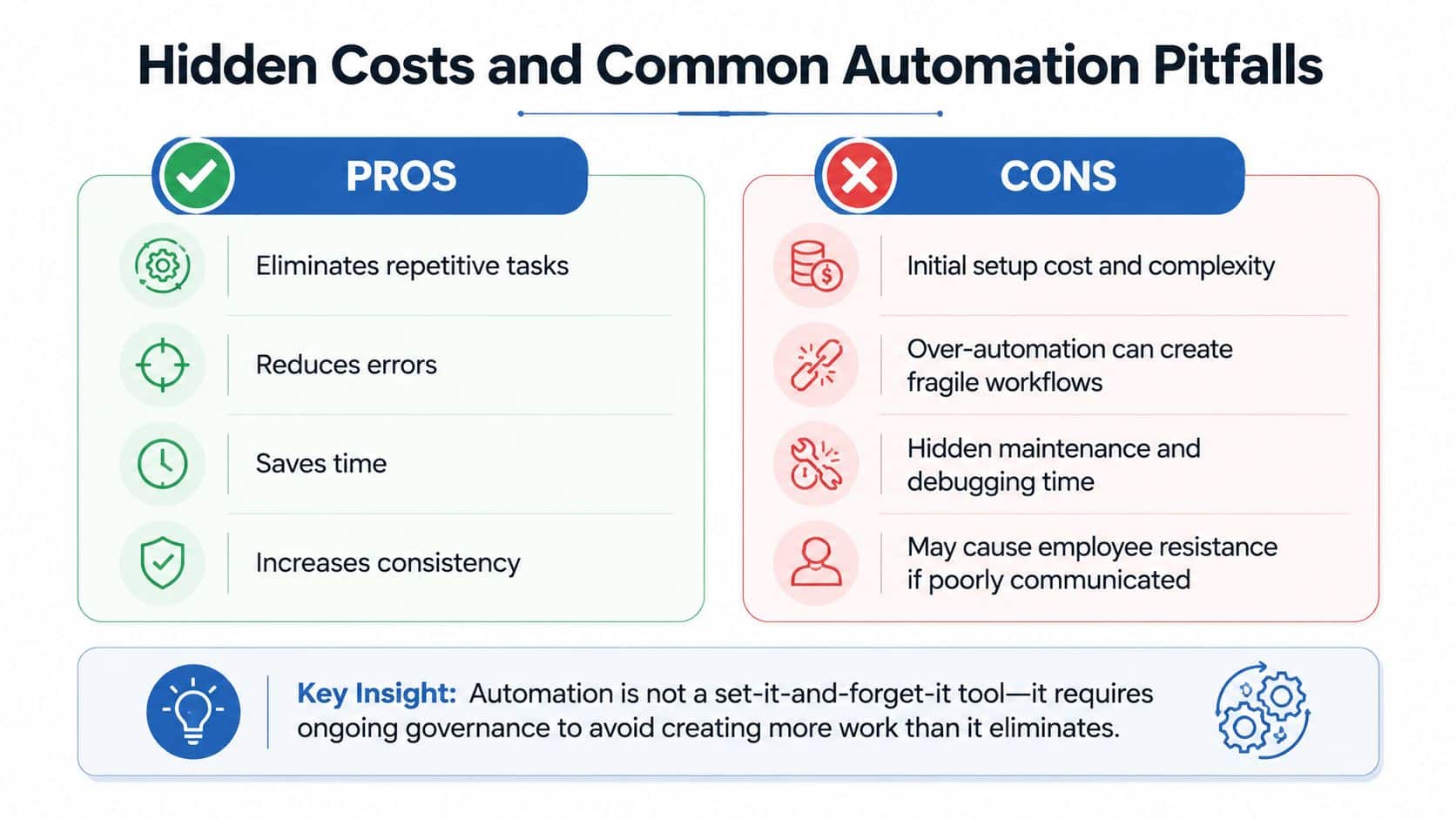
Automation cuts manual work, but it also creates ongoing overhead if the process is built without clear ownership. Appian's process automation overview points out a gap that many guides skip, the hidden burden of exception handling, workflow rigidity, and maintenance when business rules change but the automation does not in its benefits article. That is the part operators learn the hard way.
The financial impact also shows up across the customer lifecycle. A workflow that saves a few minutes on lead capture can still lose money if it slows follow-up, creates inconsistent nurture, or adds friction before the close. On the retention side, the same system can raise churn if reminders, service updates, or review requests stop matching what the customer needs.
The costs that show up later
Maintenance is the first hidden cost. Someone has to update workflows when forms change, offers change, pricing changes, or routing rules change. In a growing agency or local business, that often means the automation becomes another system that needs checking, testing, and documentation every time the process shifts.
Exception management is the second cost. Every automated system needs a human path for odd cases, and those odd cases can pile up fast if the process was designed around the ideal customer instead of the actual one.
Over-automation creates a third problem. When every customer interaction becomes a scripted sequence, staff can start treating unusual situations like errors instead of opportunities. That hurts relationships, especially in service businesses where trust depends on context, timing, and tone.
Warning signs that the workflow is too brittle
A few symptoms usually show up together. Supervisors spend too much time clearing alerts. Frontline staff stop trusting the system and work around it. Reports look clean, but the team is still doing manual rescues behind the scenes. That is automation debt.
Key insight: automation is not set-and-forget software. It needs ownership, review, and periodic cleanup, or it just moves work from the frontline to the manager's inbox.
A good rule is to keep humans in the loop anywhere the customer is upset, the risk is high, or the edge case is common enough to deserve judgment. The point is to automate the parts of the operation that benefit from consistency, while leaving room for a human touch where it matters. For teams comparing platforms, a practical question is whether the system fits the work you run, which is why guides like GoHighLevel worth it for agencies tend to focus on workflow fit, not just feature lists.
How to Evaluate Which Processes to Automate First
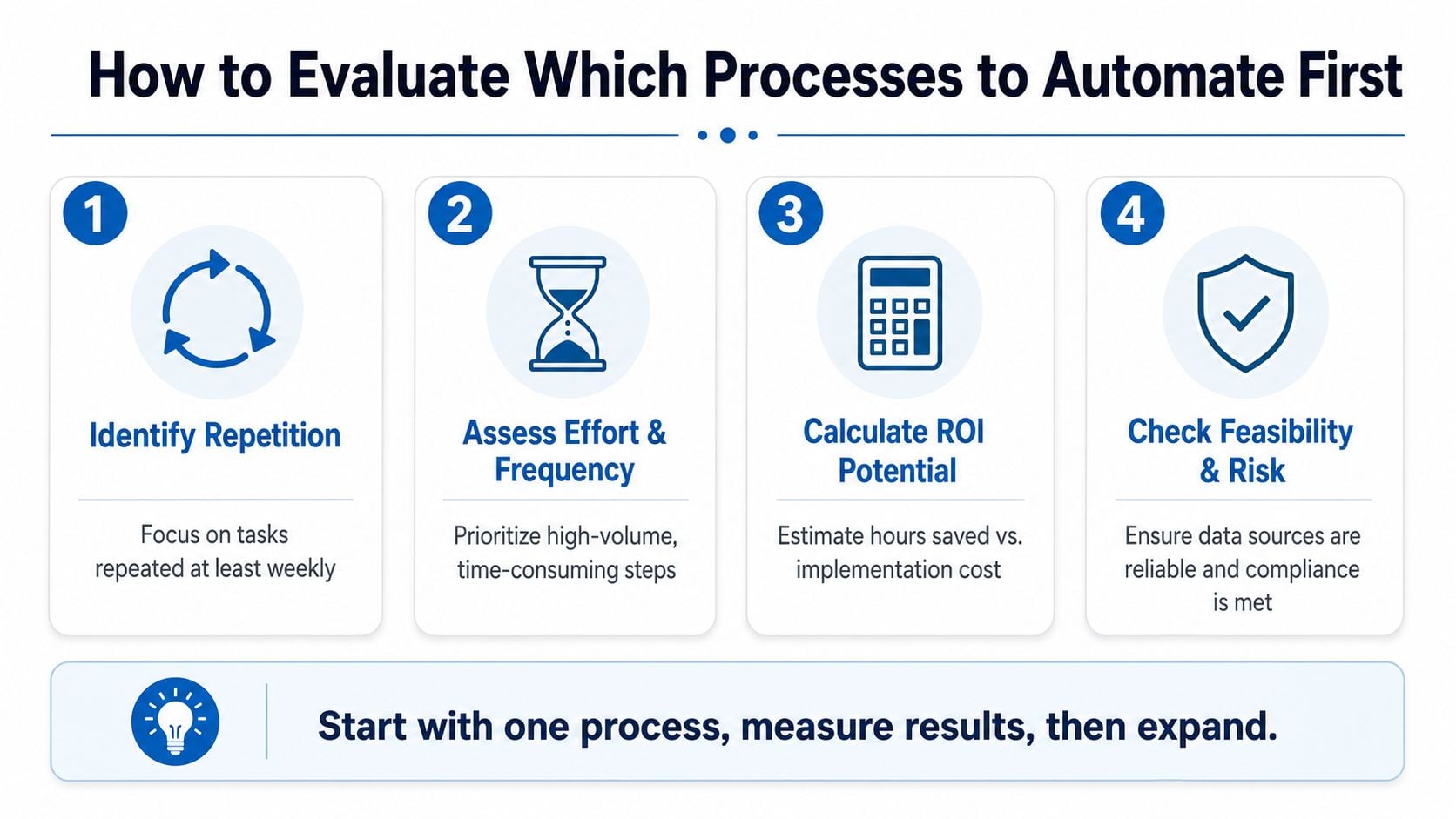
The best automation programs don't start with the flashiest workflow. They start with the one that's repeated often, causes visible friction, and can be implemented without fragile dependencies. That's how teams avoid spending weeks automating a low-value edge case while the primary bottleneck keeps slowing the business down.
A simple prioritization framework
Identify repetition. Look for tasks repeated at least weekly, because repetition is what turns a small gain into a meaningful one. Assess effort and frequency. High-volume steps are usually better candidates than rare but annoying ones. Calculate ROI potential. Compare estimated hours saved against implementation and maintenance effort. Check feasibility and risk. Data quality, compliance, and system reliability matter more than enthusiasm.
The best candidates are usually the workflows that sit between customer intent and revenue. Lead routing, booking, payment follow-up, reminder sequences, and review requests often belong near the top because they affect both conversion and retention.
Start small, then expand
Map the process before you automate it. Write down each handoff, each status change, and each system involved. If the current process is unclear on paper, it'll be worse once software is responsible for it.
Start with one process, measure the result, then expand only after the workflow is stable.
That approach keeps the team from automating confusion. It also creates internal buy-in, because the first win proves the system can remove work instead of just changing where the work sits.
Building Your Automation Strategy With the Right Platform
Automation strategy gets easier when the platform matches the lifecycle you're trying to manage. If capture, nurture, close, and retain live in separate tools, the team spends too much time stitching data together. If those stages sit in one operating system, the workflow can move with the customer instead of restarting in a new app each time.
That's why all-in-one architecture matters for agencies and SMBs. It reduces context switching, keeps the conversation history visible, and makes it easier to standardize what happens after a lead submits a form, replies to a text, books a call, pays an invoice, or leaves a review. The platform choice matters less because of any one feature and more because of how the pieces connect.
Native AI is useful when it helps respond faster, route conversations, summarize context, or draft follow-up without forcing the team to jump between tools. Consolidated communication streams matter for the same reason, they keep the workflow coherent. The more fragmented the stack, the more likely the operation is to create hidden manual work around the automations.
A practical rollout plan looks like this. Audit the manual processes that touch revenue or customer retention. Pick the top three candidates using the checklist above. Build the first version, watch where exceptions appear, then tighten the workflow before expanding to the next process.
If you're evaluating software, focus on whether the platform can carry the lifecycle you want to automate, not just one task inside it. That's the difference between a point solution and an operating system.
HighLevel brings together CRM, messaging, workflows, booking, payments, and reputation tools in one place, which makes it easier to automate the full customer lifecycle instead of a single task. If you're ready to reduce manual follow-up, tighten handoffs, and build a cleaner operating rhythm, visit HighLevel and see how an all-in-one system fits your process.
