


A business pipeline is a stage-based system that tracks every opportunity from first contact to closed-won or closed-lost, and each stage carries a value and a probability used to forecast revenue. It's not a list of leads, it's the operating map that shows what's moving, what's stuck, and what's likely to close.
If you've ever stared at a CRM full of contacts and still felt unsure about next week's revenue, you're already feeling the difference between a pile of names and a real pipeline. The working definition matters because it turns selling from guesswork into something you can measure, compare, and manage.
Table of Contents
- What a Business Pipeline Actually Is
- Pipeline vs Funnel vs Deal Stages
- The Standard Pipeline Stages and What Each One Does
- Pipeline Metrics That Actually Predict Revenue
- How Agencies and Local Services Use Pipelines Differently
- Common Pipeline Mistakes That Break Forecasts
- Building a Pipeline in a CRM Like HighLevel
- Putting It All Together and Your First 30 Days
What a Business Pipeline Actually Is
A lot of owners start with a lead list and call it a pipeline. That works until they need to forecast revenue, assign follow-up, or see why deals keep stalling in one stage.
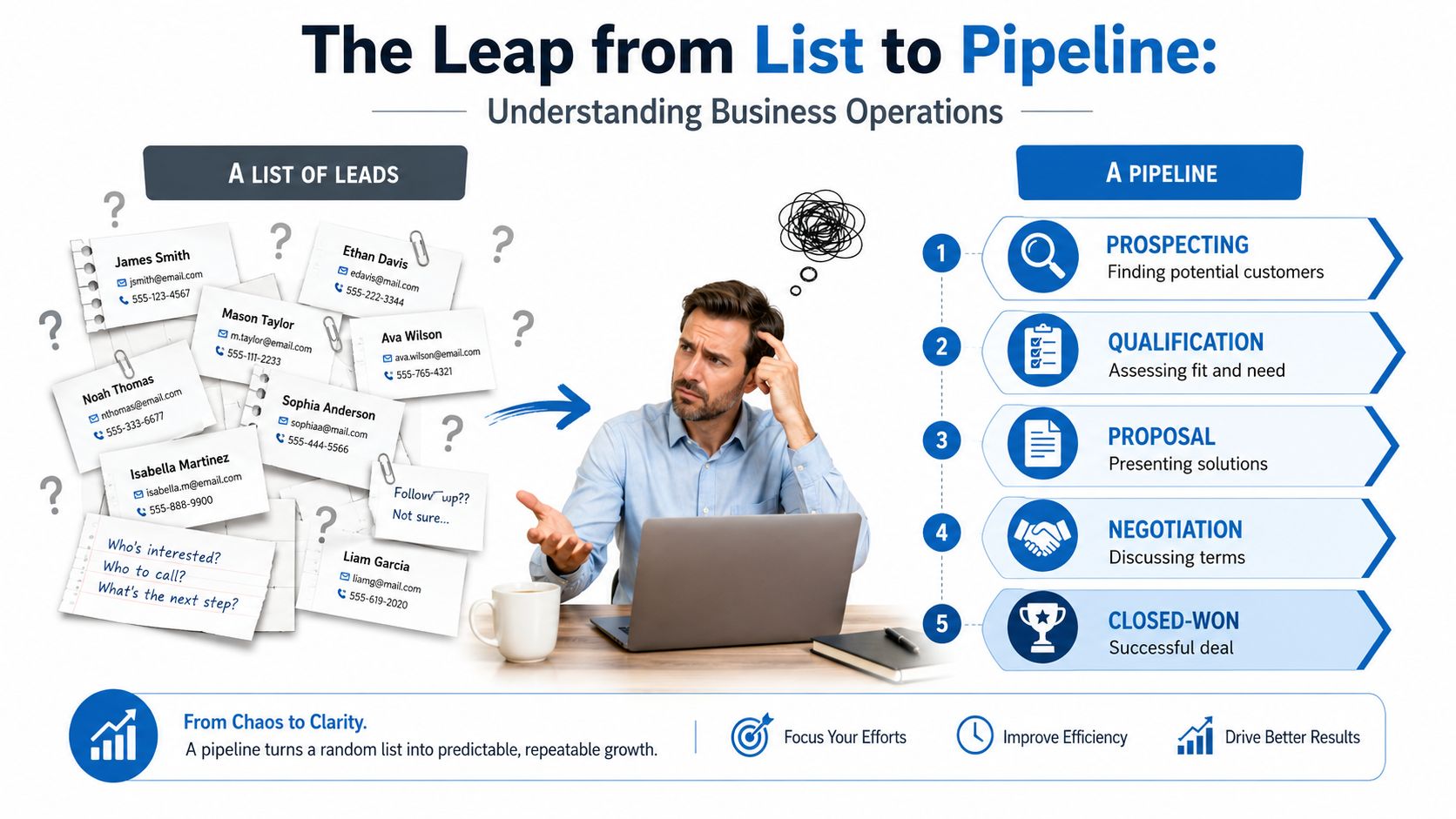
A business pipeline is a stage-based system that tracks an opportunity from first contact to closed-won or closed-lost. Each stage has a clear meaning, an owner, and a next action. That structure turns a messy list of names into something a sales team can manage.
For an agency owner, that matters because revenue does not move in a straight line. A lead can sit in discovery, wait on a proposal, or stall after a follow-up call, and each of those points needs to be visible. A pipeline makes those handoffs explicit, so you can see where work is moving and where it is getting stuck.
Think of it like a moving assembly line
An assembly line does not just hold parts. It moves work through predictable stations, and each station has a purpose. A pipeline works the same way, because each deal should enter, move, and exit through a defined set of steps.
That is why pipeline management is more than a report. Industry guidance from SalesHive describes a pipeline as a structured, visual representation of opportunities moving through stages such as lead, qualified, proposal, negotiation, and closed. In practice, that lets you compare reps, review forecasts, and spot bottlenecks without guessing.
Practical rule: if a deal has no stage, no owner, and no next action, it is not really in your pipeline yet.
A real pipeline also creates accountability. If two reps each say they have “good opportunities,” the pipeline shows whether those opportunities are at the same point in the process. That makes it useful for planning cash flow, hiring, and capacity.
Some owners start with a spreadsheet, then outgrow it as soon as follow-up gets harder to track. If you want a tool later, compare lead tracking software after you know what the pipeline needs to do. The software should support the process, not define it.
Pipeline vs Funnel vs Deal Stages
People mix these terms up because they all sound like ways to describe sales activity. They're related, but they're not the same thing, and confusing them leads to messy reporting.
A pipeline is your live list of real opportunities, with owners, dates, values, and stage movement. A funnel is an aggregate model that shows conversion across a population. Deal stages are the named checkpoints inside one pipeline. That distinction is the difference between running the business and describing it.
| Concept | What it measures | Best used for |
|---|---|---|
| Pipeline | Individual opportunities, stage, owner, value, and movement | Daily sales execution and forecasting |
| Funnel | Group conversion across a population of leads | Marketing performance and process design |
| Deal stages | Progress checkpoints inside one pipeline | Operational rules and follow-up control |
A practical example makes it clearer. If you say, “We have 30 deals in Proposal,” that's pipeline language. If you say, “We convert 18% of marketing-qualified leads,” that's funnel language. One helps a manager know what the team can close now, the other helps a marketer know how the front end is performing.
That's why pipeline and funnel reporting should not be blended carelessly. You need a pipeline to run the business, and a funnel to design the business. The wrong report in the wrong meeting creates false confidence.
If you want a deeper software shortlist for the top of the funnel, Top sales funnel software is useful only when you already know which metrics matter. A good tool won't fix a bad definition.
The Standard Pipeline Stages and What Each One Does
Most service businesses can start with a default stage structure and then adapt it. The labels can change, but the logic stays the same, because every stage should answer a simple question, “What has to happen before this deal can move forward?”
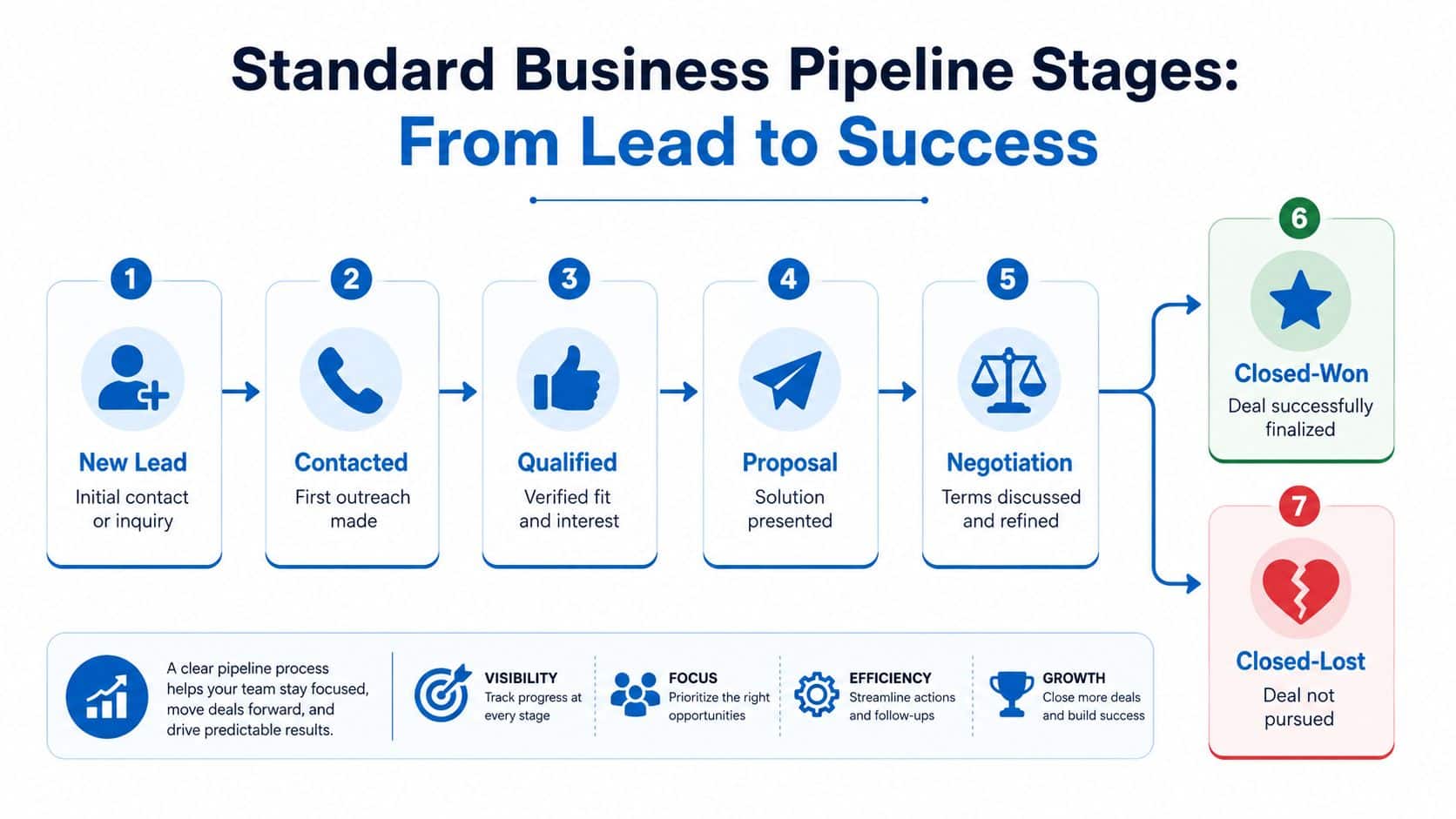
A usable default for most B2B teams
A clean B2B agency pipeline usually starts with New Lead. The entry criterion is a real inquiry, not just a scraped contact. The exit criterion is first outreach completed, and the action in that stage is simple follow-up, often supported by a rep or a service like Hire SDRs when teams need help with outbound volume.
Contacted means the first outreach landed and the prospect is aware of the conversation. The deal should only exit when the lead responds, books, or clearly disqualifies. Qualified means fit and need are confirmed; teams that want to improve conversion with HighLevel can connect lead scoring to stage movement at this point. Proposal means a solution has been presented and the buyer is reviewing it. Negotiation means terms, scope, or timing are being refined. Closed-Won and Closed-Lost are the exits.
“A stage is only real if you can tell when it starts and when it ends.”
Local services and memberships need different labels
The structure stays the same, but the names shift with the revenue process. A local-services business might use Lead, Booked, Showed, Proposal, Closed, because appointment attendance is a major checkpoint. A membership business might add Onboarding and Reactivation, because first payment isn't the full story.
That's where the control system idea matters. A pipeline is strongest when each stage has entry criteria, exit criteria, and a single operational action while the deal sits there. When those rules are written down, the CRM stops being a note repository and starts acting like a process manager.
For an agency, Hire SDRs can help handle outreach, but the pipeline still needs a clear definition for when a lead becomes qualified and when it should move to proposal. The same is true for the local service owner who needs to know exactly what “booked” means.
Pipeline Metrics That Actually Predict Revenue
A pipeline with a lot of deals can still mislead you. If the stages are old, the probabilities are guessed, or work keeps piling up in one spot, the forecast looks healthier than the business really is.
The five numbers worth watching
Pipeline coverage ratio asks a simple question, do you have enough pipeline to support the target ahead of you? A useful way to read it is pipeline divided by target. If coverage is thin, the team starts the period already underfilled.
Weighted coverage asks a different question, how much of that pipeline is likely to become revenue? Stage probability belongs here, because a deal in early qualification should not count the same as one already in negotiation. That is why Prospeo is helpful as a reference point, probability-adjusted values make the forecast more honest.
Slippage or push rate shows how much forecasted business got delayed. When deals keep moving out, the forecast is too optimistic or the stage rules are too loose. Stage velocity shows how long work sits in each stage, which helps managers spot where the handoff is slowing down. Sales velocity shows how quickly revenue is moving, using the benchmark formula “Number of Opportunities × Win Rate × Average Deal Size ÷ Sales Cycle Length.” That same Prospeo guidance explains why this matters, because it turns movement into a dollar-per-day view.
These measures answer different questions. Coverage tells you whether there is enough work in the pipe. Weighted coverage tells you whether that work is realistic. Sales velocity tells you whether revenue is moving.
A simple video can help a new manager see how those numbers fit together.
For weekly team reviews, agency reporting solutions only stay useful when the pipeline data behind them is clean. If you want more prospecting volume, BDRs can help fill the top of the pipe, but the stage definitions still have to be disciplined. A CRM like HighLevel works best as a control system when these metrics are checked week by week, not left to guesswork.
How Agencies and Local Services Use Pipelines Differently
A marketing agency pipeline should not be built like a roofing company pipeline. Both need structure, but the money shows up through different events, so the stages have to match the work that creates revenue.
A simple example makes the difference easier to see. In an agency, a deal may start with discovery, move through proposal, then continue into onboarding, kickoff, and ongoing service delivery. In a local service business, the important handoff may be from inquiry to booked appointment to completed visit to follow-up estimate. The pipeline is the control system that tracks those changes, not just a list of names in a CRM.
Agency revenue doesn't end at the signed contract
For agencies, the pipeline often needs to keep going after the proposal is accepted. The signed contract matters, but the business value may come later, after onboarding, launch, and retained service delivery start creating steady monthly revenue. The pipeline should reflect the full revenue-operations process, not only the sales handoff.
That is why it helps to evaluate agency CRM tools with post-close stages in mind. A CRM that stops at closed-won can hide the work that keeps the account healthy and retained. Agencies usually need visibility into onboarding, kickoff, and sometimes renewal or reactivation. If those steps are missing, the team can look busy while the account is drifting.
Local services need operational proof, not just interest
A home-services business often depends on appointment completion. In that setting, “showed up” is a meaningful stage, because a booked estimate is not the same thing as a completed visit. A no-show should have a closed-lost reason that supports rebooking rules, reminders, or a callback workflow.
The pipeline then becomes a control system instead of a chart. If you need help filling roles, find the right staffing platform, but staffing and process design are separate jobs. The value comes from making each stage match the way money enters the business, such as inquiry, booked job, arrived on site, quote sent, and job won.
Useful check: if a stage does not change what your team does next, it probably does not belong in the pipeline.
The same pipeline logic exposes different bottlenecks in each business. Agencies usually find trouble in onboarding and retention. Local services usually find trouble in scheduling and arrival. The stages differ because the revenue process differs, and the CRM should make that visible day by day.
Common Pipeline Mistakes That Break Forecasts
Broken pipelines usually don't fail loudly. They drift. A manager notices the forecast wobbling, the CRM feels busy but unclear, and nobody can explain why deals keep disappearing between meetings.
The four habits that quietly wreck accuracy
Vague stage names are the first problem. If “in progress” or “follow-up” can mean three different things, the CRM can't tell the truth. The fix is to write clear entry and exit criteria for every stage.
No assigned probability is the second problem. When every deal is treated as equally likely, the forecast becomes wishful thinking. The fix is to assign probability by stage and update it only when the stage changes.
Using the pipeline as a dumping ground is the third problem. Junk leads, cold list imports, and half-formed prospects all get mixed together, and suddenly every report looks inflated. The fix is to only let real opportunities into the pipeline and keep raw leads elsewhere.
Ignoring stale deals is the fourth problem. Old opportunities sit in the CRM, owners stop touching them, and the forecast starts to look better than it is. The fix is a regular cleanup rule that moves, closes, or re-qualifies old deals.
A pipeline with stale deals is not full. It's clogged.
You can usually trace all four problems back to one cause, a missing definition. The cure is always the same, write the rules down and enforce them in the CRM, not on a whiteboard. A chart can only be trusted when the people using it follow the same stage logic.
Building a Pipeline in a CRM Like HighLevel
A pipeline becomes useful when the CRM treats each stage as a trigger point, not just a label. That means the stage should tell the system what happens next, who owns the task, and what data has to be present before the deal can move.
Start with stage rules, not colors
For each stage, define the entry rule, the exit rule, and the required fields. If a lead enters Qualified, the record should already show fit, intent, and owner assignment. If it enters Proposal, the estimate, scope, or payment workflow should be ready to send.
In a tool like HighLevel, the Opportunities > Pipelines setup becomes useful, because you can name a pipeline, add ordered stages, and attach opportunity values to individual deals. You can also map stage actions to workflows so a qualification stage triggers nurture, a proposal stage triggers document or payment steps, and a stalled stage triggers escalation.
A pipeline-ready CRM setup
- Define every stage clearly: Each stage needs an entry point and an exit point, or reporting will blur together.
- Assign owners immediately: No deal should sit in a stage without a person responsible for the next move.
- Set probabilities once: Tie them to stages so forecast math stays consistent.
- Link workflows to movement: Stage changes should launch reminders, follow-up tasks, or handoffs.
- Review stale records weekly: Old deals should be moved, requalified, or closed out.
Practical rule: if a stage doesn't trigger a task, a message, or a workflow, it's probably not doing real work.
Automation helps, but only when the definition is solid. Qualification can start a nurture sequence, proposal can start a payment flow, and a stalled opportunity can create an escalation task. When the CRM is configured this way, the pipeline feeds coverage and velocity reporting instead of hiding behind a colorful chart.
Putting It All Together and Your First 30 Days
A pipeline is a stage-based revenue-operations system. Every stage needs a definition, an action, and a probability, and the whole point is to turn activity into a forecast you can trust.
Start with one metric and one habit
If you only track one number this week, start with pipeline coverage ratio. It's the easiest way to see whether you've got enough qualified opportunity to support the goal in front of you. If coverage is low, you know the problem before the month slips away.
The habit to build is a weekly cleanup meeting. Every stale deal should be moved, qualified again, or closed-lost. That one meeting keeps the pipeline honest and prevents old opportunities from inflating the forecast.
Don't add stages unless they earn their place
New stages sound helpful, but extra labels without exit criteria only create confusion. If a stage doesn't change the next action, it doesn't belong in the process. Keep the system lean enough that the team can use it every day.
The goal isn't more reporting. It's more closed revenue. A clean pipeline helps a small team act faster, follow up better, and beat a bigger team that's still guessing.
If you want a pipeline that supports follow-up, bookings, payments, and reactivation in one place, take a look at HighLevel. It centralizes sales pipelines, workflows, conversations, and CRM activity, which makes it easier to turn a stage definition into daily action.
