

You've got the payment out the door, and now the supplier is staring at a bank deposit with no clue which invoices it covers. That's the moment email remittance advice earns its keep, because it turns a vague payment into a usable record that AP and AR teams can readily reconcile. When the payment is large, urgent, international, or bundled across several invoices, that extra context saves everyone from a back-and-forth that nobody wanted in the first place.
Table of Contents
- What Email Remittance Advice Actually Does for Your Business
- Essential Components Every Remittance Email Must Include
- Email Templates and Subject Lines That Get Results
- When to Send Remittance Advice and When to Skip It
- Security Controls and Fraud Prevention for Remittance Emails
- Automating Remittance Advice in Your Payment Workflow
- Measuring the Impact on Reconciliation and Cash Flow
What Email Remittance Advice Actually Does for Your Business
A supplier gets paid, the bank shows the money, and the AR team still can't tell whether it belongs to one invoice, three invoices, or a partial settlement with deductions. That is the gap email remittance advice closes. It is a digital payment notification that tells the supplier how to match incoming funds to the right invoices, which is why it shows up so often in large, urgent, international, or combined payments.
The practical value is matching, not politeness
The best way to think about remittance advice is as the bridge between payment movement and invoice posting. It is a courtesy rather than a legal requirement, but the operational value is obvious when a payment includes invoice dates, invoice numbers, discounts, and payment amounts, because those are the fields AR needs to clear open items cleanly. That is also why it has become a back-office workflow instead of a marketing-style email, especially when the notice is generated automatically by accounting or ERP systems and sent through transactional email channels. JPMorgan's remittance advice explanation lays out that operational role clearly.
For suppliers, the benefit is fewer suspense-account headaches and less manual research. For payers, it means fewer “what was this for?” emails, fewer disputes, and less cash application friction. Clear remittance helps reduce invoice disputes, because it removes ambiguity before people start guessing.
Practical rule: if a payment would make a supplier stop and ask for clarification, send remittance advice with it.
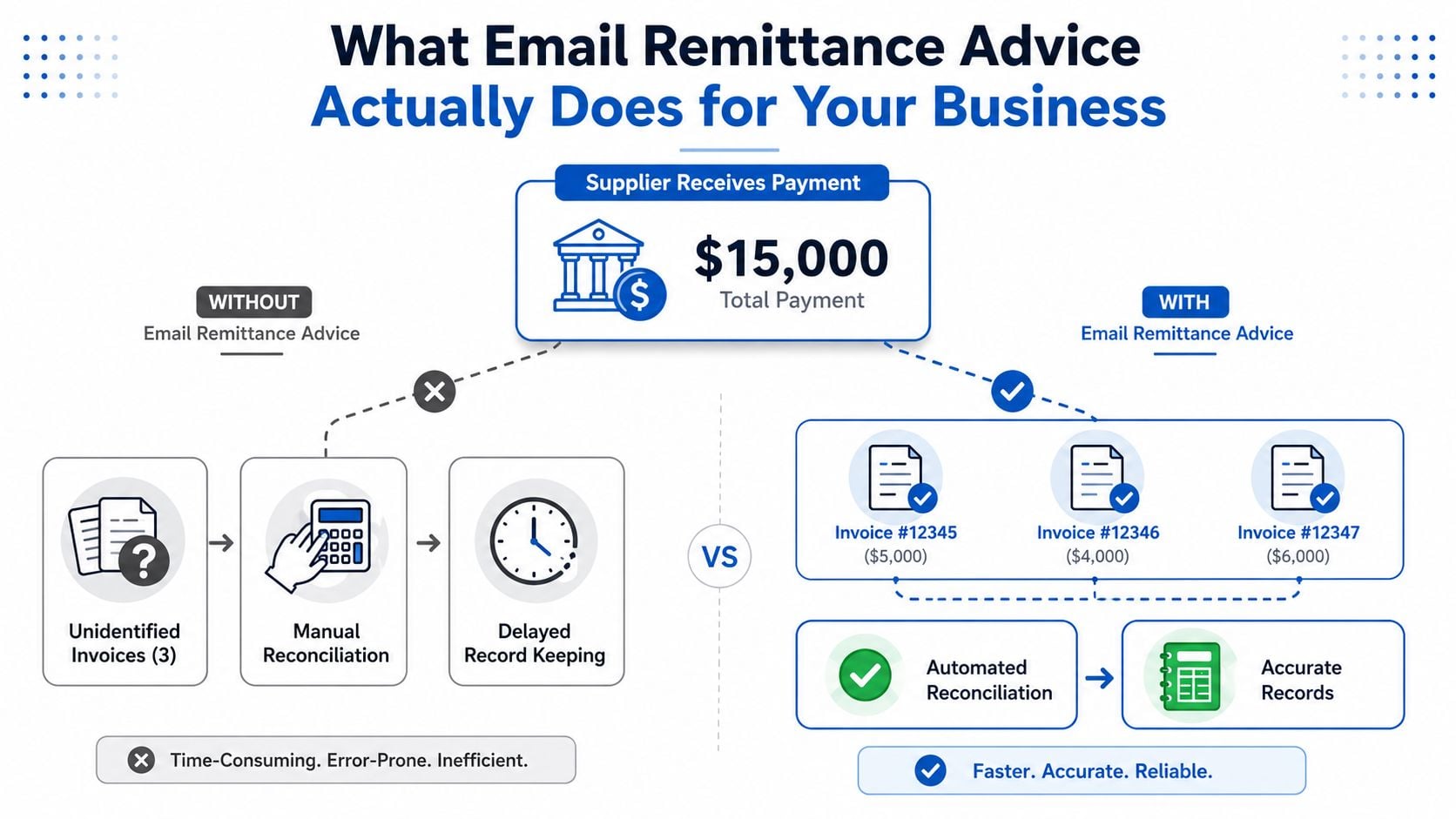
The workflow difference is easy to see. Without remittance, the supplier manually hunts through open invoices and delays record keeping. With it, the invoice numbers and amounts point the team straight to automated reconciliation and accurate records.
A lot of teams also miss the cash-flow angle. When the supplier can post funds faster, liquidity planning improves on both sides because open items do not sit unresolved while someone searches through old emails or bank feeds. If you run a multi-entity or cross-border operation, that clarity matters even more because payment timing and invoice ownership often do not line up neatly.
There is also a systems choice behind the process. If remittance is tied into the same environment that handles invoicing, collections, and follow-up, it is easier to keep the payment trail consistent. That is where HighLevel platform advantages matter for teams that want fewer handoffs and less duplicate entry.
Essential Components Every Remittance Email Must Include
A remittance email only helps if the recipient can post it without decoding your intent. The useful versions carry deterministic identifiers, validated amounts, and enough context to reconcile the payment without a phone call. In practice, that means the email has to match the way your AP or AR system records the transfer, not just the way your team talks about it internally. Texas Instruments' remittance API requirements show why structure matters in high-volume workflows.
The fields that earn their place
At minimum, a remittance email should make the payment traceable. That usually means invoice numbers, payment amounts, invoice dates, discount details when they exist, and a payment reference or ID that ties back to the transfer itself. JPMorgan's guidance notes that remittance advice commonly lists invoice dates, invoice numbers, discounts, and payment amounts, which is the information suppliers use to apply cash accurately.
Missing one of those fields does not always break the process, but it slows it down. Missing several fields turns a routine posting task into exception handling. That is where operational volume starts to matter, because the same template that works for a low-touch vendor can become a bottleneck when a finance team is sending out many payments across multiple accounts.
A simple internal standard works better than over-designing the layout. Use a short header with payer and payee details, then an itemized section beneath it. If the payment covers multiple invoices, group them in a table so the receiver can scan invoice number, date, amount, and any deduction in one pass.
A remittance email should answer one question immediately, “What invoices does this payment close?”
The difference between minimal and detailed documentation comes down to posting confidence. Minimal viable remittance may be enough for a single invoice and a known vendor. Detailed documentation is better when deductions, offsets, or partial settlements enter the picture because each adjustment needs to be understandable without an extra email thread.
Here is the practical filter I use on implementations:
- Single invoice, full payment. Keep it concise, but still include the invoice number and payment reference.
- Multiple invoices. Use a structured list, not free-form prose.
- Partial payment or deduction. Call out the reason clearly so AR does not have to infer it.
- International or combined payment. Include enough identifiers to survive banking delays and currency confusion.
The right template is the one your supplier can post without escalation. Anything less just creates a nicer-looking version of the same problem.
The 10 best proposal software for 2026 article on the SaaS Agency Guide is a decent reminder that structured business documents win because they are easy to scan, and remittance emails work the same way.
Email Templates and Subject Lines That Get Results
Subject lines for remittance emails should do one job fast, tell the recipient what the payment is tied to. If you leave out the invoice number or the payment context, the message competes with everything else in a finance inbox. Keep the wording direct, because AR teams usually scan before they open.
Single invoice payment template
Subject: Remittance for Invoice 10482, Payment Received
Body:
Hello [Vendor Name],
Payment for Invoice 10482 has been issued on [date] for [amount].
Payment reference, [reference number]
Invoice date, [invoice date]
Payment method, [ACH, wire, card, or check]
Please apply this payment to the invoice above. If anything looks off, reply to this email with the mismatch details.
Best,
[Your name]
[Your company]
This version works because the subject line names the invoice directly, and the body keeps the critical fields near the top. Use a PDF attachment only if your supplier expects a document copy, because the email body alone is often easier to search and archive.
Multiple invoice batch template
Subject: Remittance for Invoices 10482, 10483, 10491
Body:
Hello [Vendor Name],
Please apply the following payment to the listed invoices.
- Invoice 10482, [date], [amount]
- Invoice 10483, [date], [amount]
- Invoice 10491, [date], [amount]
Total payment, [total amount]
Payment reference, [reference number]
Discounts applied, [details if applicable]
If your records differ from this list, send the open item report and we'll review the variance.
Best,
[Your name]
Use this format when one payment settles several invoices. A bullet list is easier to parse than a paragraph, and it reduces the chance that a single line item gets buried in the message. The structure also makes it simpler for the supplier to paste the details into their ERP.
Partial payment with deductions template
Subject: Partial remittance for Invoice 10482, deduction included
Body:
Hello [Vendor Name],
We've sent a partial payment for Invoice 10482 in the amount of [amount].
Invoice total, [original total]
Amount paid, [paid amount]
Deduction, [short description of deduction]
Payment reference, [reference number]
Please post the payment against the invoice and review the deduction details above. If you need supporting backup, reply and we'll share it.
Best,
[Your name]
Precision matters most in this scenario. Partial payments lacking a clear reason trigger the longest reconciliation delays because the supplier must decide if the difference is an approved discount, a disputed charge, or a posting error.
Formatting and attachment guidance
Plain text usually wins when the recipient's process is email-first and they want quick scanning. HTML is fine if you keep the layout lean, but don't overdo branding or graphics, because finance inboxes care about clarity more than design. For an internal workflow that already uses automated messaging, the ad copy guide can be a useful reminder that the first line should do the heavy lifting.
When to Send Remittance Advice and When to Skip It
Not every payment needs a separate email. Sometimes the platform record is enough, especially when the supplier already receives rich payment data through the rail they're using. The decision comes down to whether the payment data will reach the supplier in a usable form without extra interpretation.
Send it when the payment creates ambiguity
The strongest reason to send remittance advice is simple, the payment can't be matched confidently from bank data alone. That usually happens with multiple invoices, partial payments, discounts, and foreign currency payments. It also shows up when the customer relationship is new, because the supplier hasn't yet learned how your team structures payment references.
Visa's 2024 Digital Remittances Adoption Report shows that 66% of remittance users prefer sending money digitally, and the World Bank's Q2 2024 data shows the global average cost of sending remittances at 6.65%, up from 6.35% in Q1 2024, with South Asia at 5.53% as the lowest-cost receiving region. Those figures don't tell you when to send a remittance email, but they do show how far the market has moved toward digital notification and away from paper-based processes. World Bank Remittance Prices Worldwide Q2 2024 captures that shift clearly.
If the supplier's AR team would need to guess, send the email.
Rely on platform data when the rail already carries enough detail
If a single invoice is paid in full and the payment platform already exposes a clean reference, you may not need a separate remittance email. That's often true in tightly controlled workflows where the buyer and supplier have agreed on reference conventions and both sides reconcile from the same payment record. In those cases, adding another email can create noise instead of value.
A known, trusted vendor relationship also changes the equation. Once both teams trust the matching process, the operational burden of a separate notice drops. Structured payment rails can carry enough data on their own, especially when the receiving system is built to ingest it automatically.
Use a decision rule, not a habit
The most practical policy is a routing rule. Send remittance advice when the payment is anything other than obvious, and skip it only when the platform record already covers the match cleanly. That keeps the process consistent without forcing your team to send extra emails just because they've always done it that way.
If you use a workflow layer for payment follow-up, the automate client journeys concept applies well here, because the same logic that routes leads can also route payment notifications. The point is to trigger the right message for the right transaction, not to send every payment through the same channel.
The section above on field structure matters here. If your remittance payload is incomplete, even a well-timed email won't solve the matching problem. The supplier still needs the identifiers that let them post it correctly.
Security Controls and Fraud Prevention for Remittance Emails
Finance teams often treat remittance advice as administrative paperwork, which is exactly why it gets overlooked as a fraud target. Email is vulnerable, and attackers know payment notifications can look routine enough to slip past a busy inbox. Mailguard has warned that remittance advice emails can be used as a phishing lure, with attackers linking the message to malicious pages. Mailguard's scam alert on remittance advice emails is a good reminder that the channel itself needs controls.
What to protect on both sides
Sender authentication should be mandatory. SPF, DKIM, and DMARC don't make a remittance email safe by themselves, but they reduce the odds that a spoofed message will pass as legitimate. Add encryption in transit, keep attachments minimal, and avoid sending banking changes or sensitive account data in the same thread as routine remittance notices.
Safe verification matters just as much as message hygiene. If a remittance email references a new bank account, a changed remit-to address, or an unusual payment destination, the recipient should verify it through an established channel before acting. That verification should happen outside the email thread, because attackers rely on thread hijacking and lookalike replies.
A trusted portal is often safer than direct email links for sensitive payment data. It gives the supplier a controlled place to access remittance details, and it lowers the risk that someone forwards a message or clicks a malicious attachment by mistake. That doesn't mean email has no place, it means the most sensitive workflows deserve a more controlled handoff.
Security rule: if the email asks someone to change payment instructions, treat it as untrusted until verified elsewhere.
The checklist I'd use in practice
- Authenticate the sender. SPF, DKIM, and DMARC should be in place before finance emails go out.
- Limit attachment risk. Only send files your vendor needs, and keep file types predictable.
- Verify banking changes offline. Use a known phone number or portal, not the number in the suspicious email.
- Train the AP and AR teams. The people who touch these messages should know what a phishing lure looks like.
- Prefer secure portals for sensitive details. Email can carry the notice, but not every document needs to live in the inbox.
A secure process also keeps the remittance trail cleaner for audit review. If you use automation, security has to be built into the workflow, not bolted on after someone notices an odd email.
Automating Remittance Advice in Your Payment Workflow
Manual remittance emails work until payment volume starts stacking up. After that, the cost shows up in inconsistent formats, missing invoice references, and payments that leave without a clear notice. Automation fixes that by tying the remittance record to the payment event instead of asking someone to assemble it later.
Build the trigger off the payment record
The cleanest setup starts in the accounting or ERP system. Once payment is recorded, the system identifies the related invoices, checks the required fields, and generates the remittance advice automatically. Strict schemas help because deterministic identifiers and constrained amount fields give the system a way to validate the record before it posts.
You can route the output through transactional email so it lands as part of the payment workflow rather than as a separate communications task. That is what makes remittance advice dependable in practice, since it is triggered by a system event, not by someone remembering to send a message.
Choose tools that fit the volume and the rail
For smaller teams, a straightforward accounting workflow with templated email delivery may be enough. For larger implementations, ERP integrations and structured file outputs make more sense because they reduce exception handling and support multiple formats. Microsoft's bulk-email support for remittance advice from ERP workflows shows how system-driven the process has become, and Bill.com's remittance advice overview lays out the same shift from manual sending to process-driven delivery.
If you are evaluating supplier payment automation, automate supplier payments with Zaro is worth reading as a separate implementation lens, especially if your team wants remittance to travel with the payment instead of being handled as a follow-on task. The question is not whether automation exists, it is whether the output matches the supplier's receiving process.
The same idea applies in broader workflow systems too. HighLevel can sit in that mix when a business wants messaging, invoicing, and notifications connected in one place, and the same reporting discipline that helps teams automate client journeys can also help track whether payment notices were sent and opened.
Watch the integration details
High-volume setups live or die on field validation and delivery consistency. If invoice numbers, payment amounts, and payer identifiers do not validate before send, automation will push bad data faster than a manual team ever could. Standard schemas matter because they let treasury and AR systems confirm the record before it hits the ledger.
That is also where security controls need to stay inside the workflow. Sender authentication, role-based permissions, and controlled templates reduce the chance that a remittance email exposes the wrong details or carries a malformed attachment. If your process still depends on free-form edits before send, the automation layer is doing too much and the control layer is doing too little.
The video above is a useful complement if your team is mapping automation across payment and invoice workflows. The point is not to replace finance judgment, it is to remove repetitive assembly work so that judgment goes to exceptions, format checks, and supplier-specific routing.
Measuring the Impact on Reconciliation and Cash Flow
A remittance workflow earns its keep when payments stop sitting in limbo. Faster posting means fewer vendor follow-ups, fewer manual corrections, and a clearer view of what has cleared and what is still waiting on review. That improves accounts payable work, and it also tightens cash control because finance can see open items with less guesswork.
Track the right operational signals
Start with the signals that show actual workload, exception volume, supplier inquiry volume, and the number of payments that still require manual matching. Then compare the reconciliation cycle before and after you standardize remittance advice. If your team is still chasing invoice matches by hand, the process is not finished.
A bank-side reference helps teams keep payment proof separate from remittance detail. The bank reconciliation how-to guide from Alignmint is useful for that distinction, because remittance advice supports reconciliation without replacing bank evidence.
Use remittance data as an operational signal
Clear remittance gives suppliers the information they need to post cash sooner, which cuts down on clarification emails. That improves cash-flow visibility because open items close faster and unresolved payments do not linger in the books longer than necessary. It also reduces friction with suppliers, since they do not need to chase your team for invoice detail each time a payment arrives.
For teams that want reporting around the process, HighLevel reporting for SMBs is a useful reference point. Visibility matters as much as delivery. If your system cannot show whether notices were generated, sent, and matched to payments, it is hard to prove the workflow is working.
The real ROI shows up when a payment no longer needs a human to explain what the system should already know.
The shift is operational, not cosmetic. Remittance advice turns payment execution into cleaner data flow, and that reduces the number of loose ends finance has to chase later. If your current process still depends on someone manually assembling every notice, fix that next.
