


You probably know the scene already. The inbox is full of quote requests, the estimator is waiting on a pricing update, a project manager wants the latest scope notes, and someone in the office is still trying to reconcile three spreadsheets with a stack of email threads. A good job can still get messy because the handoff from sales to operations is broken, and the people who own the work are tired of hearing, “I thought that was already in the system.”
Construction CRM software only matters if it fixes that handoff. If it just stores contacts, you’ve bought a nicer spreadsheet. If it connects the bid stage to scheduling, document control, follow-up, and staffing visibility, it becomes operational infrastructure. That’s the essential test.
Table of Contents
- Why Contractors Need a Different Kind of CRM
- What Construction CRM Software Does
- Must-Have Features and Workflows
- Benefits and Realistic ROI for Contractors
- A Practical Buyer’s Checklist
- Real Use Cases Across Contractor Types
- Integration Considerations and a 60-90 Day Rollout Plan
Why Contractors Need a Different Kind of CRM
Monday morning at a mid-sized contractor usually starts with damage control. A sales rep is answering a text from an owner, the estimator is digging through an email chain for the latest drawing set, accounting wants to know whether a change order was approved, and the operations team is asking if there’s enough crew capacity for the job that was just “basically won.” The work is all connected, but the tools are not.
Generic CRM systems break at that point. They are built to track leads until the contract is signed, then hand the rest off to someone else. Construction does not work like that. Revenue does not really exist until the job gets built, handed over, and billed cleanly, which means the system has to follow the opportunity all the way into delivery.
Practical rule: if the CRM stops at award, it is not built for contractors. It is built for sales teams that do not live with the downstream mess.
Construction CRM software has to bridge bid-to-build, not just track contacts. That means centralized data, bid management, scheduling, document control, and real-time integration with finance or ERP tools are required parts of the workflow, not add-ons. NetSuite’s construction CRM overview makes that distinction clearly, because sales-stage data only helps when it can flow into execution without rekeying what CRM in construction needs to do.
Rollout risk is the part vendor demos gloss over. A CRM can look clean in a sales presentation and still fail in the field if it does not fit how estimators, project managers, and crews work. That is why contractor CRM decisions should be judged on whether the team can carry the same job record from bid stage into staffing, scheduling, and closeout without creating another stack of side systems.
There is also a workflow reality most vendors underplay. Construction teams are distributed, often split between the office and the field, so mobile access is basic plumbing. Market data backs that up, with cloud-based construction CRM adoption reported above 55% in one study and 72% of recently implemented solutions including mobile accessibility and cloud deployment in another construction CRM market adoption data. That lines up with what most contractors already know from experience, if the team cannot use the system from the truck, the site, or the airport, they will keep using texts and side spreadsheets.
A lot of contractors end up chasing automating home service lead follow-up because it feels like the fastest win, and sometimes it is. But the bigger win is not speed alone. It is making sure the bid, the handoff, and the staffing picture all live in the same operational thread.
What Construction CRM Software Does
Construction CRM software is the system that keeps a job record intact from first inquiry through estimate, award, handoff, schedule, change order handling, and follow-up. That is the job. If it cannot carry the same record across those stages, it is just contact storage with a construction label on it.
The bid-to-completion chain
The basic chain should look like this.
- Lead capture. The inquiry lands once, with source, contact, and project type attached.
- Estimating. The opportunity gets a budget, scope notes, and owner history without someone retyping the same facts into another system.
- Bid tracking. Internal owners can see status, deadlines, and next action.
- Contract handoff. Awarded work moves cleanly into operations with the original context intact.
- Scheduling and execution. The field team sees what was promised, not a watered-down summary.
- Change orders and document control. Scope shifts stay attached to the job record.
- Post-job follow-up. The client relationship doesn’t disappear after final invoice.
That chain matters because construction work is never just one file. It is a cluster of contacts, documents, dates, decisions, and obligations that need to stay connected.
A simple example makes it obvious. Take a $400K kitchen remodel. The homeowner inquiry should create a lead record, the estimate should sit on the same opportunity, the signed contract should carry into the schedule, and any change order should stay tied to the original scope and contact. If the office has to rekey the same information into project software, accounting, and a calendar tool, someone is going to miss a detail. That is not a user problem. It is a system design problem.
If you have looked at HighLevel call tracking software options before, you already understand the broader idea, one inbox for intake, follow-up, and routing. Construction CRM adds the job-specific layer on top of that, so the intake data can survive into operations.
Construction teams also lose a lot of value in document handling, especially when plans, scope notes, approvals, and revisions get scattered across inboxes and shared drives. That is why automating document workflows matters so much. It keeps the record attached to the job instead of turning every handoff into another search-and-copy exercise.
Must-Have Features and Workflows
The feature list vendors throw at you is usually backwards. They lead with slick email templates, colorful dashboards, and weirdly elaborate automation demos. That’s not what closes more work. The actual bottleneck is usually response time, handoff quality, and whether the team can find the right job data without asking three people.
What earns a place on the shortlist
These are the essentials:
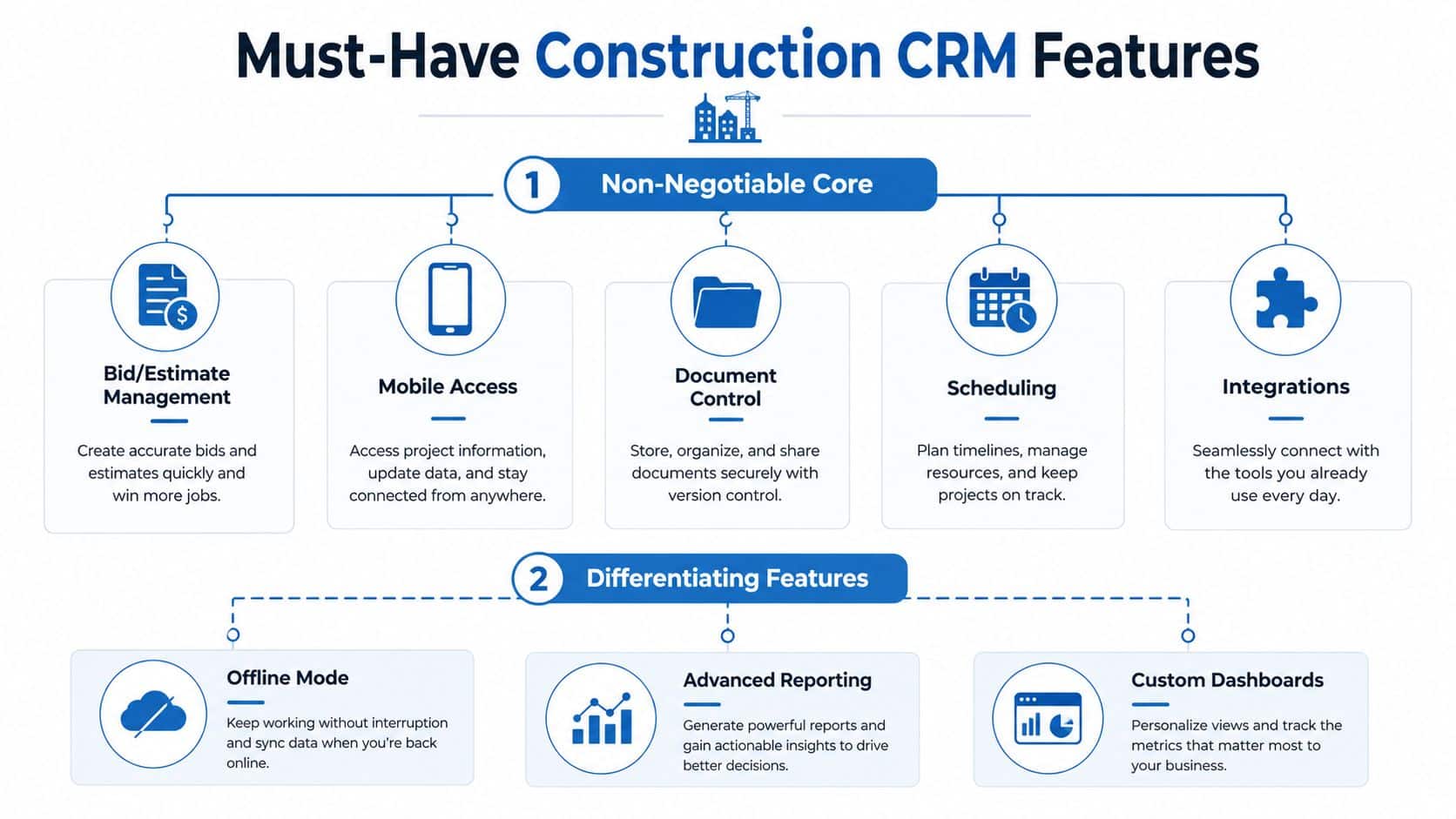
- Bid and estimate management tied to pipeline. If bid stages and estimate status live in different places, the CRM is already leaking.
- Mobile access. Field and office users need the same record from anywhere.
- Document control. Plans, scope notes, approvals, and change orders need to live with the opportunity.
- Scheduling. If the CRM can’t help coordinate site visits or post-award tasks, it’s incomplete.
- Integrations. Accounting, ERP, estimating, and project systems have to talk to the CRM without manual re-entry.
The differentiators are valuable, but only after the core works. Offline mode matters for crews in weak coverage. Change order tracking matters when your jobs evolve fast. AI-assisted follow-up can help if your team is already disciplined. Post-award handoff matters because the deal is not done when the signature comes in.
Direct advice: don’t pay extra for decoration. Pay for workflow coverage, adoption, and integration that actually removes rekeying.
A good way to evaluate automation is to ask whether it eliminates a manual step or just makes an email prettier. For a deeper process angle, the workflow principles in automating document workflows are useful because construction teams live and die by version control, approvals, and handoff discipline. That’s where automation can save real time.
The nice-to-haves are easy to spot because they look impressive in a demo and then disappear in real life. Gamified dashboards, social posting tools, and flashy email builders rarely change how contractors win work. Neither does a giant template library if the sales rep still misses the first follow-up call.
Lead prioritization is another real feature, but only if it’s tied to actual pursuit quality. If you’re comparing tools, a framework like lead scoring with HighLevel is worth understanding because construction teams need a consistent way to rank opportunities, not a pile of subjective “hot” labels.
The vendor pitch should answer one question: does this software help the company decide what to pursue, who owns it, and how the handoff happens when the job is won? If it doesn’t, it’s not construction-grade enough.
Benefits and Realistic ROI for Contractors
Most ROI pitches for CRM are mushy. “Save time.” “Win more jobs.” “Improve visibility.” None of that helps a partner who wants to know whether the software pays for itself. A better model is to look at four levers, lead response, close rate, change order capture, and collections.
A simple way to think about payback
If a contractor handles around 200 leads and 40 jobs a year, a small improvement in process has a visible effect. A faster response to inbound leads keeps more opportunities alive. A tighter bid process can lift close rate. Better handoff reduces missed change orders. Cleaner invoicing shortens collections. You do not need a heroic gain for the math to work.
Here’s the simple version in table form.
| ROI Lever | Typical Change | Annual Impact |
|---|---|---|
| Faster lead response | Fewer lead drop-offs and fewer stale inquiries | More bids from the same marketing spend |
| Better bid discipline | Small lift in close rate | More awarded work without more leads |
| Change order capture | Fewer missed scope updates | Less revenue leakage |
| Faster invoice collection | Shorter payment lag | Better cash flow and less financing pressure |
That's the right way to talk about return. Not fantasy growth, just less leakage. The same logic applies if you're running lean marketing budgets and want better output from what you already spend. For contractors looking at budget-friendly marketing strategies, CRM discipline is the part that stops good leads from going cold before a human gets back to them.
Soft benefits matter too, but don't oversell them. Fewer dropped balls during handoff means less internal friction. Better post-job follow-up means the customer is more likely to remember your company when the next project comes up. That kind of consistency is hard to quantify, but it shows up in referral quality and repeat conversations.
If you want a more formal reporting lens, the analytics and reporting guide is a useful reference point. Contractors need a dashboard that reflects pipeline health, response speed, and job handoff quality, not just a pile of vanity metrics.
The hard truth is simple. If your software doesn't help you respond faster, bid cleaner, and bill tighter, it's not a profit tool. It's a recordkeeping expense.
A Practical Buyer's Checklist
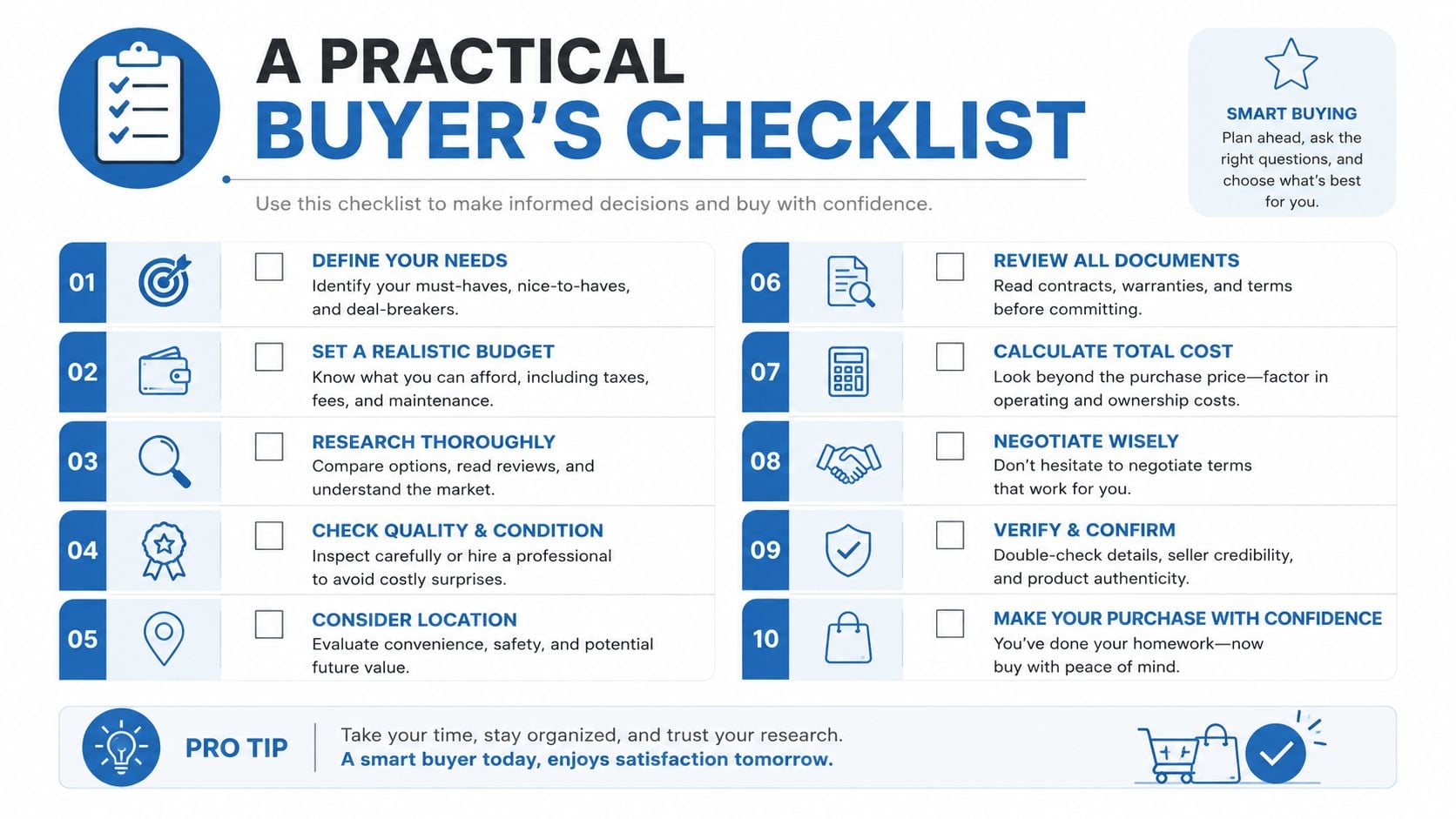
Most CRM evaluations go off the rails because people compare feature lists instead of workflow fit. Don't do that. Start with the way your team works, then judge the software against five buckets.
The five buckets that matter
- Workflow fit. Can the CRM mirror how your team handles leads, bids, handoffs, and follow-up?
- Integration depth. Does it connect cleanly to estimating, project management, accounting, and email?
- Mobile and offline experience. Can field users work without waiting to get back to the office?
- Pricing transparency. Do you know what implementation, support, and add-ons will cost?
- Vendor viability. Is the company stable enough that you won't be rebuilding in two years?
The demo questions should be blunt.
- What happens when a sales rep leaves? Can their accounts, notes, and tasks transfer cleanly?
- Can we export our data? Not a partial export, the whole thing.
- How are permissions handled for subs versus owners? Construction access rules are not generic.
- What breaks if an integration fails? That question exposes weak architecture fast.
- Can a field user do the job offline? If not, don't call it field-ready.
Red flags are usually obvious once you stop listening to the pitch deck. If the vendor can't explain data ownership, if every useful integration is “coming soon,” or if the system only works after a big services engagement, walk away. A cheap tool that the team abandons is more expensive than a capable one that gets used.
The guide to choosing an AI CRM is worth skimming if you're weighing modern automation features, but don't let AI distract you from the basics. Contractors need reliable records, clean handoffs, and usable mobile workflows before they need clever assistance.
The shortlist method is simple. Keep the three tools that fit your workflow, integrate cleanly, and won't trap your data. Everything else is noise.
Real Use Cases Across Contractor Types
The same CRM can work very differently depending on the contractor. That's the point. A residential remodeler, a commercial GC, and a specialty trade do not need the same day-to-day priorities, even if the software label is identical.

A residential remodeler usually cares about inbound speed and referral protection. A lead comes in from the website, the office needs to call back fast, and the follow-up has to stay organized because homeowner trust is fragile. The feature that matters most is tight lead routing and follow-up automation, and the metric they watch is how many inquiries turn into booked estimates.
A mid-size commercial GC has a different problem. The issue isn't just response time, it's knowing which pursuits deserve staffing attention. The CRM has to connect bid pipeline visibility with workforce planning so the company doesn't chase work it can't staff. The critical feature here is the bid-to-ops bridge, and the metric is whether leadership can make smarter go or no-go calls before the team spends a week on a bad pursuit.
A specialty trade, like HVAC or electrical, often lives in repeat service work and small-job velocity. The CRM has to keep service agreements, repeat visits, and customer history in one place so the office isn't rebuilding the same context every season. For those teams, scheduling and shared contact history matter most, and the metric is repeat booking quality, not just new lead volume.
General-purpose platforms can still fit. HighLevel, for example, combines CRM, conversation inbox, scheduling, pipelines, automation, invoicing, and mobile access in one workspace, so it can support contractor workflows that depend on quick follow-up and simple booking. That doesn't make it a construction-native operations suite, but it does make it relevant when a team wants one system for intake and nurture.
The lesson is not that every contractor should buy the same stack. The lesson is that the software has to match the business model. A remodeler needs speed. A GC needs pursuit discipline. A specialty trade needs repeatable service routing.
Integration Considerations and a 60-90 Day Rollout Plan
Integration is the make-or-break question, not a footnote. If the CRM can't connect cleanly with estimating, accounting, scheduling, ERP, Procore, email, and SMS, your team will keep entering the same data twice and resent the system. That is how adoption dies.
What to verify before you buy
Native integrations are safer than loose connector workarounds because they usually handle sync conflicts better. Zapier-style links can be fine for light automation, but they're weaker when record ownership, job status, or document versioning matters. That difference becomes obvious the first time a sync fails and someone has to figure out which system is right.
If you want a broader reference point on connectors, the top real-time data integration APIs discussion is useful because the same principle applies here, data has to move quickly and predictably, or people stop trusting it.
A rollout sequence that actually works
Start with one pilot team and one workflow. Keep the scope tight. A 60-day pilot is enough to see whether the team uses the system or works around it. Forced rollouts fail. Small, visible wins stick.
- Pick one team. Choose the group with the clearest pain point and the least process chaos.
- Define one workflow. Lead capture to estimate, or bid to handoff, not everything at once.
- Run it for 60 days. Measure login frequency, data completeness, and whether the team is still rekeying into side spreadsheets.
- Review the early signs. Low usage, duplicate records, and “shadow spreadsheets” mean adoption is weak.
- Expand only after the pilot holds. If the process is broken, reset the workflow before you scale the problem.
If your sales reps are still carrying their own spreadsheets after the pilot, the system isn't embedded. It's competing.
That last point matters more than most vendors admit. Training won't fix a bad workflow. If the tool doesn't fit the way the team works, reset the process, not the calendar. One pilot, one workflow, one source of truth. That's the cleanest path to a rollout you can defend to an owner or partner.
HighLevel gives contractors a practical way to centralize lead capture, follow-up, booking, pipelines, and mobile communication in one place, which fits the front end of the construction revenue process well. If you're trying to stop leads from leaking between texts, calls, and spreadsheets, visit HighLevel and see how its CRM and automation stack can support your intake and follow-up workflow.
